13
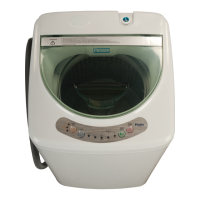
DELAY START BUTTON
Ţ
Press this button to delay the start of your wash cycle between 1 - 24 hours
in one hour increments.
Ţ
Use this button to select a delayed start of the washer. The number of hours
will be shown in the Estimated Time Remaining Display. Each press of the
Delay Wash Button will increase the time by 1 hour.
Ţ
One button press after 24 will cancel the delay wash feature. You can also
Power Button.
Ţ
The Start/Pause Button must be selected to begin the countdown.
CYCLE STATUS INDICATORS
Ţ
The Cycle Status lights indicate the stages of the selected cycle.
START/PAUSE BUTTON
Ţ
Press this button to start a selected cycle or to pause an operating cycle.
NOTE: After starting the wash cycle, you must pause the operating cycle to
change the Wash Temp, Soil Level and Water Level settings.
POWER BUTTON
Ţ
Press the power button to turn on the washer.
NOTE: If the washer is turned on, but START is not pressed, the power will


 To Next Page
 Loading...