ENGLISH
20
Listening to the other external components
You can connect an external component to:
• CD changer jack on the rear of this unit using the following adapters (separately purchased):
– Line Input Adapter, KS-U57
– AUX Input Adapter, KS-U58
Preparation: Make sure “EXT INPUT” is selected for the external input setting, see page 26.
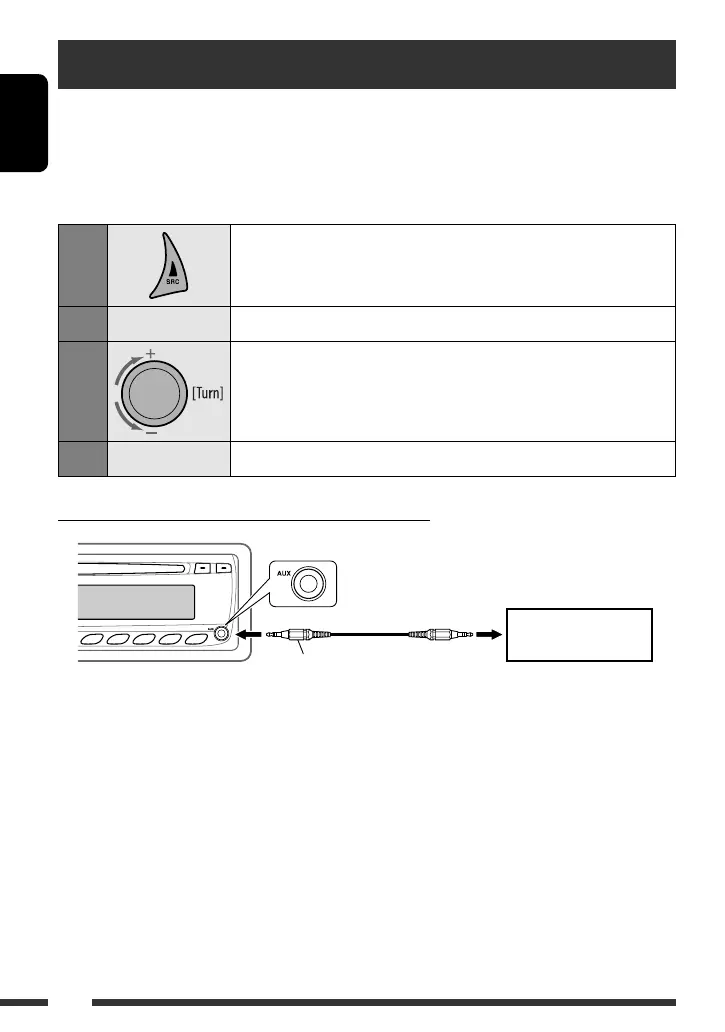
• AUX (auxiliary) input jack on the control panel.
1
Select “EXT INPUT” or “AUX IN.”
2
—
Turn on the connected component and start playing the source.
3
Adjust the volume.
4
—
Adjust the sound as you want (see pages 22 – 24).
Connecting an external component to the AUX input jack
3.5 mm stereo mini plug
(not supplied)
Portable audio player, etc.
EN16-21_KD-BT11_003A_3.indd 20EN16-21_KD-BT11_003A_3.indd 20 11/30/07 3:12:06 PM11/30/07 3:12:06 PM

 To Next Page
 Loading...