Radio
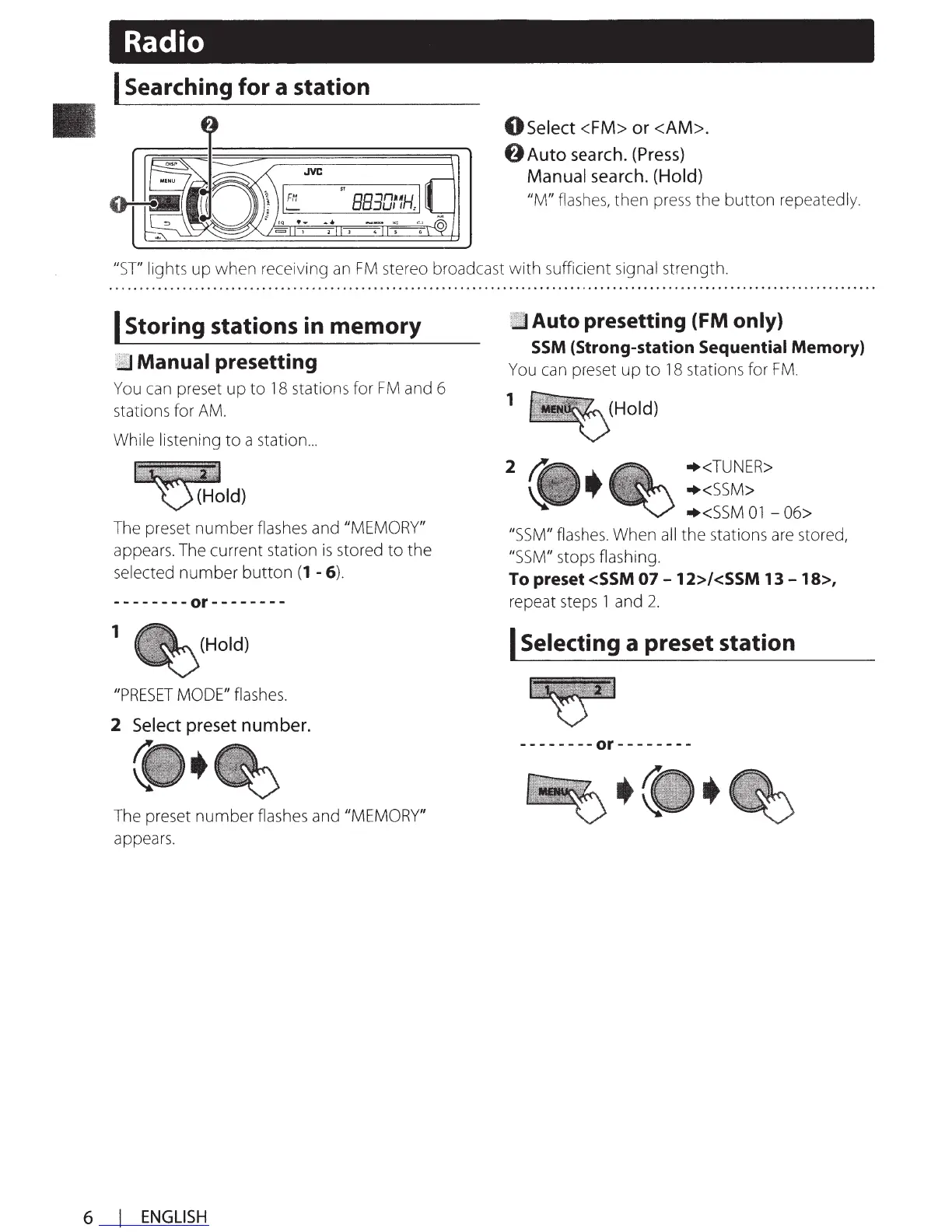
I Searching for a station
0
Select
<FM>
or
<AM>.
0 Auto
search.
(Press)
Manual
search.
(Hold)
IlM/I
flashes,
then
press
the button repeatedly.
IlST/I
lights
up
when receiving
an
FM
stereo broadcast with sufficient
signal
strength.
I Storing stations in memory
Manual presetting
You
can
preset up to
18
stations for
FM
and
6
stations for
AM.
While listening to a station
...
~I
d)
The
preset number
flashes
and
/I
MEMORY"
appears.
The
current station
is
stored to the
selected number button
(1
- 6).
--------or--------
1
(Hold)
//PRESET
MODE"
flashes.
2
Select
preset
number.
The
preset number
flashes
and
/I
MEMORY"
appears.
6 I
ENGLISH
Auto presetting (FM only)
SSM
(Strong-station Sequential Memory)
You
can
preset up to
18
stations for
FM.
1
2
(Hold)
+<TUNER>
+<SSM>
+<SSM
01
- 06>
/JSSM"
flashes.
When
all
the stations
are
stored,
/JSSM"
stops flashing.
To preset <SSM
07-
12>/<SSM
13-
18>,
repeat
steps
1 and
2.
I Selecting a preset station
--------or--------


 To Next Page
 Loading...