17
Automatic Ice & Water Dispenser
Priming the Water Supply System
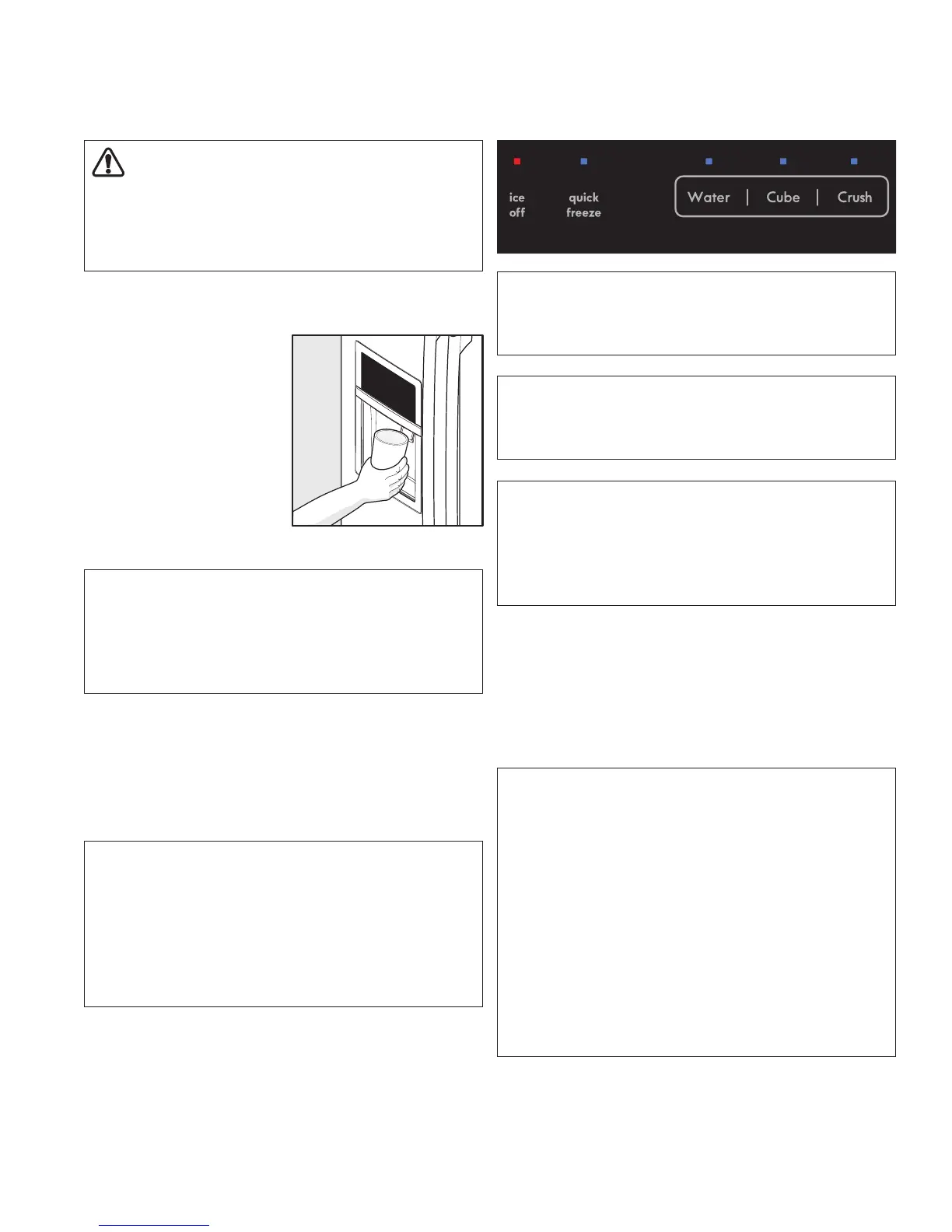
1. Begin lling the tank by pressing and holding a
drinking glass against the water dispenser paddle.
2. Keep the glass in this
position until water
comes out of the
dispenser. It may take
about 1½ minutes.
3. Continue dispensing
water for about four
(4) minutes to ush the
system and plumbing
connections of any
impurities (stopping to empty the glass as necessary).
Ice Maker Operation & Care
After the refrigerator is installed properly and has cooled
for several hours, the ice maker can produce ice within 24
hours. The ice maker will ll the ice bin from the rear. You
must dispense some ice to force the ice forward in the bin.
This will allow the bin to ll completely.
Turning the Fresh Food Ice Maker On and
O
Ice production is controlled by the ice maker’s On/O
icon on the control panel. Press and hold the “Ice O” icon
for three (3) seconds to turn the ice maker “ON” or “OFF”.
The ice maker is turned o when the LED above the “Ice
O” icon is illuminated.
Using the Ice Maker after Installation
Before making ice for the rst time, be sure to prime the
water supply system. Air in new plumbing lines can result
in two (2) or three (3) empty ice maker cycles. Furthermore,
if the system is not ushed, the rst ice cubes may be
discolored or have an odd avor.
IMPORTANT
Turning o the ice maker will disable the ice dispenser.
You will still be able to dispense water.
CAUTION
For proper dispenser operation, recommended water
supply pressure should fall between 30 psi and 100
psi. Excessive pressure may cause water lter to
malfunction.
NOTE
The water dispenser has a built-in device that shuts o
the water ow after three (3) minutes of continuous use.
To reset this shuto device, simply release the dispenser
paddle.
IMPORTANT
On occasion, unusually small ice cubes may be noticed
in the bucket or in dispensed ice. This could occur in
normal operation of the ice maker. If you start seeing
these more frequently, it may be an indication of low
water pressure or the water lter needs to be replaced.
As the water lter nears the end of its useful life and
becomes clogged with particles, less water is delivered
to the ice maker during each cycle. Remember, if it’s
been six (6) months or longer since you last changed
your water lter, replace the water lter with a new one.
Poor quality household water may require the lter to be
changed more frequently.
IMPORTANT
Your ice maker is turned on at the factory so it can work
as soon as you install your refrigerator. If you cannot
connect a water supply, set the ice maker’s On/O icon
to O and turn o the water supply valve; otherwise, the
ice maker’s ll valve may make a loud chattering noise
when it attempts to operate without water.
IMPORTANT
Turning o the ice maker will result in existing ice melting
in the bin.
NOTE
The ice maker also has a built-in plastic signal bale arm
that automatically stops ice production when the ice bin
is full. This signal arm should not be used to manually
stop the ice maker.


 To Next Page
 Loading...