EasyManua.ls Logo

Kenwood TH-77A - Paging Code Management; Paging Code Memories and Setting

Kenwood TH-77A
55 pages
Print Icon
To Next Page IconTo Next Page
To Previous Page IconTo Previous Page
Loading...
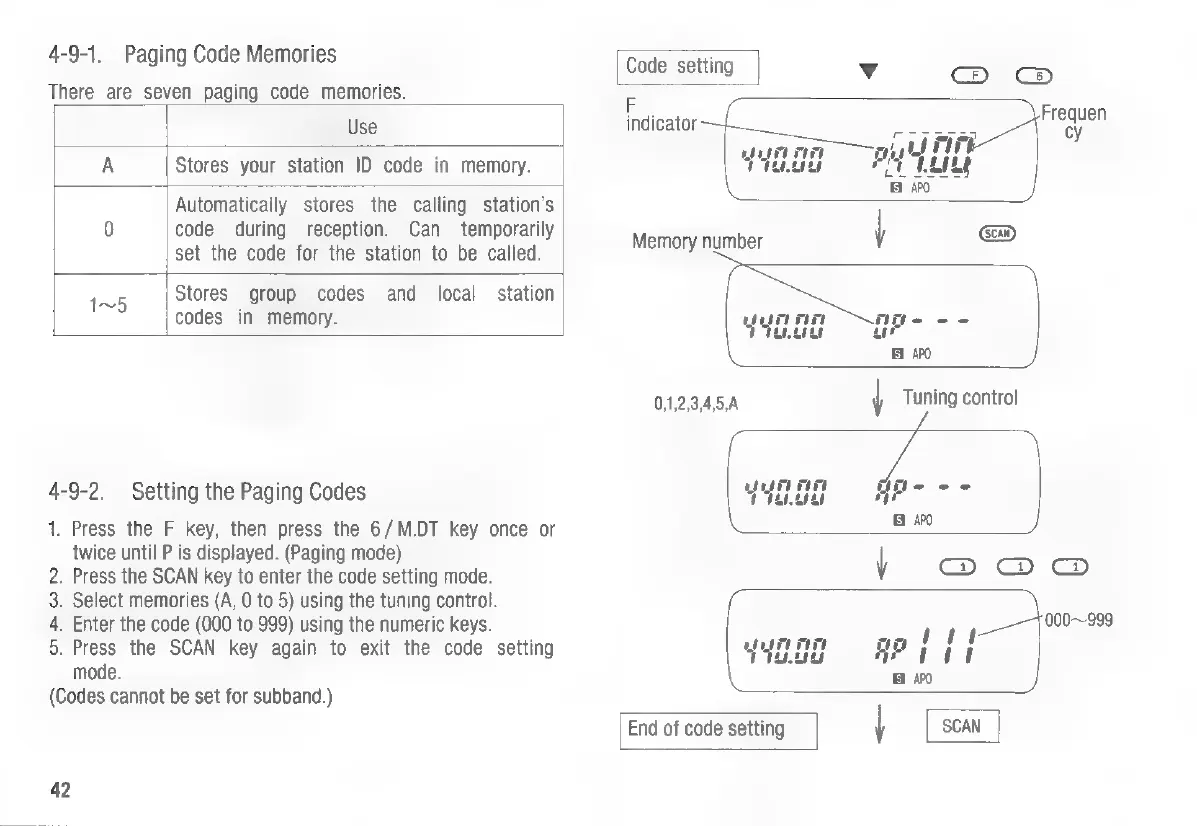
4-9-1.
Paging
Code
Memories
Code
setting
Vv
:
(ex)
There
are
seven
paging
code
memories.
F
Use
indicator
ie)
A
Stores
your
station
ID
code
in
memory.
Automatically
stores
the
calling
station’s
|
0
code
during
reception.
Can
temporarily
~
set
the
code
for
the
station
to
be
called.
Money
TERber
1n5
Stores
group
codes
and
local
station
codes
in
memory.
yun
nn
Age
--
APO
0,1,2,3,4,5,A
|
Tuning
control
4-9-2.
Setting
the
Paging
Codes
Y4E
OR
—GPe
1.
Press
the
F
key,
then
press
the
6/M.DT
key
once
or
ay
twice
until
P
is
displayed.
(Paging
mode)
2.
Press
the
SCAN
key
to
enter
the
code
setting
mode.
V
=)
=)
3.
Select
memories
(A,
0
to
5)
using
the
tuning
control.
4.
Enter
the
code
(000
to
999)
using
the
numeric
keys.
tee
000~999
5.
Press
the
SCAN
key
again
to
exit
the
code
setting
yyone
APoadad
mode.
Bi
AP0
(Codes
cannot
be
set
for
subband.)
End
of
code
setting
|
SCAN
42

Other manuals for Kenwood TH-77A

Related product manuals