TROUBLESHOOTING49
TROUBLESHOOTING
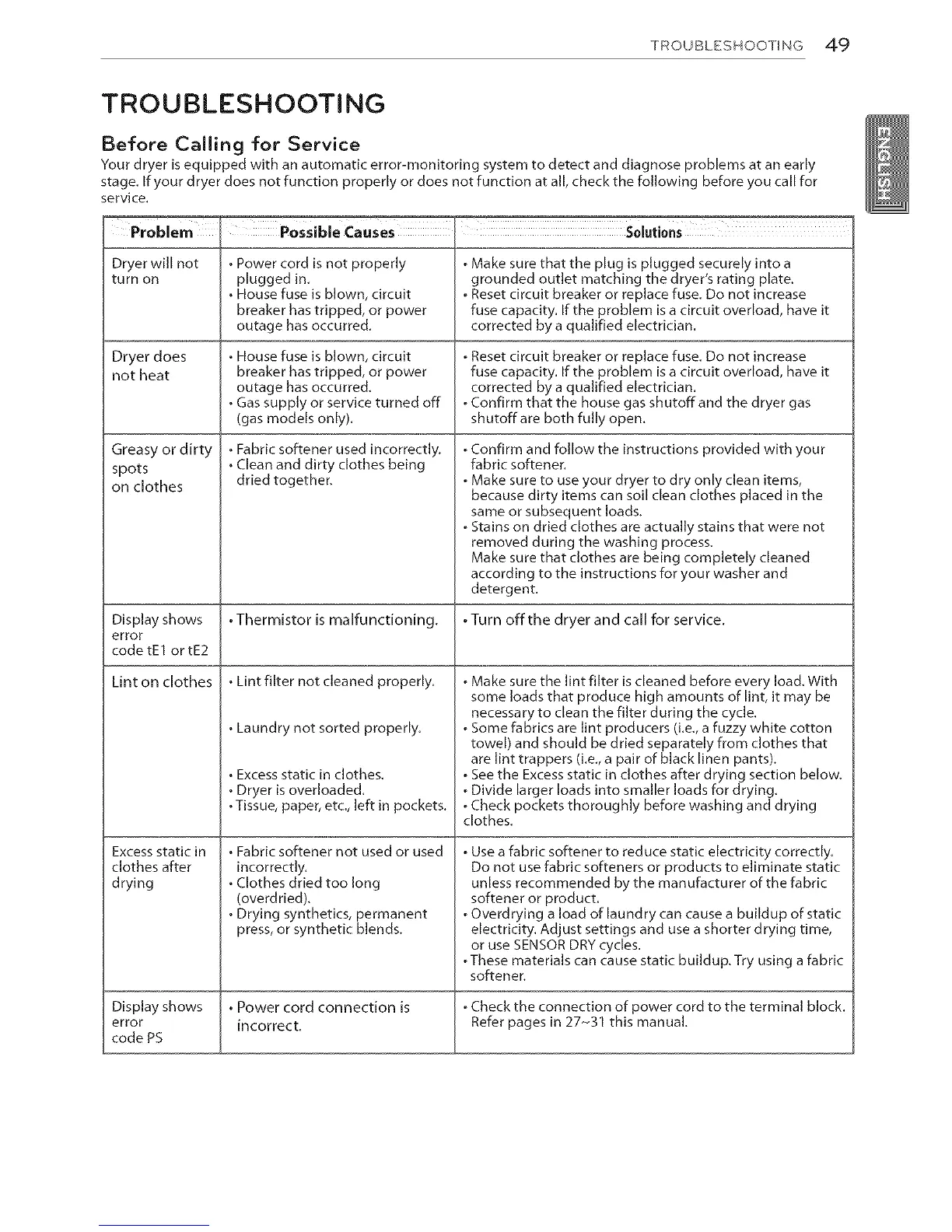
Before Calling for Service
Your dryer is equipped with an automatic error-monitoring system to detect and diagnose problems at an early
stage. If your dryer does not function properly or does not function at all, check the following before you call for
service.
Problem
Dryer will not
turn on
Dryer does
not heat
Possible Causes Solutio"S
• Power cord is not properly
plugged in.
• House fuse is blown, circuit
breaker has tripped, or power
outage has occurred.
• House fuse is blown, circuit
breaker has tripped, or power
outage has occurred.
• Gas supply or service turned off
(gas models only).
Greasy or dirty
spots
on clothes
• Fabric softener used incorrectly.
• Clean and dirty clothes being
dried together.
•Make sure that the plug is plugged securely into a
grounded outlet matching the dryer's rating plate.
•Reset circuit breaker or replace fuse. Do not increase
fuse capacity. If the problem is a circuit overload, have it
corrected by a qualified electrician.
•Reset circuit breaker or replace fuse. Do not increase
fuse capacity. If the problem is a circuit overload, have it
corrected by a qualified electrician.
•Confirm that the house gas shutoff and the dryer gas
shutoffare both fully open.
•Confirm and follow the instructions provided with your
fabric softener.
•Make sure to use your dryer to dry only clean items,
because dirty items can soil clean clothes placed in the
same or subsequent loads.
•Stains on dried clothes are actually stains that were not
removed during the washing process.
Make sure that clothes are being completely cleaned
according to the instructions for your washer and
detergent.
Display shows . Thermistor is malfunctioning. . Turn offthe dryer and call for service.
error
code tEl or tE2
Lint on clothes . Lint filter not cleaned properly.
. Laundry not sorted properly.
• Excess static in clothes.
• Dryer is overloaded.
•Tissue, paper, etc., left in pockets.
. Fabric softener not used or used
incorrectly.
. Clothes dried too long
(overdried).
. Drying synthetics, permanent
press, or synthetic blends.
Excess static in
clothes after
drying
•Make sure the lint filter is cleaned before every load. With
some loads that produce high amounts of lint, it may be
necessary to clean the filter during the cycle.
•Some fabrics are lint producers (i.e, a fuzzy white cotton
towel) and should be dried separately from clothes that
are lint trappers (i.e, a pair of black linen pants).
•See the Excess static in clothes after drying section below.
•Divide larger loads into smaller loads for drying.
•Check pockets thoroughly before washing and drying
clothes.
•Use a fabric softener to reduce static electricity correctly.
Do not use fabric softeners or products to eliminate static
unless recommended by the manufacturer of the fabric
softener or product.
•Overdrying a load of laundry can cause a buildup of static
electricity. Adjust settings and use a shorter drying time,
or use SENSOR DRY cycles.
•These materials can cause static buildup.Try using a fabric
softener.
Display shows . Power cord connection is •Check the connection of power cord to the terminal block.
error incorrect. Refer pages in 27-31 this manual.
code PS


 To Next Page
 Loading...