14
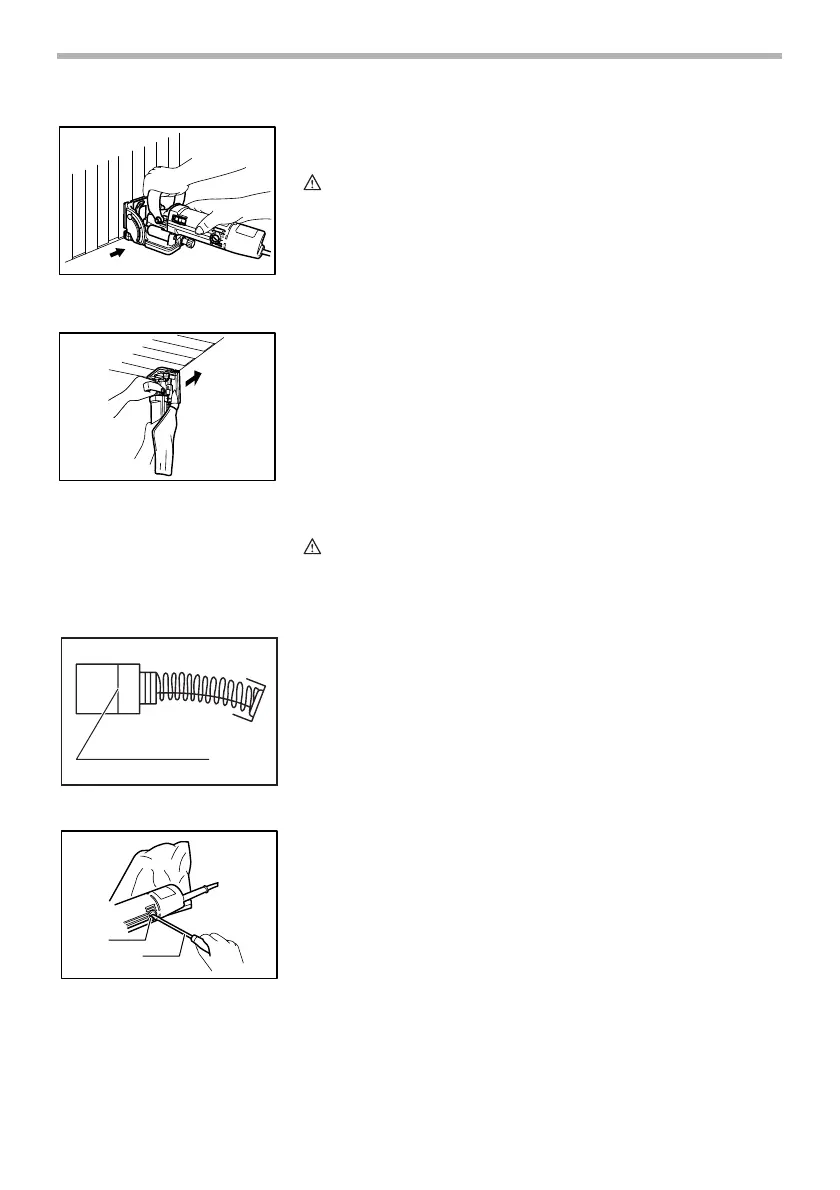
Set the depth of cut to “MAX”. Rest the base on the floor (when trimming the
wall panels) or the wall (when trimming the ceiling panels). Using the floor or
wall as a guide, trim wall or ceiling panels. Feed in the direction of the arrow.
CAUTION:
• Before trimming the panels, check the wall or ceiling carefully to avoid
cutting the electrical wires, nails or other foreign materials.
• Always reinstall the rubber facing after trimming the panels. If cutting
slots for biscuits without the rubber facing installed properly on the tool,
the tool might slip unexpectedly on the workpiece, causing dangerous
loss of control of the tool. When installing the rubber facing, always hook
it onto the inside of the front opening.
MAINTENANCE
CAUTION:
• Always be sure that the tool is switched off and unplugged before
attempting to perform inspection or maintenance.
Replacing carbon brushes
Remove and check the carbon brushes regularly. Replace when they wear
down to the limit mark. Keep the carbon brushes clean and free to slip in the
holders. Both carbon brushes should be replaced at the same time. Use only
identical carbon brushes.
Use a screwdriver to remove the brush holder caps. Take out the worn carbon
brushes, insert the new ones and secure the brush holder caps.
To maintain product SAFETY and RELIABILITY, repairs, any other mainte-
nance or adjustment should be performed by Makita Authorized or Factory
Service Centers, always using Makita replacement parts.
1. When trimming the wall panels
1. When trimming the ceiling panels
1
004606
1
004607
1. Limit mark
1
001145
1. Brush holder cap
2. Screwdriver
1
2
004608


 To Next Page
 Loading...