Advanced (Playback)
- 164 -
You can stamp the recording date/time, name, location, travel date or title onto the
recorded pictures.
It is suitable for regular size printing. (Pictures with a picture size larger than [ ] will be
resized when stamping the date etc. on them.)
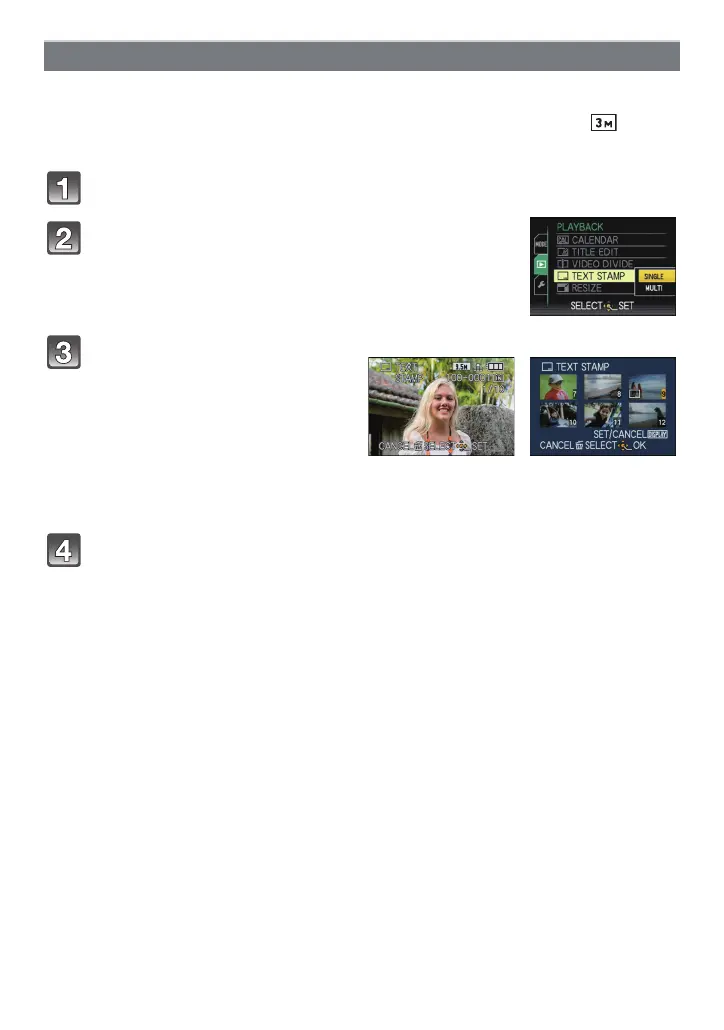
Select [TEXT STAMP] on the [PLAYBACK] Mode menu. (P28)
Press 3/4 to select [SINGLE] or [MULTI] and
then press [MENU/SET].
Press 3/4 to select text stamp items, and then press 1.
[TEXT STAMP]
Select the picture, and then
press [MENU/SET] to set.
• [‘] appears on screen if the picture is
stamped with text.
[MULTI] setting
Press [DISPLAY] to set (repeat),
and then press [MENU/SET] to set.
•
The setting is canceled when
[DISPLAY] is pressed again.
[SINGLE] [MULTI]
Press 2/1 to select
the picture.
Press 3/4/2/1 to
select the pictures.



 To Next Page
 Loading...