© Allegion 2014
Printed in USA
P516-872 Rev. 03/14-a
6. If you are moving the lock to a new door, install the lock on that
door before continuing.
7. To check that the lock was reset, press the Schlage Button and
enter one of the Default User Codes. If the reset was successful, the
Default User Codes will unlock the deadbolt.
L The lock must be set up again aer the reset is complete (see
Step 7 Set up the Lock).
L Z-Wave network settings are maintained through Factory Default
Reset.
10 Z-Wave Functions
10a About Z-Wave
• This lock may be included into any Z-Wave network, from any
manufacturer.
• Listening nodes from any manufacturer can act as repeaters to
extend network range.
• The lock will have limited functionality if included with a non-
secure controller.
• Configuration parameters and association group information can
be found at answers.schlage.com.
L The Z-Wave radio is disabled by default to conserve battery
life. When the lock is included for the first time, the radio is
automatically enabled.
L If you no longer wish to use the lock with a Z-Wave network,
make sure to exclude the lock to conserve battery life.
10b Z-Wave Function Descriptions
Include the Lock Turns the Z-Wave radio on and enrolls the lock.
Verify Lock
Inclusion
Verifies that the lock is included in a Z-Wave
network.
Exclude the Lock Excludes the lock and turns the Z-Wave radio
off.
To Include/Exclude the lock, you must first put your Z-Wave
Controller into inclusion mode:
1. Put the controller or panel in Include/Exclude mode.
L This procedure will vary depending on controller manufacturer.
2. Extend the bolt on the lock and then perform the following:
Include/
Exclude the
Lock
6 Digit
Programming
Code
OR
The lock
was
included/
excluded
The lock
was not
included/
excluded
L The programming indicator will flash rapidly while inclusion is in
process.
To verify Inclusion:
1. Remove the battery cover. See Install the Batteries.
2. Disconnect the battery connector.
3. Observe the indicator in the center of the printed circuit board while
reconnecting the battery connector.
4. The indicator will blink if the lock is included.
NEED HELP?
Please call customer support before returning the product.
Toll-Free Calling From:
U.S.A.: (888) 805-9837
Canada: (800) 997-4734
Mexico: 018005067866
Visit our web site for videos, FAQs and more:
answers.schlage.com
REGISTER YOUR PRODUCT
Document your purchase and register your warranty at
RegisterMySchlage.com
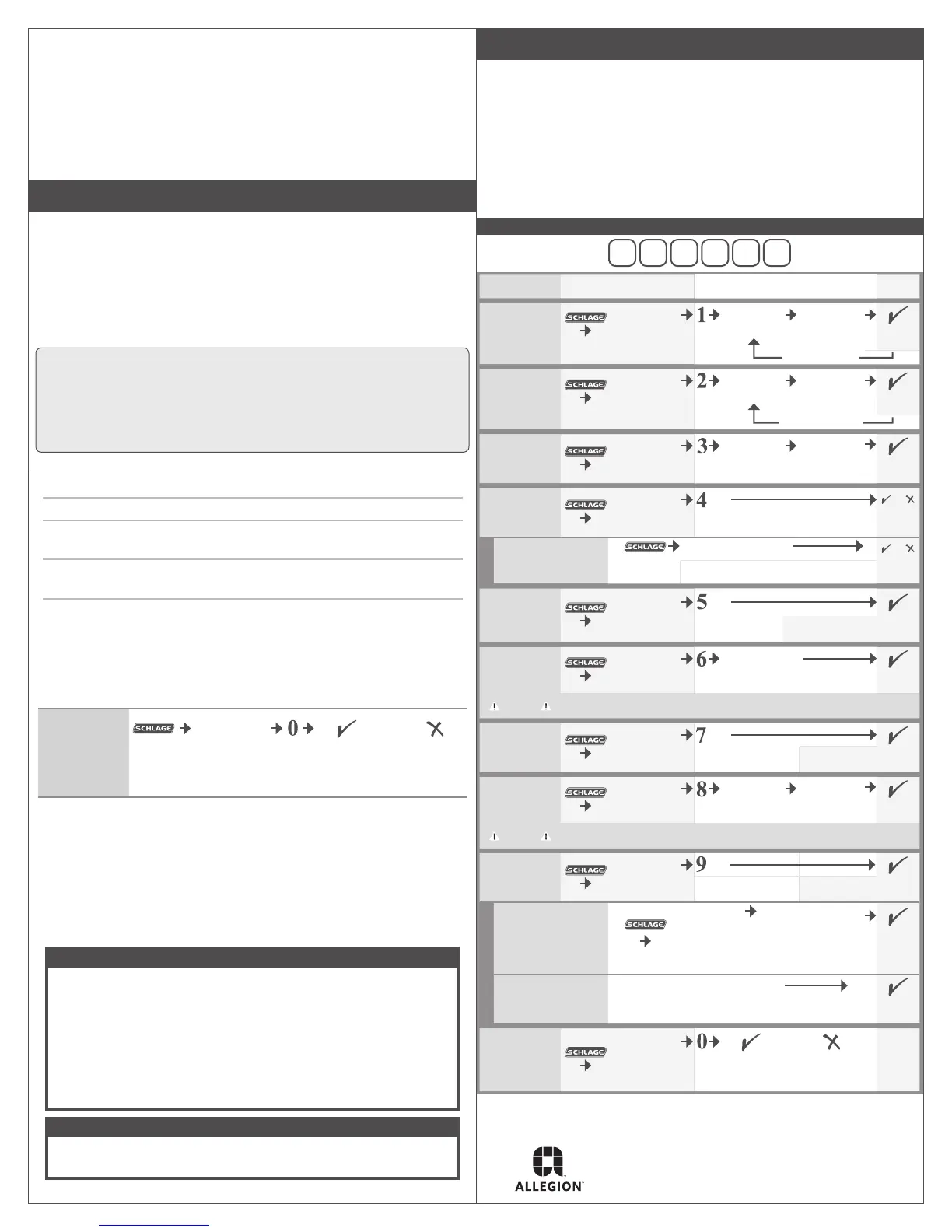
11 Programming Procedures
L Determine how long you want
your User Codes to be BEFORE
adding any User Codes. If you
change the User Code length,
all existing User Codes will be
deleted!
L Programming Mode will
automatically time out aer 30
seconds of inactivity.
1. Open the door and extend the deadbolt before beginning.
2. If you make a mistake, press the Schlage Button to leave
Programming Mode, and then start over.
WRITE YOUR PROGRAMMING CODE HERE FOR EASY ACCESS
FUNCTION
ENTER PROGRAMMING
MODE (PRESS)
FUNCTION STEPS
(PRESS)
VERIFY
Add User Code
6 Digit
Programming
Code
New 4-8 Digit
User Code
Same New
4-8 Digit User
Code
2 blinks +
2 beeps
Delete User
Code
6 Digit
Programming
Code
4-8 Digit User
Code
Same 4-8 Digit
User Code
2 blinks +
2 beeps
Change
Programming
Code
6 Digit
Programming
Code
New 6 Digit
Programming
Code
Same New
6 Digit
Programming
Code
2 blinks +
2 beeps
Enable Vacation
Mode
6 Digit
Programming
Code
or
1 blink +
1 beep
Disable Vacation Mode
6 Digit Programming Code
or
2 blinks +
2 beeps
Enable/Disable
Beeper
6 Digit
Programming
Code
Enable:1 blink + 1 beep
Disable: 2 blinks + 2 beeps
Delete ALL User
Codes
6 Digit
Programming
Code
6 Digit
Programming
Code
2 blinks +
2 beeps
Warning
Removes ALL User Codes from the lock. User Codes cannot be retrieved aer they are
deleted!
Enable/Disable
Lock & Leave
6 Digit
Programming
Code
Enable:1 blink + 1 beep
Disable: 2 blinks + 2 beeps
Change User
Code Length
6 Digit
Programming
Code
Desired User
Code Length
Same Desired
User Code
Length
2 blinks +
2 beeps
Warning
Changing the User Code length will delete all existing User Codes! User Codes cannot
be retrieved aer they are deleted!
Enable/Disable
Auto-Lock
6 Digit
Programming
Code
Enable:1 blink + 1 beep
Disable: 2 blinks + 2 beeps
Temporarily Disable
Auto-Lock
(deadbolt should be
locked to begin)
4-8 Digit
User Code
Within 5 seconds,
manually lock and unlock
the deadbolt using the
thumbturn.
1 blink +
1 beep
Restore
Auto-Lock
Relock the deadbolt using the thumbturn.
2 blinks +
2 beeps
Include/Exclude
the Lock
6 Digit
Programming
Code
OR
The lock was
included/
excluded
The lock was
not included/
excluded
Add another code
Delete another
code


 To Next Page
 Loading...