EasyManua.ls Logo

Sony BDP-S380 - Playing from a USB Device; Playing via a Network

Sony BDP-S380
15 pages
Print Icon
To Next Page IconTo Next Page
To Previous Page IconTo Previous Page
Loading...
14
Playing
from
a
USB
Device
You
can
play
video/music/photo
files
on
the
connected
USB
device.
For
playable
USB
devices,
see
“Playable
types
of
files”
(page
25),
1
Connect
the
USB
device
to
the
USB
jack
on
the
player.
Refer
to
the
instruction
manual
supplied
with
the
USB
device
before
connecting.
USB
device
N
Select
H
[Video],
JJ
[Music],
or
E
[Photo]
on
the
home
menu
using
=.
Select
=.
[USB
device]
using
4/4,
and
press
ENTER.
wo
Playing
via
a
Network
|
Serves
as
a
gateway
delivering
the
selected
Internet
content
and
a
variety
of
on-demand
entertainment
straight
to
your
player.
v
*
Some
Internet
content
requires
registration
via
a
PC
before
it
can
be
played.
For
further
details,
visit
the
following
website:
http://www.sony.com/bluraysupport/
+
Some
Internet
content
may
not
be
available
in
some
regions/countries.
1
Prepare
for
BRAVIA
Internet
Video.
Connect
the
player
to
a
network
(page
12).
2
Select
£4
[Video],
JJ
[Music],
or
141
[Photo]
on
the
home
menu
using
--.
J
Select
an
Internet
content provider
icon
using
4/4,
and
press
ENTER.
When
an
Internet
content
list
has
not
been
acquired,
an
unacquii
new
icon
is
displayed.
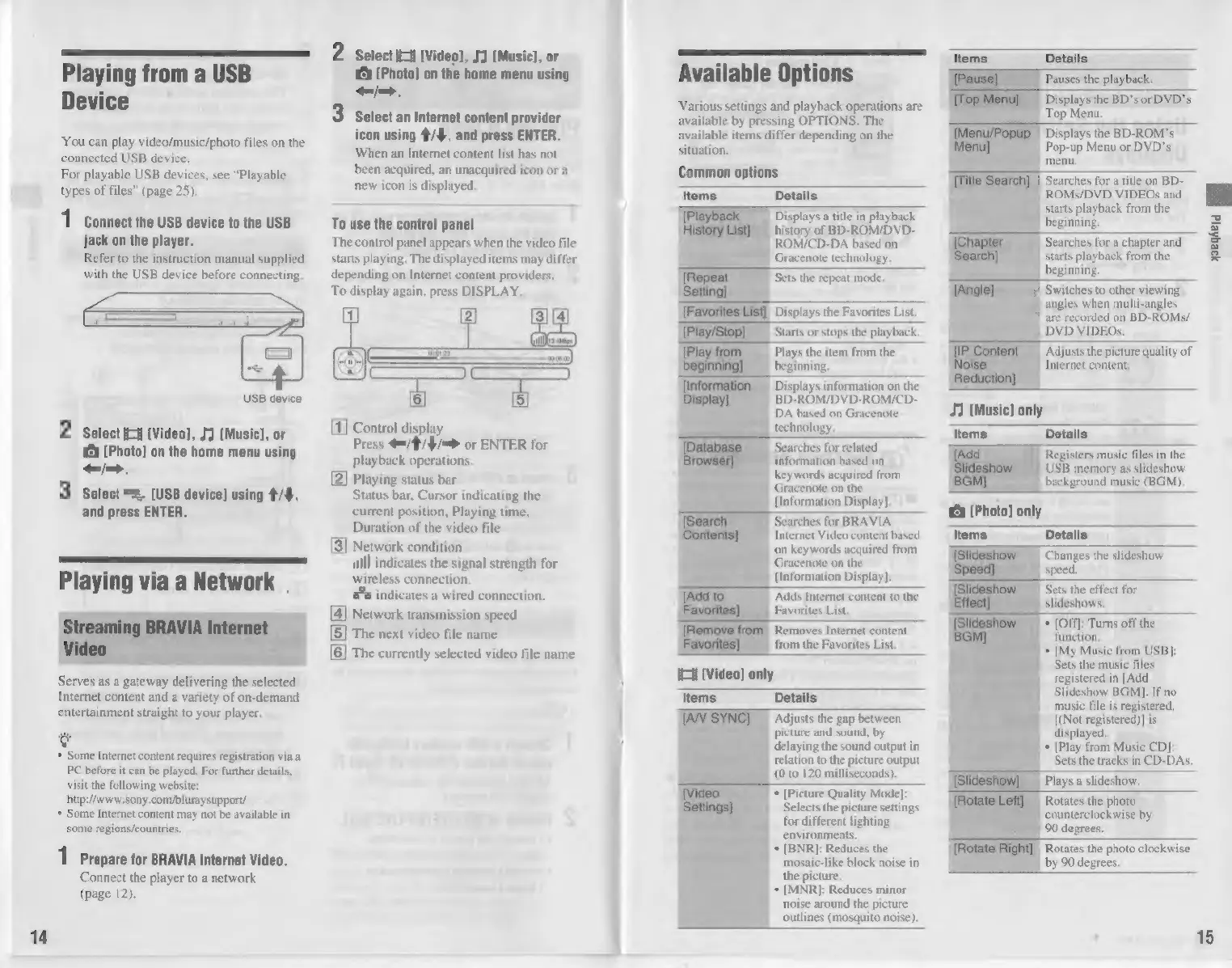
To
use
the
control
panel
The
control
panel
appears
when
the
video
file
starts
playing.
The
displayed
items
may
differ
depending
on
Internet
content
providers.
To
display
again,
press
DISPLAY.
Control
display
Press
=/4/4/=®
or
ENTER
for
playback
operations.
[2]
Playing
status
bar
Status
bar,
Cursor
indicating
the
current
position,
Playing
time,
Duration
of
the
video
file
3]
Network
condition
mlll
indicates
the
signal
strength
for
wireless
connection.
indicates
a
wired
connection,
4|
Network
transmission
speed
N
5|
The
next
video
file
name
1
6]
The
currently
selected
video
file
name |
Available
Options
Various
settings
and
playback
operations
are
available
by
pressing
OPTIONS.
The
available
items
differ
depending
on
the
situation.
Common
options
Details
Displays
a
title
in
playback
history
of
BD-ROM/DVD-
ROM/CD-DA
based
on
Gracenote
technology.
Sets
the
repeat
mode.
I]
Displays
the
Favorites
List.
Plays
the
item
from
the
beginning.
Displays
information
on
the
BD-ROM/DVD-ROM/CD-
DA
based
on
Gracenote
technology,
Searches
for
related
information
based
on
keywords
acquired
from
Gracenote
on
the
[Information
Display].
Searches
for
BRAVIA.
Internet
Video
content
based
‘on
keywords
acquired
from
Gracenote
on
the
[Information
Display].
Adds
Internet
content
to
the
Favorites
List.
Removes
Internet
content
from
the
Favorites
List.
H
[Video]
only
Items
Details
Adjusts
the
gap
between
picture
and
sound,
by
alain
the
sound
output
in
relation
to
the
picture
output
(0
to
120
milliseconds).
*
[Picture
Quality
Mode]:
Selects
the
picture
settings
for
different
lighting
environments.
*
[BNR]:
Reduces
the
mosaic-like
block
noise
in
the
picture.
+
[MNR]:
Reduces
minor
noise
around
the
picture
outlines
(mosquito
noise).
Pauses
the
playback.
Displays
the
BD's
or
DVD's
Top
Menu.
Displays
the
BD-ROM’s
Pop-up
Menu
or
DVD's
menu,
7
Searches
for
a
title
on
BD-
ROMs/DVD
VIDEOs
and
starts
playback
from
the
beginning.
Searches
for
a
chapter
and
starts
playback
from
the
beginning.
|
Switches
to
other
viewing
angles
when
multicangles
"are
recorded
on
BD-ROMs/
DVD
YIDEOs.
Adjusts
the
picture quality
of
Internet
content.
J1
(Music)
only
Ite
Details
Registers
music
files
in
the
USB
memory
as
slideshow
background
music
(BGM),
É
[Photo]
only
Items
Details
Cia
gs
the
slideshow
a
the
effect
for
+
{Off}:
Turns
off
the
Sets
the
music
files
registered
in
[Add
Slideshow
BGM].
If
no
music
file
is
registered,
[(Not
registered)]
is
displayed.
*
[Play
from
Music
CD]:
Sets
the
tracks
in
CD-DAs.
Plays
a
slideshow.
Rotates
the
photo
counterclockwise
by
90
degrees.
Rotates
the
photo
clockwise
by
90
degrees.
15

Other manuals for Sony BDP-S380

Related product manuals