20
Pan/Tilt Status Codes
( – : optional)
Press/Release Commands
The unit supports commands that imitate a
button press and button release for functions
that would be active while a button is pressed.
The commands can also imitate a long press for
buttons that support different operations when
pressed and held.
When a Press command is received, the
o
peration starts. When a Release command is
received, the operation stops. Always issue these
commands in pairs.
The standard for GUI buttons of the unit that
su
pport a long-press operation, unless otherwise
noted, is 1 second or longer from receiving a
Press command until receiving a Release
command.
Accordingly, to activate a long-press operation,
mak
e sure that the interval between receiving
Press and Release commands is 1 second or
longer.
To avoid activating a long-press operation, issue
t
he Press and Release commands in quick
succession.
For details about the specific operation of each
comm
and, refer to the description of the
corresponding button of the Web App in the
Help Guide.
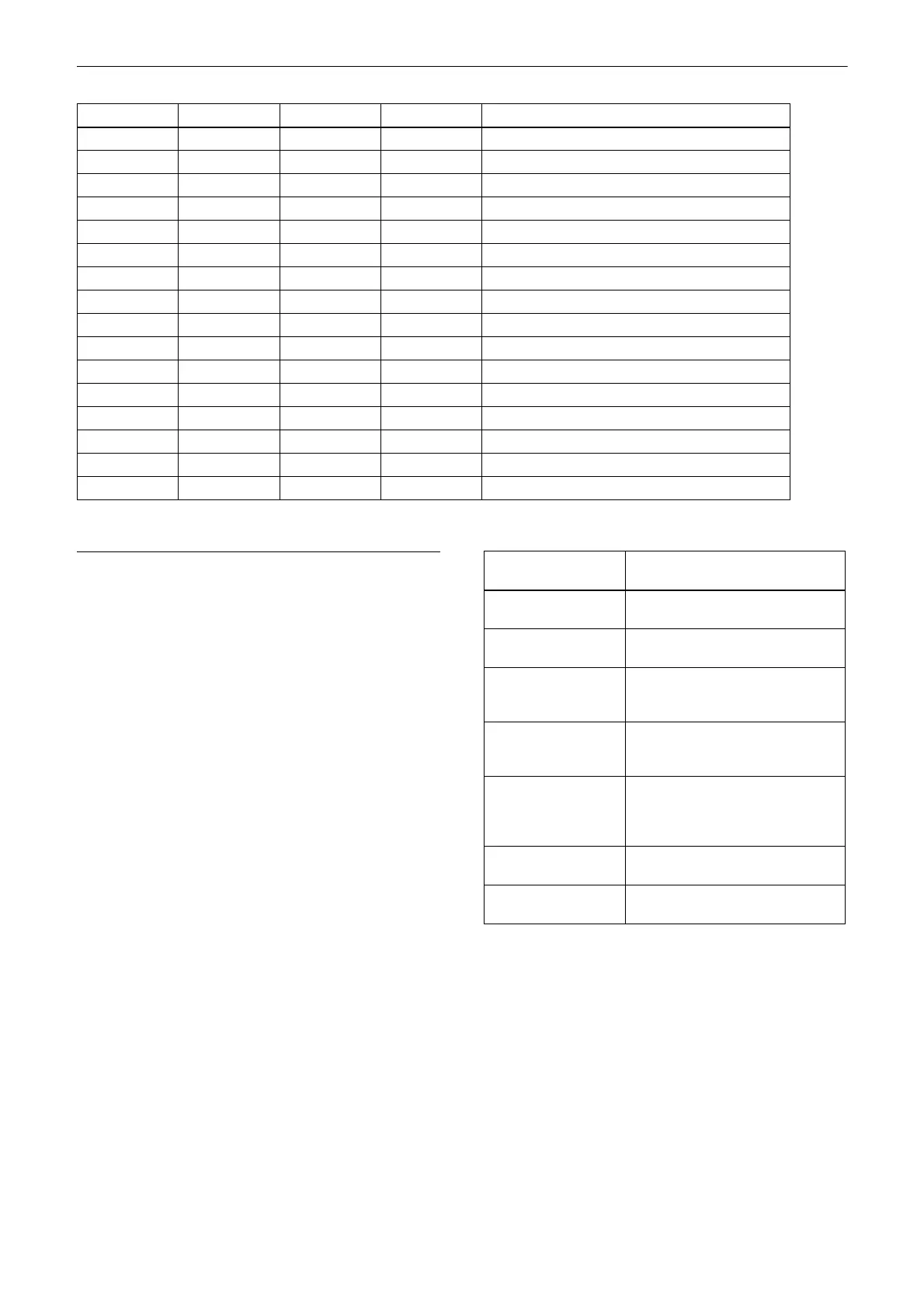
p p p p Status
–––– –––– 0––– –––1 Panning reaches the end of the left.
–––– –––– 0––– ––1– Panning reaches the end of the right.
–––– –––– 0––– –1–– Tilting reaches the upper limit.
–––– –––– 0––– 1––– Tilting reaches the lower limit.
–––– –––– ––00 –––– Pan functions normally.
–––– –––– ––01 –––– Pan mechanism is defective.
–––– ––00 0––– –––– Tilt functions normally.
–––– ––01 0––– –––– Tilt mechanism is defective.
–––– 00–– 0––– –––– No movement instruction
–––– 01–– 0––– –––– Pan/Tilt operating
–––– 10–– 0––– –––– Pan/Tilt operations complete.
–––– 11–– 0––– –––– Pan/Tilt operating failed.
––00 –––– 0––– –––– Not initialized
––01 –––– 0––– –––– Initializing
––10 –––– 0––– –––– Initialization completes.
––1 1 –––– 0––– –––– Initialization failed.
Command Corresponding Web App
button
Push AF/MF Live operation screen > Focus
t
ab > Push AF/MF button
Recording Live operation screen record
ST
ART/STOP button
Display Live operation screen/Playback
oper
ation screen > Display
button
Assignable button Live operation screen/Playback
o
peration screen > assignable
buttons
Multi Selector Live operation screen/Playback
op
eration screen > GUI control
panel > up/down/left/right/Set
buttons
Multi Function Dial N/A (see “Multi Function Dial
Command”)
Direct Menu N/A (see “Direct Menu
Command”)


 To Next Page
 Loading...