Hint
Even if the speaker is not turned on, the (BLUETOOTH) indicator flashes when touching with a device. When the connection is established, the
(BLUETOOTH) indicator lights up in white.
If you cannot connect the speaker, try the following.
Start the app on the device and move the device slowly over the N marked part of the speaker.
If the device is in a case, remove the case.
Make sure that the app screen is displayed on the device.
The app may not be downloadable in some countries/regions.
Start “NFC Easy Connect” on the device.
Make sure that the app screen is displayed.
3
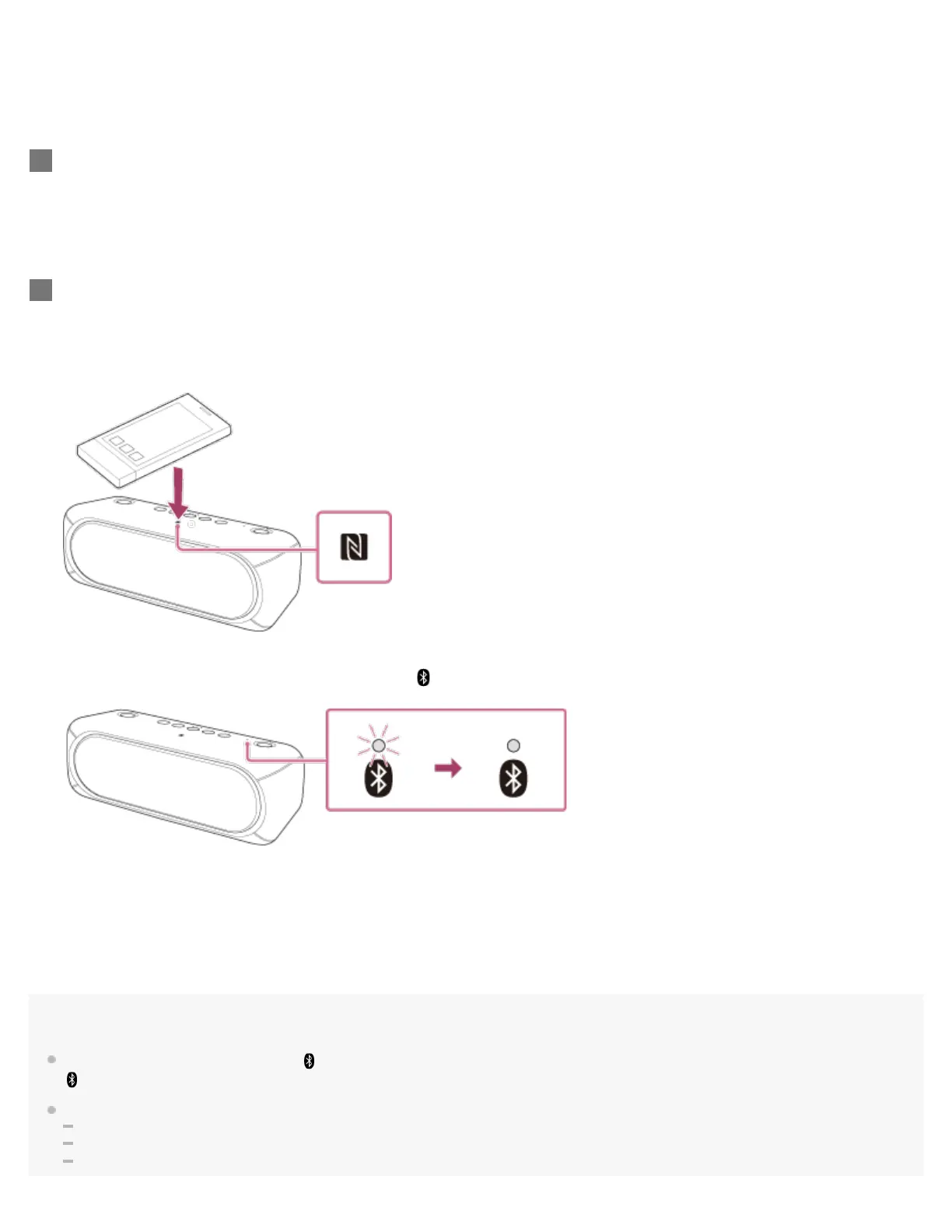
Touch the speaker with the device.
Unlock the screen of the device beforehand.
Keep touching the device on the N marked part of the speaker until the device responds.
If the speaker is off, it will turn on when the device touches it.
Follow the on-screen instructions to establish the connection.
When the BLUETOOTH connection is established,
(BLUETOOTH) indicator stays lit.
To disconnect, touch the speaker with the device again.
4


 To Next Page
 Loading...