33
GB
D:\NORM'S JOB\SONY HA\SO0086\STR-DN610_PMRF 2\GB\GB04CON_STR-DN610-U2.fm masterpage: Right
STR-DN610
4-167-824-13(1)
Preparing the Receiver
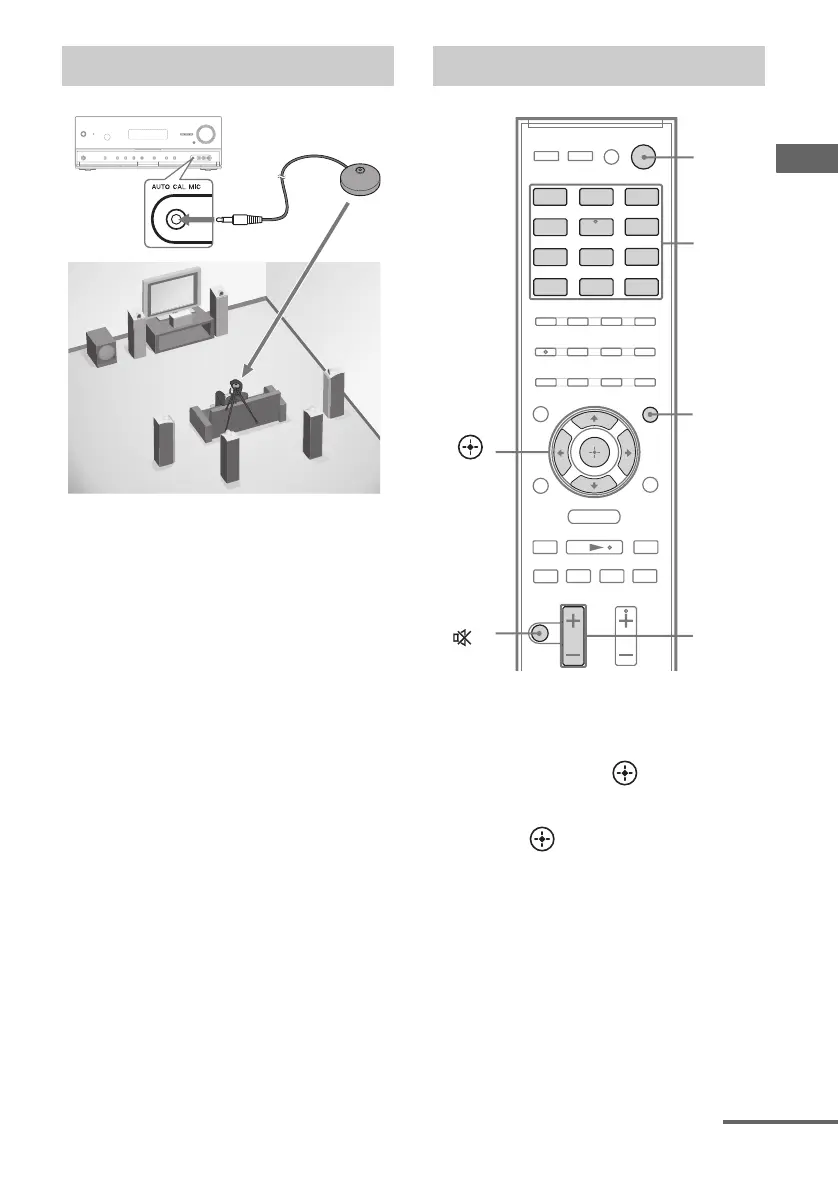
1 Connect the supplied optimizer
microphone to the AUTO CAL
MIC jack.
2 Set up the optimizer
microphone.
Place the optimizer microphone at your
listening position. Use a stool or tripod so
that the optimizer microphone remains at
the same height as your ears.
1 Press AMP MENU.
2 Press V/v repeatedly to select
“A. CAL”, then or b.
“START” appears on the display.
3 Press .
Measurement starts in 5 seconds. A count
down is displayed.
The measurement process will take a few
minutes to complete.
Setting up the Auto Calibration
?/1
Optimizer microphone
Performing Auto Calibration
.
mM
>
X
x
BD DVD
SAT/
CATV
VIDEO1
VIDEO2
SA-CD/
CD
DMPORT TUNER
MENU
O
TV
HDMI 2 HDMI 3HDMI 1
Input
buttons
?/1
MUTING/
MASTER
VOL +/–/
2 +/–
AMP
MENU
,
V/v/B/b
continued


 To Next Page
 Loading...










