Getting Started
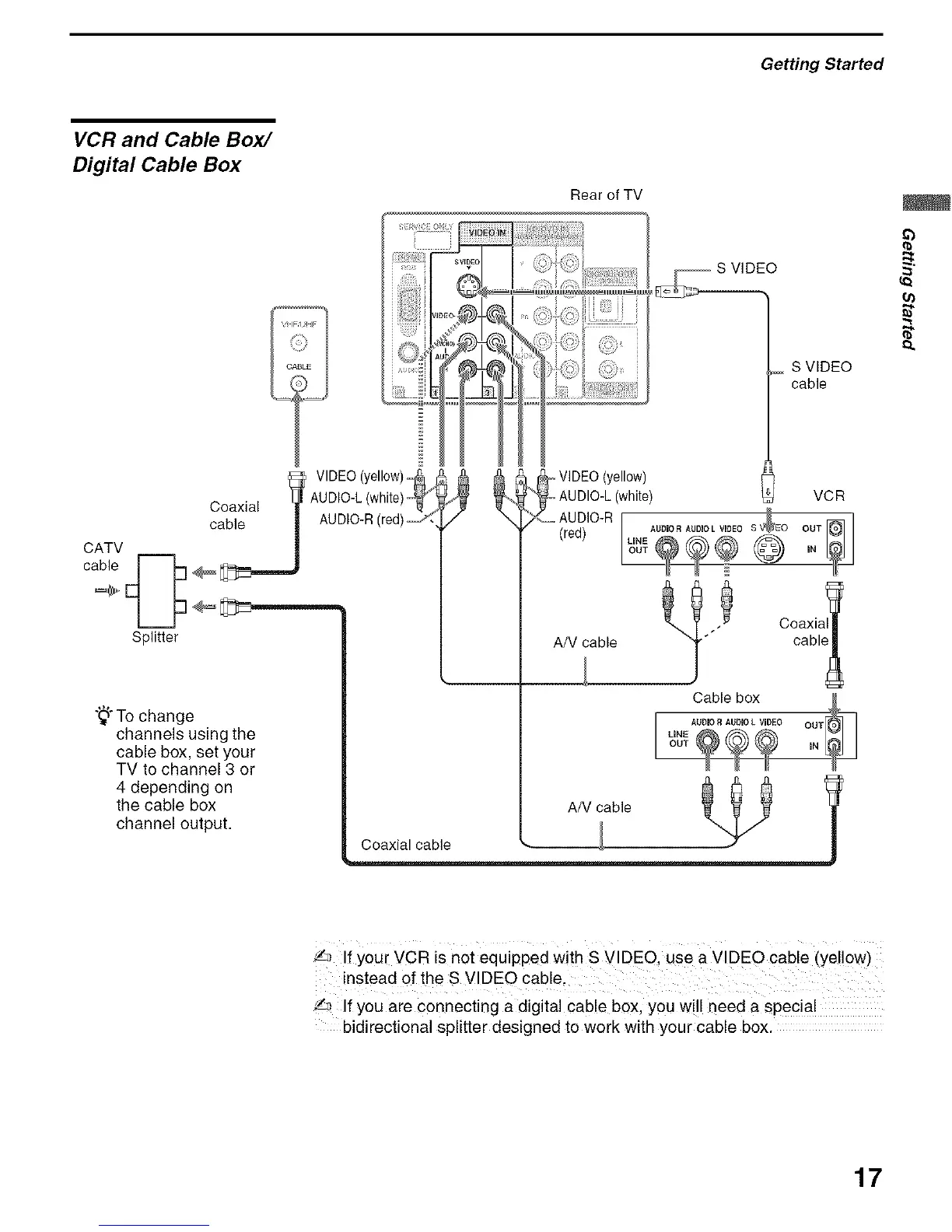
VCR and Cable Box/
Digital Cable Box
Rear of TV
CATV
Splitter
VIDEO (yellow)_
Coaxial I_ AUDIO'L (white)_"
cca_J AUDIO R(red)_
"_"To change
channels using the
cable box, set your
TV to channel 3 or
4 depending on
the cable box
channel output.
S VIDEO
cable
,_ VIDEO(yellow)
AUDIO-L(white) o VCR
OUT J
(red) UNEAUDIORAUDIOLVIDEO
iN
A/V ab,e
_b
{a
D.
'/_ If You[ VCR is not equipped With s VIDEO use a VIDEO cable (Yellow)
instead of the S VIDEO cable.
'/,_ If you are connecting a digital cable box, you will need a special
bidirectional splitter designed to work with your cable box.
17


 To Next Page
 Loading...