Prius User-Guide (2010-2012)
Timer (PHV)
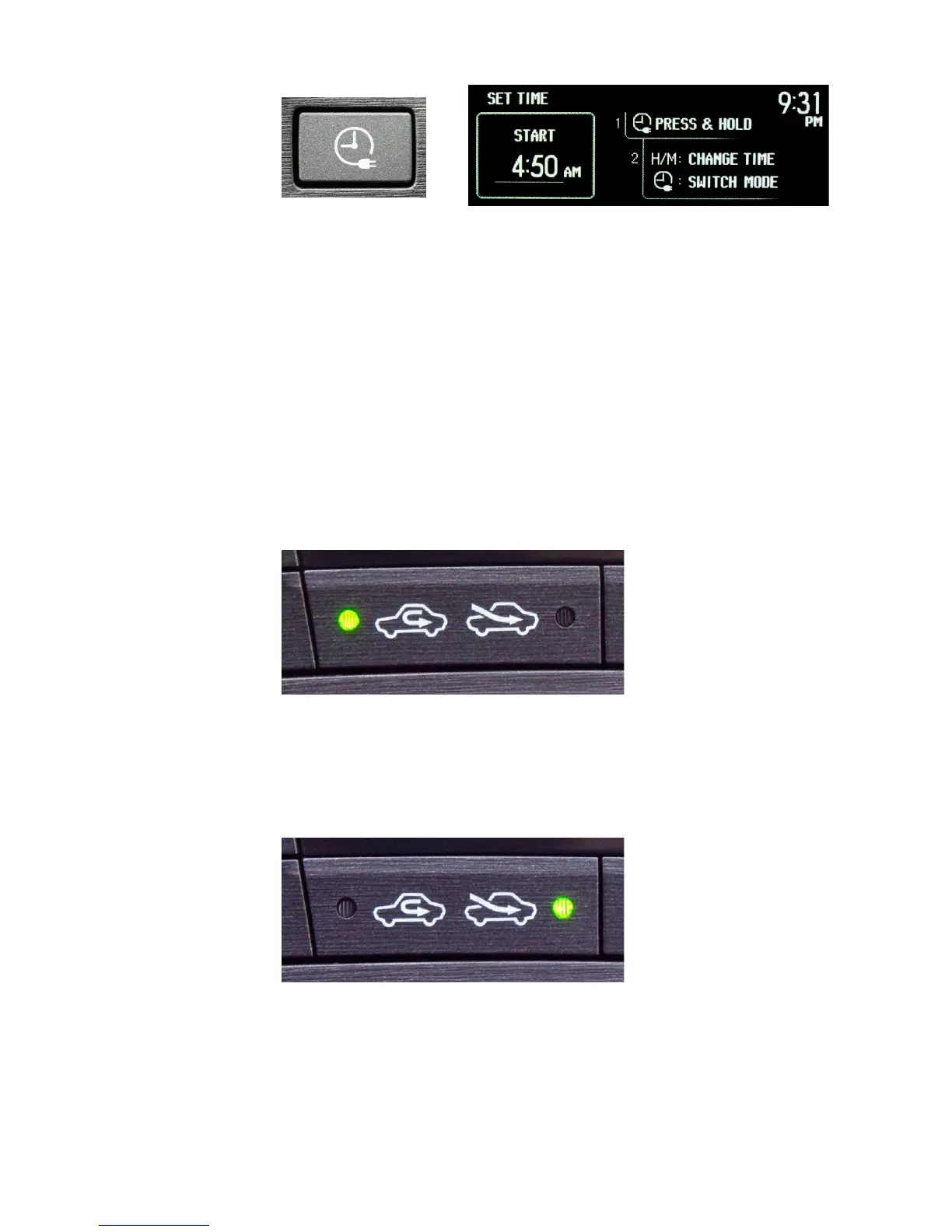
Unique to the PHV model is the timer button. Pressing this displays the screen for scheduling a
delayed charge start. You can do this at any time, including after having pressed the power button
to shut off the Prius.
Using this button allows you to take advantage of lower electricity rates during off-peak hours. It’s
also beneficial for battery longevity to wait before charging again. Delaying recharge to let the
battery cool down after use is called a “cold soak”. The timer button makes this easy.
There are 2 timer options available. The photo shown above is the START option; charging will
start at the time specified. There is also an END option; charging will start 3 hours prior to that
time specified.
Cabin Air
Pressing the LEFT side of this rocker-switch causes the air-conditioning system to circulate inside
air throughout the passenger-cabin. This is handy for retaining hot or cold air, but will also retain
moisture from your breathing which will eventually cause the windows to fog.
When using the toggle button on the steering-wheel, the indicator light will alter accordingly.
Pressing the RIGHT side of this rocker-switch causes the air-conditioning system to draw fresh air
from outside to circulate throughout the passenger-cabin. Use this mode to avoid window fogging.
When using the toggle button on the steering-wheel, the indicator light will alter accordingly.


 To Next Page
 Loading...