ENG VIVAX
15
► Connections
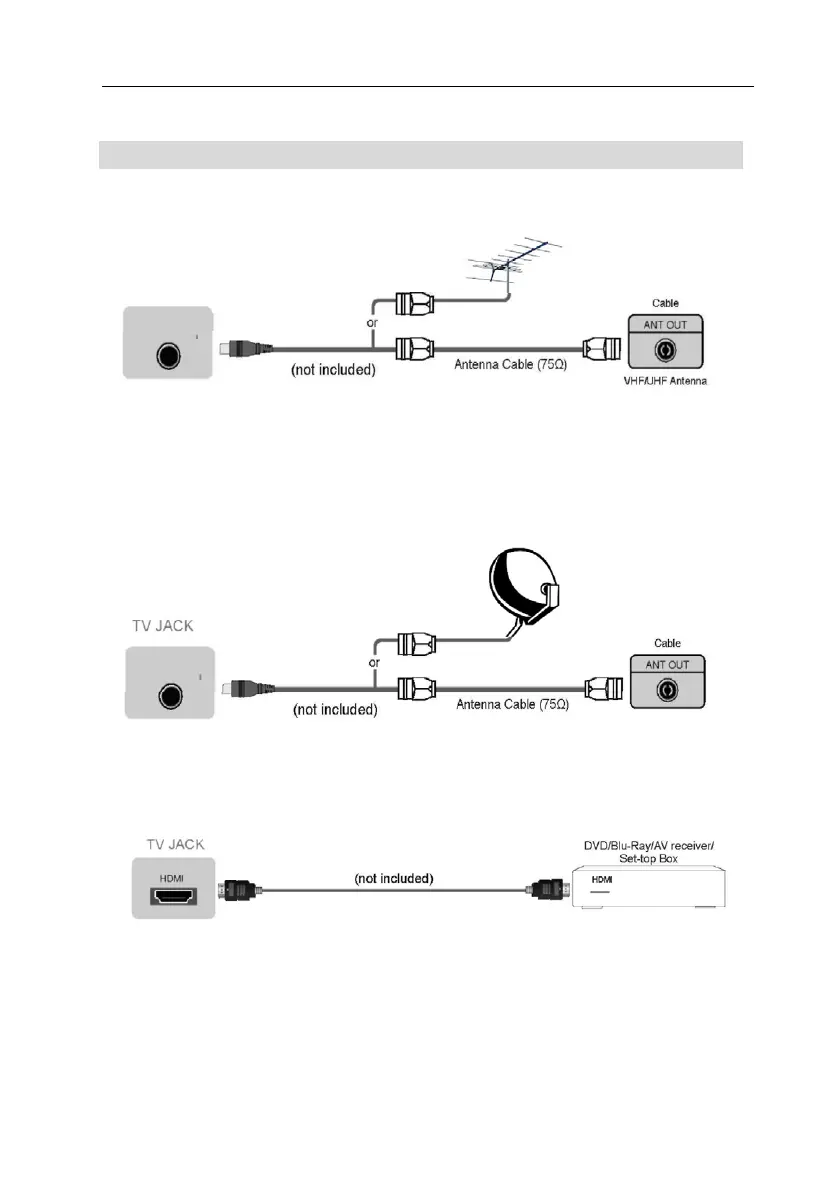
► TUNER RF: Connect (ATV/DVB-T2) an outdoor VHF/UHF antenna or cable
► DVB S2: Connect (DVB-S2) an outdoor Satellite dish or Sat. Cable
conection. (option, only models with Satellite Tuner)
► HDMI1, HDMI2, HDMI3 Digital connection
Connect an HDMI cable from an external A/V equipment.
Some devices such as DVD player require HDMI signal to be set to output in the
device's settings.
Please consult your device user manual for instructions. Please note that the
HDMI connector provides both video and audio signals, it's not necessary to
connect an audio cable.
• Press [SOURCE] button, when the list of Input Source appears, press [▲/▼]
to select the source [HDMI], then press [OK] to connect.
DVBS2
LNBIN
SATAntenna
SATcablesocket
TUNER
RF


 To Next Page
 Loading...