model no. 060-1984-8 | contact us: 1.866.523.5218 model no. 060-1984-8 | contact us: 1.866.523.5218
13
model no. 060-1984-8 | contact us: 1.866.523.5218
2. Installing and removing the battery pack
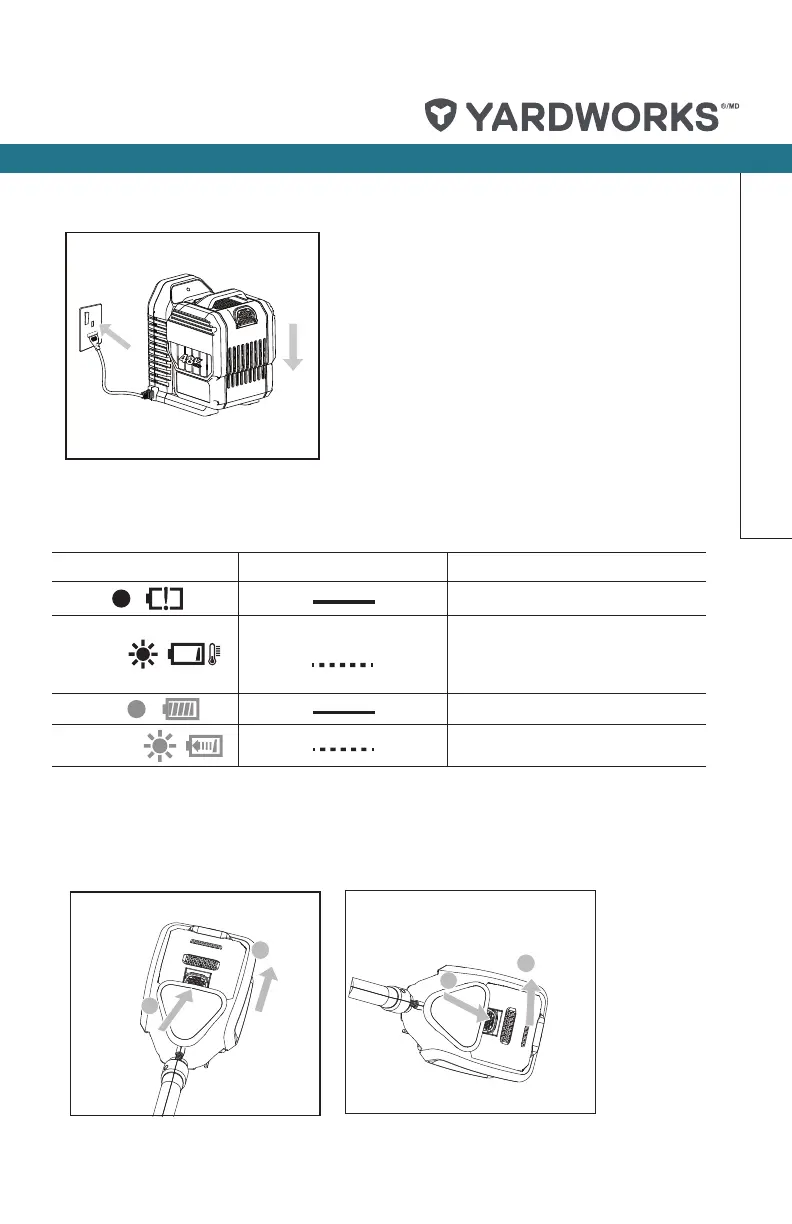
Slide the battery pack into tool’s battery port. A simple push and slight pressure will be
sufcient (see Fig. E1).
Press the battery pack latch and remove the battery pack from the tool (see Fig. E2).
E1
E2
G
F
H2
H1
H4
H3
J1
I
J3
J2
K2
J4
K1
LOW
High
1
2
1
2
Operation
Light ON/ Flash Status
Red on
Defective battery.
Red ash
Battery Temperature Protection.
The temperature of battery pack is
less than 0
o
C (32
o
F) or more than
40
o
C (104
o
F).
Green on
Fully charged.
Green ash
Charging.
CHARGING INDICATOR
This charger is designed to detect some problems that can arise with battery packs.
Indicator lights indicate problems (see table below).


 To Next Page
 Loading...