EasyManua.ls Logo

Zojirushi cv-dcc40 - Boil Mode

Zojirushi cv-dcc40
40 pages
Print Icon
To Next Page IconTo Next Page
To Previous Page IconTo Previous Page
Loading...
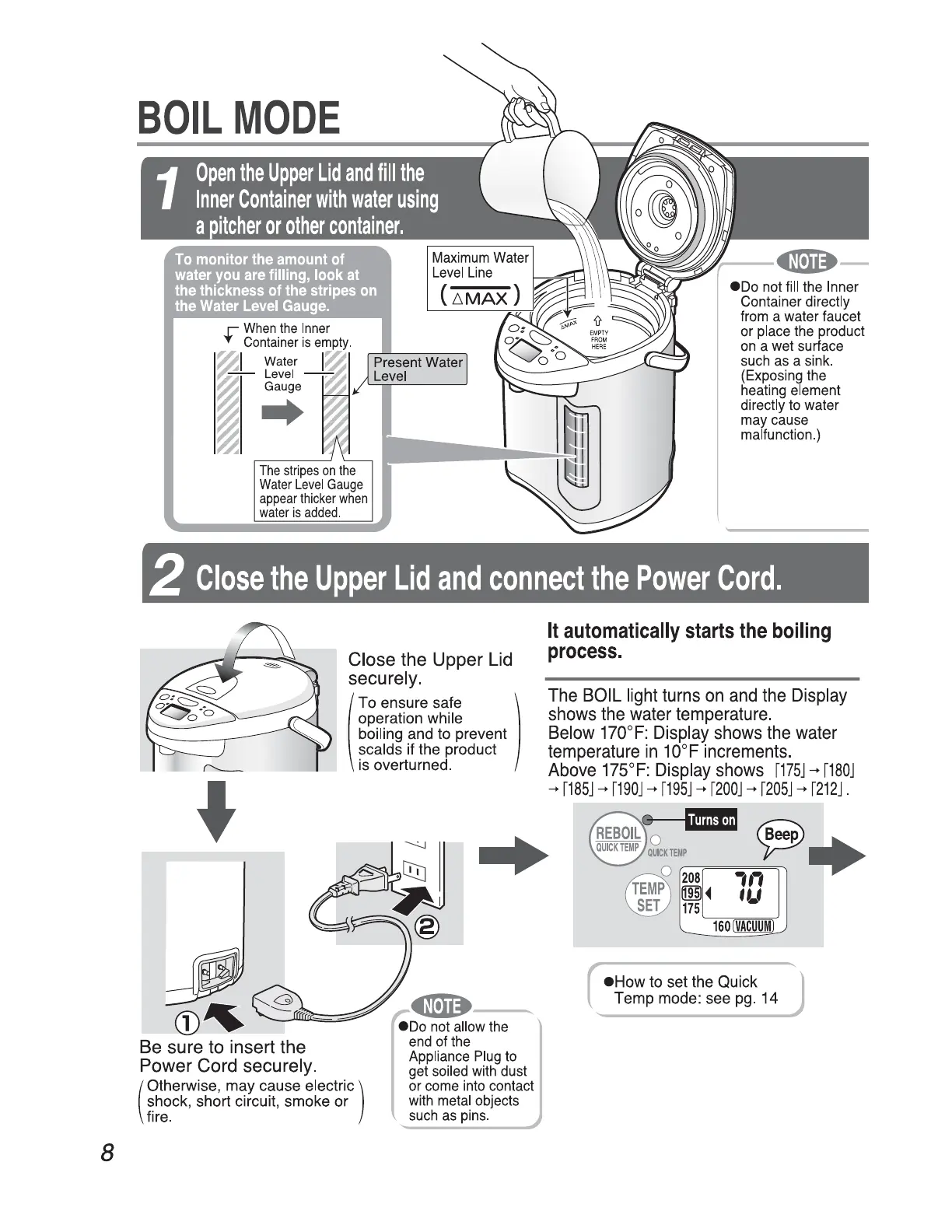
BOIL
MODE
8
..
'f'
~ I
Water
I~
I
~~vu~e
~
~
~
r
When
the
Inner
Container
is
empty
.
The
stripes
on
the
Water
Level
Gauge
appear
thicker
when
water
is
added
.
eoo
not
fill
the
Inner
Container
directly
from
a
water
faucet
or
place
the
product
on
a
wet
surface
such
as
a
sink
.
(Exposing
the
heating
element
directly
to
water
may
cause
malfunction
.)
2
Close
the
Upper
Lid
and
connect
the
Power
Cord.
"--..
G
CD~
-- -
Close the Upper
Lid
securely.
(
To ensure safe
operation while
boiling and to prevent
scalds if the product
is overturned.
)
Be
sure
to
insert the
Power Cord securely.
(
) Otherwise, may cause electric
shock, short circuit, smoke or
fire.
---
•oo
not
allow
the
end
of
the
Appliance
Plug
to
get
soiled
with
dust
or
come
into
contact
with
metal
objects
such
as
pins
.
It
automatically
starts
the
boiling
process.
The
BOIL
light
turns
on
and
the
Display
shows
the
water
temperature.
Below
17O
°
F:
Display
shows
the
water
temperature
in
1O°F
increments.
Above
175
°
F:
Display
shows
r175J
rrnoJ
rrnsJ
r19oJ
r19sJ
r200J
r20sJ
r212J.
How
to set the Quick
Temp mode: see
pg.
14

Related product manuals