To Next PageTo Next PageTo Previous PageTo Previous Page
 Need help?
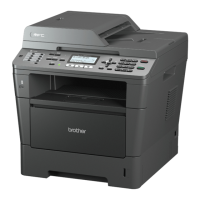
Do you have a question about the Brother MFC-8370DN and is the answer not in the manual?
 General
| Duplex printing | Yes |
|---|---|
| Print technology | Laser |
| Maximum resolution | 1200 x 1200 DPI |
| Time to first page (black, normal) | 8.5 s |
| Print speed (black, normal quality, A4/US Letter) | 28 ppm |
| Input color depth | 48 bit |
| Optical scanning resolution | 600 x 2400 DPI |
| Copier resize | 25 - 400 % |
| Maximum copy resolution | 1200 x 600 DPI |
| Maximum number of copies | 99 copies |
| N-in-1 copy function (N=) | 2, 4, 9, 16, 25 |
| Copy speed (black, normal quality, A4) | 28 cpm |
| Faxing | Mono faxing |
| Fax memory | 500 pages |
| Modem speed | 33.6 Kbit/s |
| Total input capacity | 250 sheets |
| Total output capacity | 150 sheets |
| Multi-Purpose tray input capacity | 50 sheets |
| Auto document feeder (ADF) input capacity | 20 sheets |
| Display | LCD |
| Product color | Grey, White |
| Market positioning | Home & office |
| Display number of lines | 2 lines |
| Display number of characters | 16 |
| Card reader integrated | - |
| Sound power level (standby) | 30 dB |
| Sound pressure level (printing) | 56 dB |
| Paper tray media types | Bond paper, Envelopes, Labels, Plain paper, Recycled paper, Transparencies |
| Non-ISO print media sizes | Executive |
| ISO A-series sizes (A0...A9) | A4, A5, A6 |
| ISO B-series sizes (B0...B9) | B5 |
| Maximum ISO A-series paper size | A4 |
| Multi-Purpose Tray media weight | 60 - 163 g/m² |
| Standard interfaces | Ethernet, USB 2.0 |
| USB 2.0 ports quantity | 1 |
| Dimensions (WxDxH) | 531 x 451 x 475 mm |
| All-in-one functions | Copy, Fax, Scan |
| Color all-in-one functions | Scan |
| Power consumption (standby) | 85 W |
| Power consumption (average operating) | 680 W |
| Package weight | 21100 g |
| Digital sender | No |
| Maximum duty cycle | - pages per month |
 Weight and Dimensions
| Depth | 443 mm |
|---|---|
| Width | 390 mm |
| Height | 442 mm |
Overview of the user guide, symbols, and conventions used within the documentation.
Details the function and layout of the machine's control panel keys and display for operation.
Explains how to load various types of paper and print media into the machine's trays.
Specifies the types, sizes, and capacities of paper supported by the machine's trays.
Provides instructions for loading documents into the Automatic Document Feeder (ADF) and scanner glass.
Guides users on setting the paper type and size for different trays to optimize print quality.
Explains how to adjust ring volume, beeper volume, and speaker volume for the machine.
Details how to restrict access to machine functions and set up user profiles for security.
Provides steps to set an administrator password for managing security features and user access.
Covers the procedures for sending faxes, including single-sided, double-sided, and from scanner glass.
Explains how to set up receive modes, manage incoming faxes, and configure related settings.
Details methods for dialing numbers, storing contacts, and managing speed dial and one-touch dialing.
Guides on printing files directly from USB drives or digital cameras without a computer.
Information on using the machine's software, including HTML user guides and network features.
Important safety instructions, legal information, and compliance statements for the machine.
Guidance on resolving common problems, error messages, and performing regular maintenance tasks.