6-7
Using the Picture Recording Function
Using the Still Picture Recording Function with a Predetermined Schedule
○○○○○○○○○
Sample Still Picture Recording Settings
Settings specified on the “Camera and Video” page (→ P.3-7)
Specify the appropriate settings for the VB-C50iR being used.
Settings specified on the “Preset” page (→ P.3-13)
Set the camera angle focusing on the object to Preset 1.
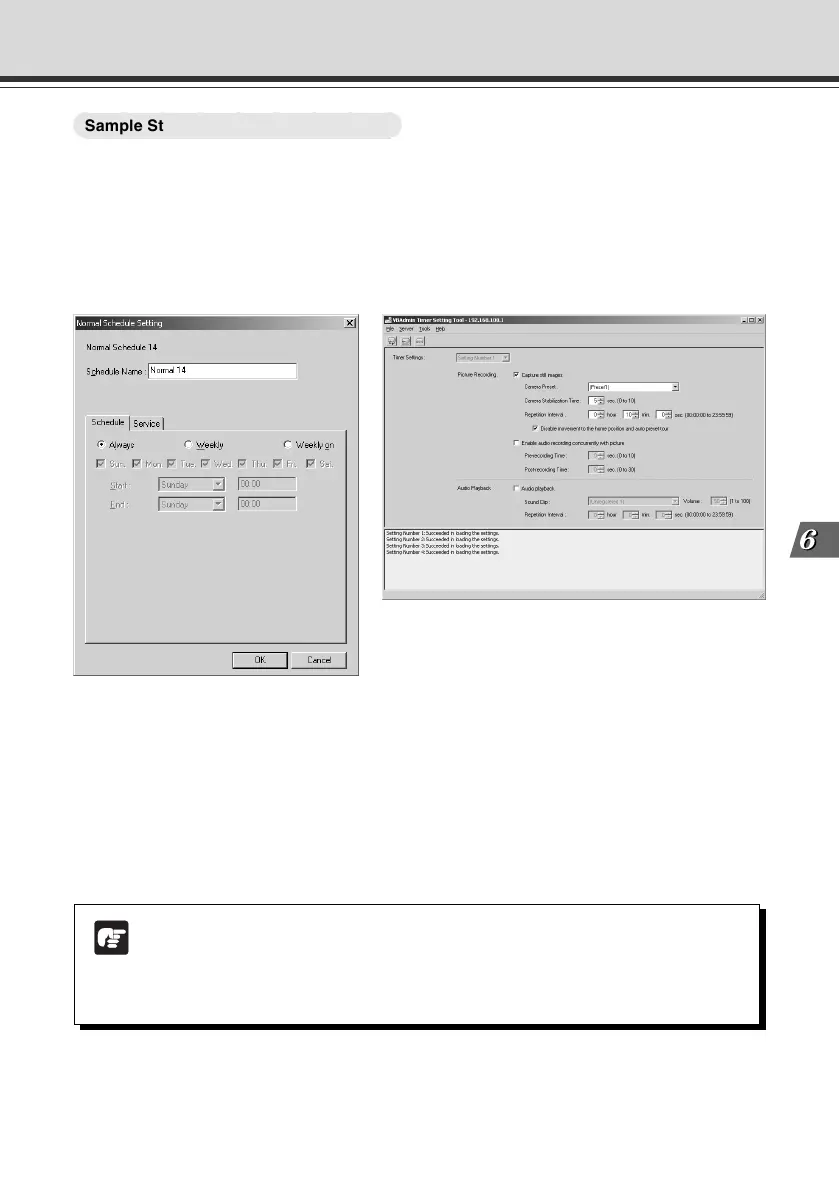
Photographic conditions specified in “Timer Setting Tool” (→ P.4-39)
Note
● The number of still pictures that can be recorded depends on size of the pictures.
Check the average file size per still picture in advance (→ P.3-7 and 3-29).
● Still pictures beyond VB-C50i/VB-C50iR’s capacity can be recorded if VBCollector
is used to download still pictures recorded by the VB-C50i/VB-C50iR (→ P.6-11).
● In the “Normal Schedule Setting” screen (→ P.4-30), select a schedule and then select “Always”
in the “Schedule” tab.
● In the “Service” tab, select “Timer”, then select ”Setting Number” and click the “Detail” button.
● Select “Capture still image”.
● Set “Camera Preset” to “Preset1”.
● To take a photograph after the position of the camera has stabilized, set “Camera Stabilization
Time” to “5” seconds.
● Set “Repetition Interval” to “10” minutes.
006-VBC50i-E-US 06.7.6, 11:40 AM7


 To Next Page
 Loading...










