17
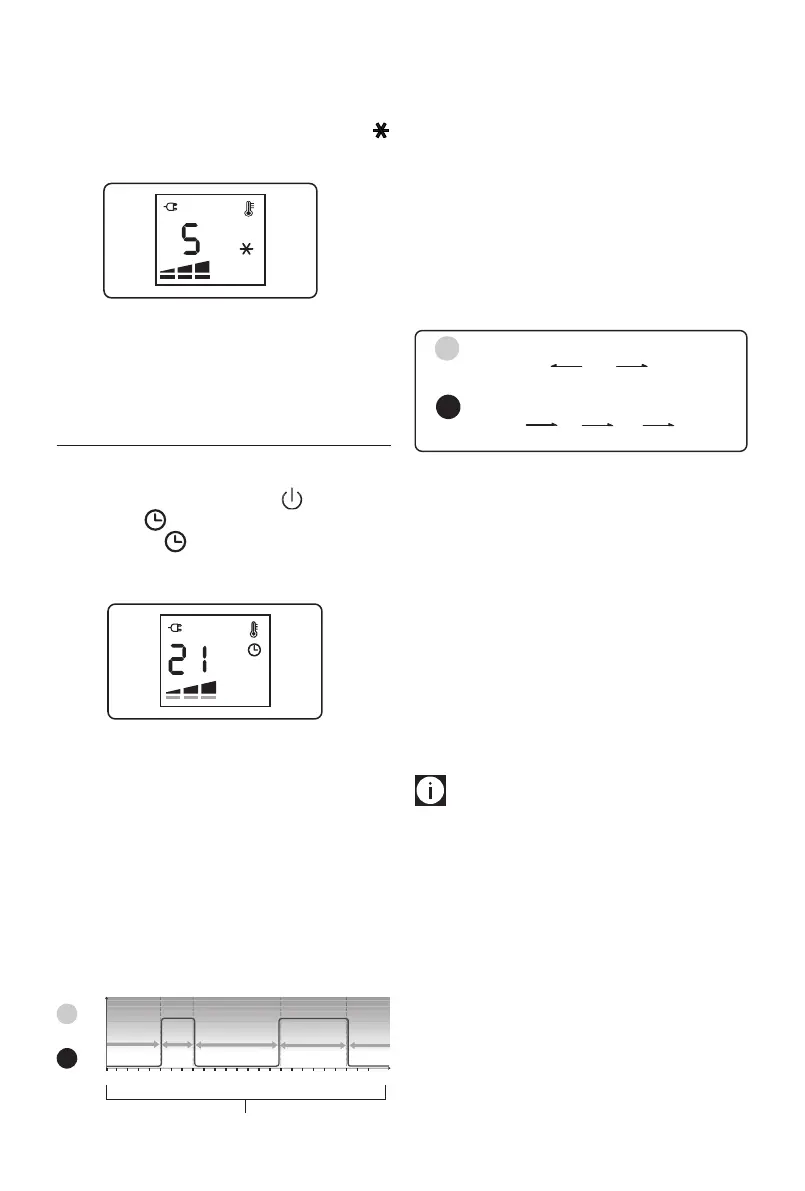
Anti-freeze function
This function is useful to prevent freezing.
To activate this function, turn power ON and turn the dial
counter clockwise till the set point 5°C is displayed and a
will appear.
In this operation mode the working power can not be set. The
appliance will automatically set to Max power level. If you
turn the dial clockwise, you will restore the previous power
setting.
TIMER OPERATION MODE
In Timer operation mode the unit works according to a pre-
set. Daily timer program that can be altered to suit your
needs. Turn on the unit by pressing the (A) button and
then press the button to activate the timer operation
mode. The symbol will appear on the display together
with the pre-set temperature and power level assigned to the
current time interval.
Daily Timer program
The daily timer program consists of a 24 hour timeline that
can be divided into 96 time intervals of 15 minutes each. To
each time interval it is possible to associate one of the 2 timer
temperature settings , T1 or T2. The time intervals and the
temperatures T1 and T2 can be changed to suit your needs.
Preset daily timer program
The default preset daily timer program is the following:
l T1= 21°C
l T2= heating o
426
8
10 12 14 16 18 20 22 0
0
21°C
O
T2 T2 T2
T1T1
Time intervals
T1
T2
Note: the previous chart is showing
T2 from midnight to
5am, T1 from 5am to 8am, T2 from 8am to 4pm, T1 from 4pm
to 10pm, T2 from 10pm to midnight.
How to change the daily timer temperatures
It is possible to change the temperature settings for T1 and T2
to better suit your needs.
T1 is associated to Green light (l) and can be set at any tem-
perature from 10°C to 28°C; T2 is associated to Red light (l)
and can be set from OFF to anti-freeze 5°C or to any tempera-
ture from 10°C to less than T1.
Min
10°C
Min
10°C
Max
28°C
Default
21°C
Default
O
Anti-frost
5°C
Red light
Green light
T1
T2
Max
less than T1
To change the timer temperature setting, with POWER ON:
1. Press the control dial.
2. The power level will blink.
3. Turn the dial till you see the clock icon blinking and press
the dial once.
4. A green light will appear in the display blinking.
Turn the dial to choose between green light (T1) or red
light (T2) and press the dial once to conrm.
5. The temperature digits will blink.
Turn the dial to adjust the temperature according to
your needs and press the dial to conrm.
6. The unit will exit the menu and the display will show
again the manual operation settings.
Please note:
Follow same 6 steps above to set the
other daily timer temperature not previously set.


 To Next Page
 Loading...