14
PIZZA
Pizza is special automatic function that incorporates preset
programs. Temperature, cooking time and cooking mode are
automatically selected. Cooking time is extendable to desired
cooking results, at the end of cooking process.
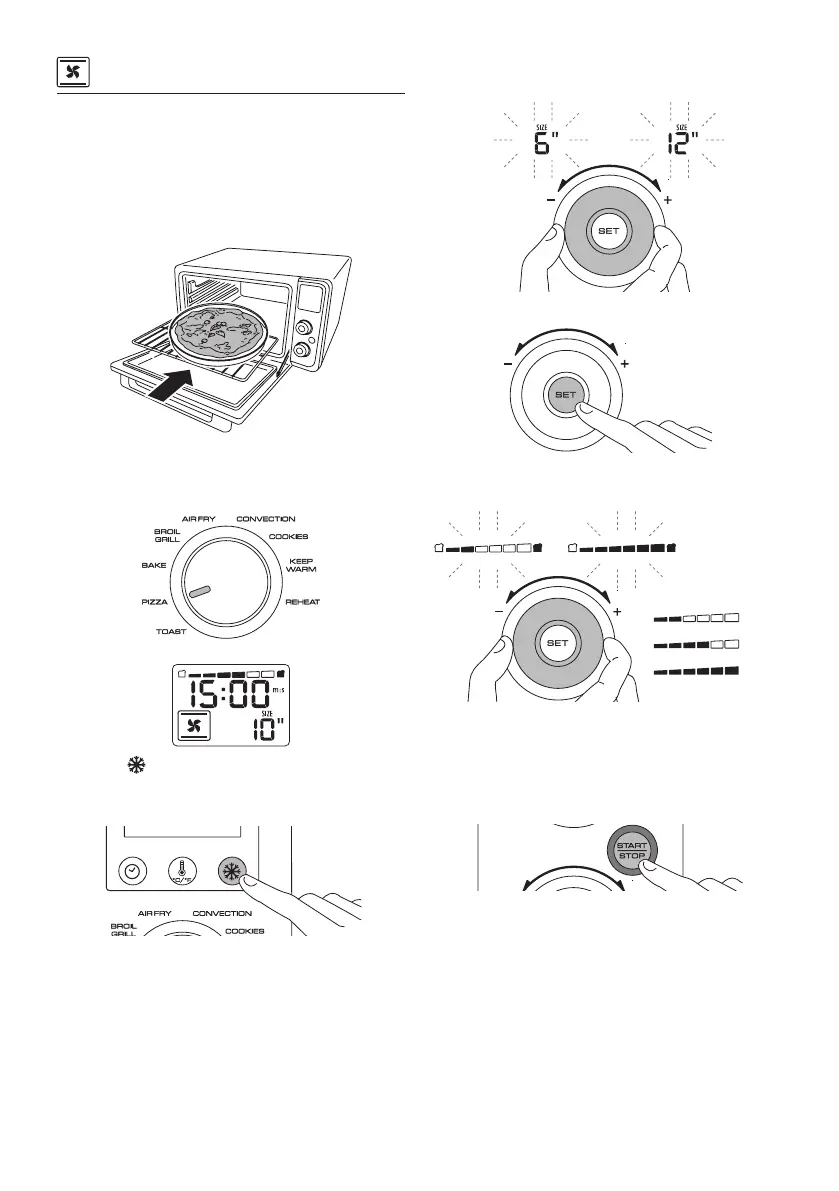
Place the pizza on the pizza pan (R) and insert in the oven in
position 1.
No preheat is needed.
Close the door.
Turn the Function selection dial (L) in PIZZA position.
Default mode is “FROZEN”.
Pressing the Frozen option button (H) allows you to disable
the ‘frozen’ option, to cook ‘fresh’ pizza.
Further pressing will return ‘frozen’ mode.
Turn the Time/temperature/toast color/pizza size/slices/tray
dial (N) to set the desired pizza size.
Press the SET button (O).
Set the desired level of crusting by turning the Time/tempera-
ture/toast color/pizza size/slices/tray dial (N) .
(min)
For thin pizza we suggest min crust level. For thick pizza we sug-
gest max level of crust.
Press the START/STOP button (M) to start cooking.
The red ON light (T), that is located around the edge of the
START/STOP button (M), turns on.
The oven starts the cooking process.
During cooking ‘fresh’ pizza only, the oven will play a sound sig-
nal (6 minutes before the end of cooking time). It is a signal to
add mozzarella or soft cheese topping to your pizza.


 To Next Page
 Loading...