18
If START/STOP button (M) is not pressed within 15 minutes, the
oven will automatically restart the function.
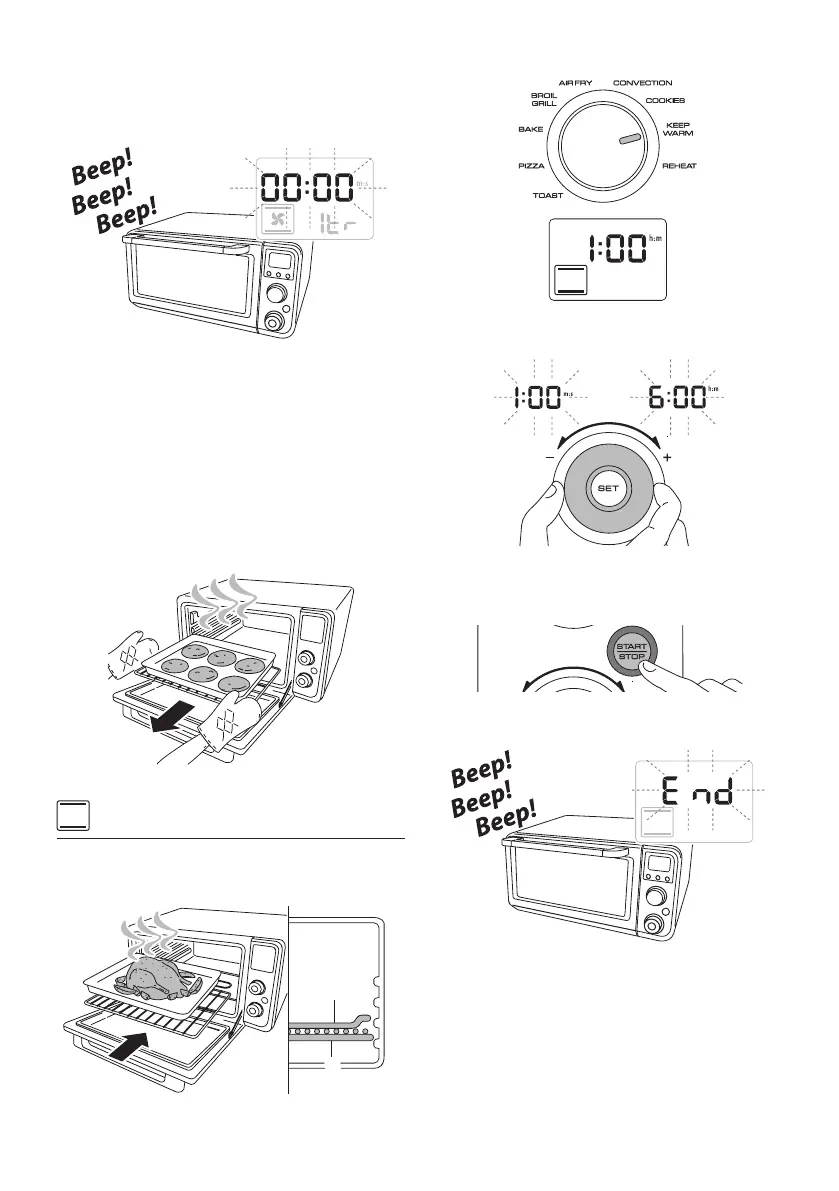
At the end of the set time the appliance will play a sound signal
and the display will show 00:00.
The control is now in ‘waiting mode’. In this state you can add up
to 10 minutes, if necessary, to complete the cooking.
This state is kept for 5 minutes, after that the control will turn o
the oven automatically.
Turn the Time/temperature/toast color/pizza size/slices dial (N)
to adjust up to 10 additional minutes, if necessary, and press the
START/STOP button (M) at the end of time, the control will turn
o the oven.
Open the door and remove the food. Take great care when tak-
ing the food out of the oven. Use oven gloves.
KEEP WARM
Place the food previously cooked on the bake pan over the rack.
The wire rack must be positioned as shown in the gure (po-
sition 1).
Q
P
Close the door. Turn the Function selection dial (L) in KEEP
WARM position.
Turn the Time/temperature/toast color/pizza size/slices/tray
dial (N) to set the desired time. The default time is 1:00 (hour).
Press the START/STOP button (M) to start cooking.
The red ON light (T), that is located around the edge of the
START/STOP button (M), turns on.
At the end of the set time the appliance will play a sound signal
and the display will show END.
Open the door and remove the food. Take great care when tak-
ing the food out of the oven. Use oven gloves.


 To Next Page
 Loading...