3-1
3
3. MAINTENANCE, TROUBLE-
SHOOTING
3.1 Maintenance
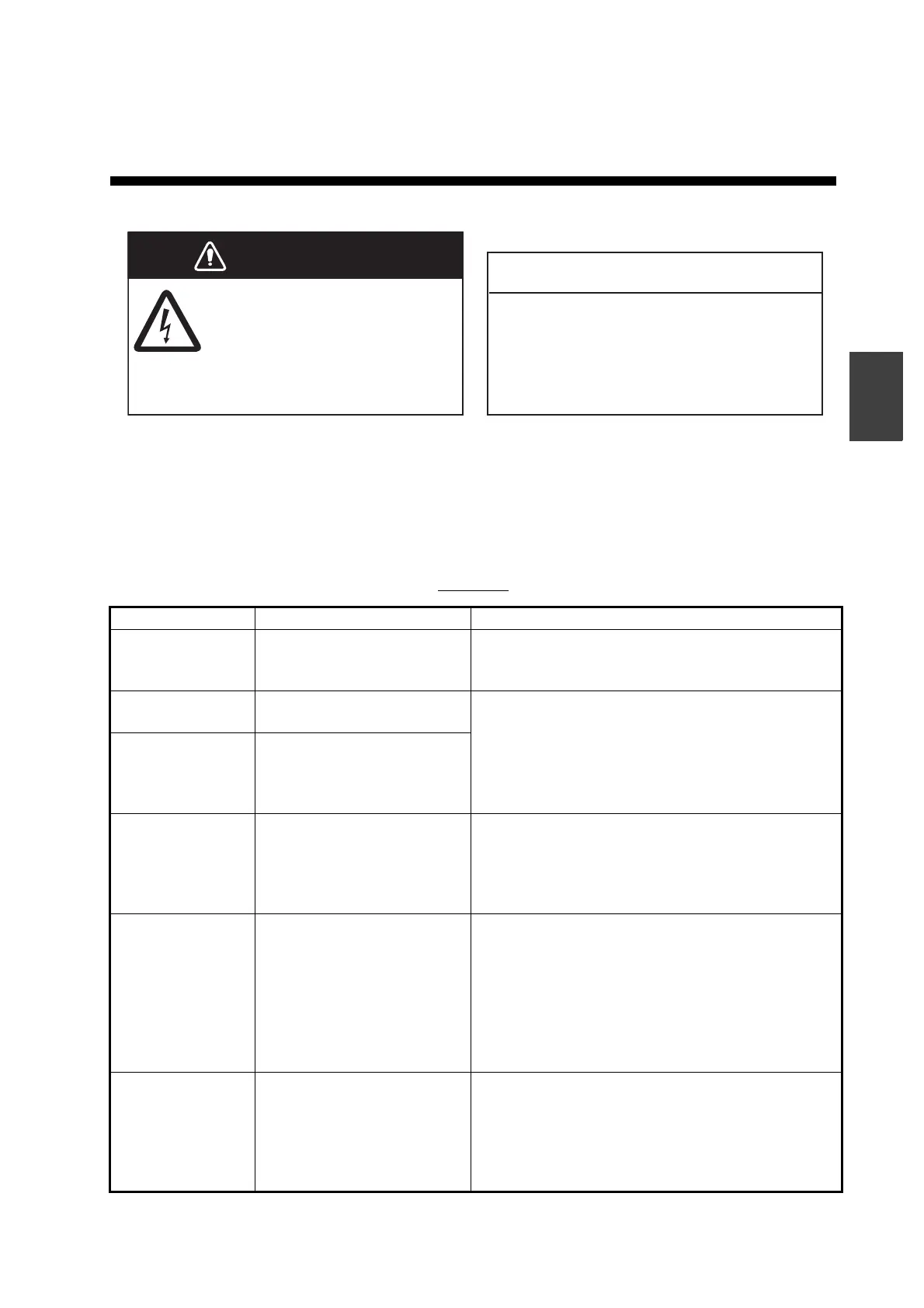
Regular maintenance is essential for good performance. Check the items listed in the
table below monthly to help keep your equipment in good shape for years to come.
Checking
Item Check Action
Transducer cable Check the cables are se-
curely connected and not
damaged.
• Connect the cable if loosened.
• Replace the cable if damaged.
Connector Check for looseness and
rust.
• Refasten if necessary.
• Remove rust if necessary.
Ground terminal Check the ground terminal
is not loosened or rusty and
that the ground wire is prop-
erly grounded.
Cabinet Check the cabinet for dust
and dirt.
Dust or dirt may be removed from the cabinet with
a soft cloth. Water-diluted mild detergent may be
used if desired. DO NOT use chemical cleaners to
clean the display unit; they may remove paint and
markings.
LCD Check the LCD surface for
dust and dirt.
Wipe the LCD carefully to prevent scratching, us-
ing the cleaning cloth provided and an LCD clean-
er. To remove dirt or salt deposits, use an LCD
cleaner, wiping slowly with cleaning cloth so as to
dissolve the dirt or salt. Do not use solvents such
as thinner, acetone or benzene for cleaning. Also,
do not use degreaser or antifog solution on the
LCD, as they can strip the coating on the LCD.
Transducer Marine life on the face of the
transducer will result in a
gradual decrease in sensi-
tivity. Check the face of the
transducer regularly for
cleanliness.
• Clean off any deposits on the transducer sur-
faces.
• Carefully remove any marine life with a piece of
wood or fine-grade sandpaper.
• DO NOT use chemical cleaners to clean the
transducer.
NOTICE
WARNING
ELECTRICAL SHOCK HAZARD
Do not open the equipment
(other than when installing flush
mount hanger cover).
Do not apply paint, anti-corrosive sealant
or contact spray to coating or plastic parts.
Those items contain organic solvents that can
damage coating and plastic parts, especially
plastic connectors.
Only qualified personnel can work
inside the equipment.


 To Next Page
 Loading...





