AFMS, GARMIN G500 PFD/MFD SYSTEM 190-01102-01 Rev. 9
FAA APPROVED Page 14 of 40
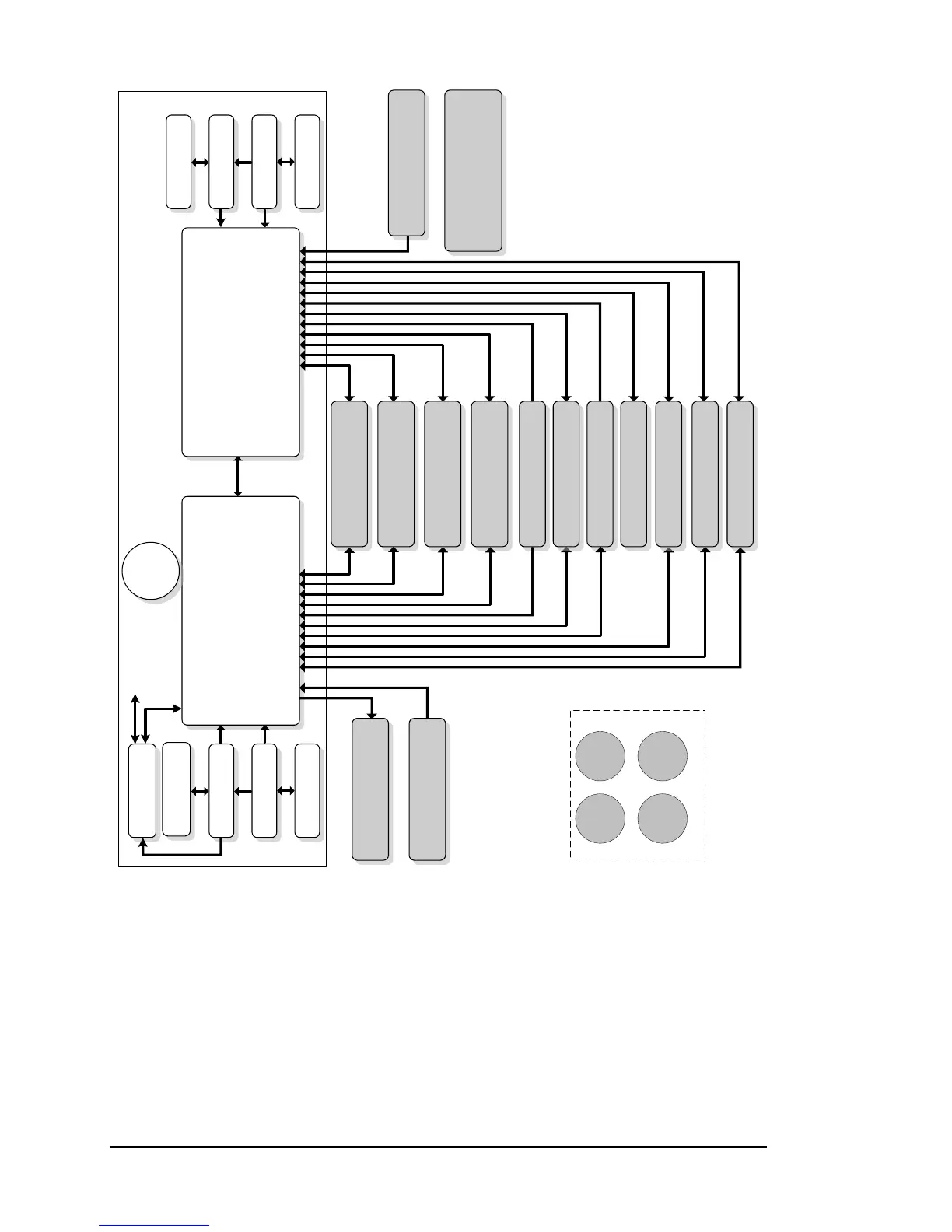
1.12 Dual G500 Operational Block Diagram
Equipment Installed per this STC
Air Data Computer
AHRS
Magnetometer
GMU 44 #1
GRS 77 #1
GDC 74() #1
Temperature Probe
GTP 59 #1
Pilot PFD/MFD Display
GDU 620
Copilot PFD/MFD Display
GDU 620
Audio Panel
Various Models
(optional)
***
XM WX/Entertainment
GDL 69/69A
(optional)
Autopilot/Flight Director
(optional)**
Flight Director Only
ADF
(optional)**
No. 1 VOR/Localizer/GS
(optional)**
Standby
Attitude*
Standby
Airspeed
Standby
Altimeter
Magnetic
Compass
(required on pilot side only)
No. 1 GPS/SBAS Navigator
(required)
Air Data Computer
AHRS
Magnetometer
GMU 44 #2
GRS 77 #2
GDC 74() #2
Temperature Probe
GTP 59 #2
No. 2 GPS/SBAS Navigator
(required)
No. 2 VOR/Localizer/GS
(optional)**
Adapter
(optional)
GAD 43/43e
to Aircraft Systems
(optional)
Existing Equipment
(already installed in aircraft)
*Standby Attitude: May be replaced
with electric attitude indicator with
integral /dedicated backup battery.
**
Optional Equipment: Connection
of optional equipment to both GDUs
is not required. Functions provided
by the optional equipment will only
be available on the GDU to which
the optional equipment is
connected.
***Audio Panel connection to GDU
620 is recommended for tones and
aural alerts generated by the GDU
620. This MUST be connected if
SVT is enabled.
**** Installation of the Mid-Continent
electric standby attitude indicator is
approved by this STC.
Weather Radar
(optional)**
Electric
Standby
Attitude****
Traffic
(optional)**
Radar Altimeter
(optional)
Iridium Data Link
(optional)**
Video Source
(optional)**
Video Source
(optional)**


 To Next Page
 Loading...