89
GPSmap 76CS
Interfacing the GPSmap 76CS
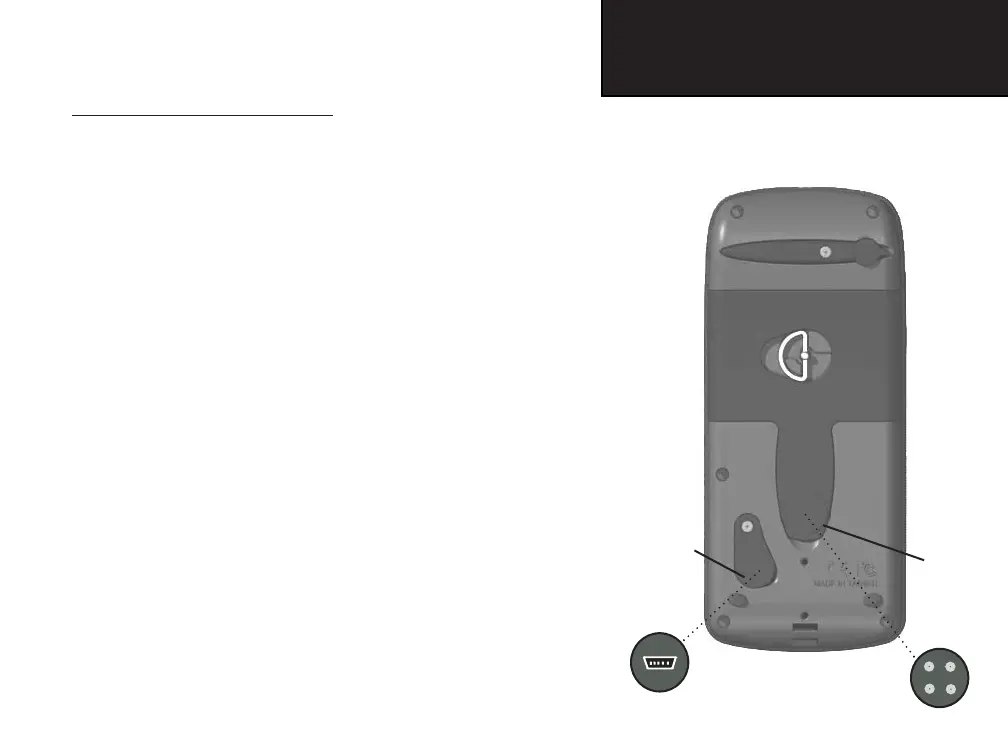
The GPSmap is provided with interface connection to a PC using
either a serial port or USB connector cable. Connection to your computer
is necessary for downloading of detailed map from Garmin MapSource
Map Data CDs. You can also save routes, waypoints, and tracks from
the GPSmap 76CS to MapSource. Refer to the MapSource User’s Guide
provided with your MapSource CDs.
T
o connect to your computer using the USB connector:
1. Lift the USB protective cover from the back of the GPSmap
76CS and insert the smaller connector on the USB cable (pro-
vided with the unit) into the matching port.
2. Connect the remaining cable end to your PC USB port.
3. Set your GPSmap 76CS interface setting to GARMIN format.
(See page 58.
To connect to your computer using a Serial Port connector
:
1. Lift the Serial Port protective cover from the back of the
GPSmap 76CS and insert the round indexed connector on the
cable into the matching port.
2. Connect the remaining cable end to your PC Serial port or other
appropriate device.
3. Set your GPSmap 76CS interface setting to the appropriate
interface format. Refer to Interface Setup on page 58.
Appendices
Connecting the GPSmap 76CS
to a Computer
Universal Serial
Bus (USB) Port
Serial
Communications
Port
Lift Cover
Lift Cover
GPSmap 76CS Owner's Guide copy.indd 89 3/30/2004, 2:01:02 PM


 To Next Page
 Loading...