5
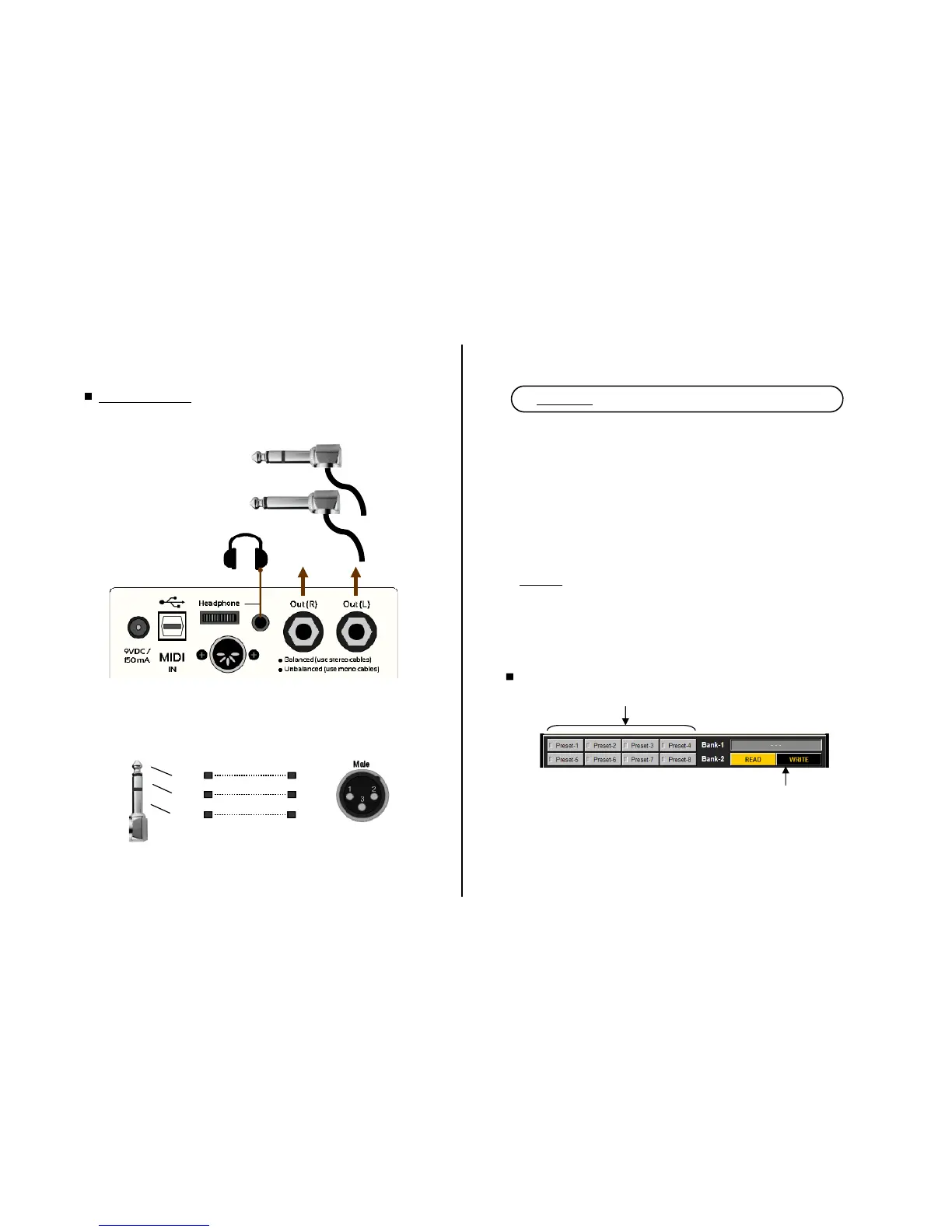
main outputs
TRS (stereo) plug
(for balanced connection)
TRS (mono) plug
(for unbalanced connection)
or
Tip
Sleeve Pin-1
Ring Pin-3
Pin-2
Converting TRS to XLR.
If you are connecting Cabzeus outputs to an equipment that do not have TRS
input socket you will need to use a cable with a TRS plug on one end, and an
XLR on the other end. Use the following schematic if you plan to build such a
cable yourself.
TRS XLR
Output Connections
Cabzeus has two outputs which can operate in balanced mode or unbalanced
mode, depending on the type of plug / cable you use.
stereo cable
mono cable
6
Saving algorithms as preset into Cabzeus
(1) Choose the desired preset location
(2) Click ‘Write’
Chapter 2 - Using CabsLab software (brief guide)
Here are some of the things that you can do with CabsLab :
Customize the speaker simulation system algorithms.
Store the customized algorithms to your pedal as presets.
Read the stored algorithms in your pedal and display them on screen.
Save local presets (favourites) in your computer.
Configure the MIDI channel on your pedal.
Revert your pedal to factory setting.
Update your pedal’s firmware.
Highlights
:
Real-time preview as you tweak the parameter controls.
‘Solo’ function for single speaker auditioning or quick A/B
comparison.
Extensive set of speakers simulation system parameters.


 To Next Page
 Loading...