Y
HANDLEASSEMBLY
(STANDARD MODEL)
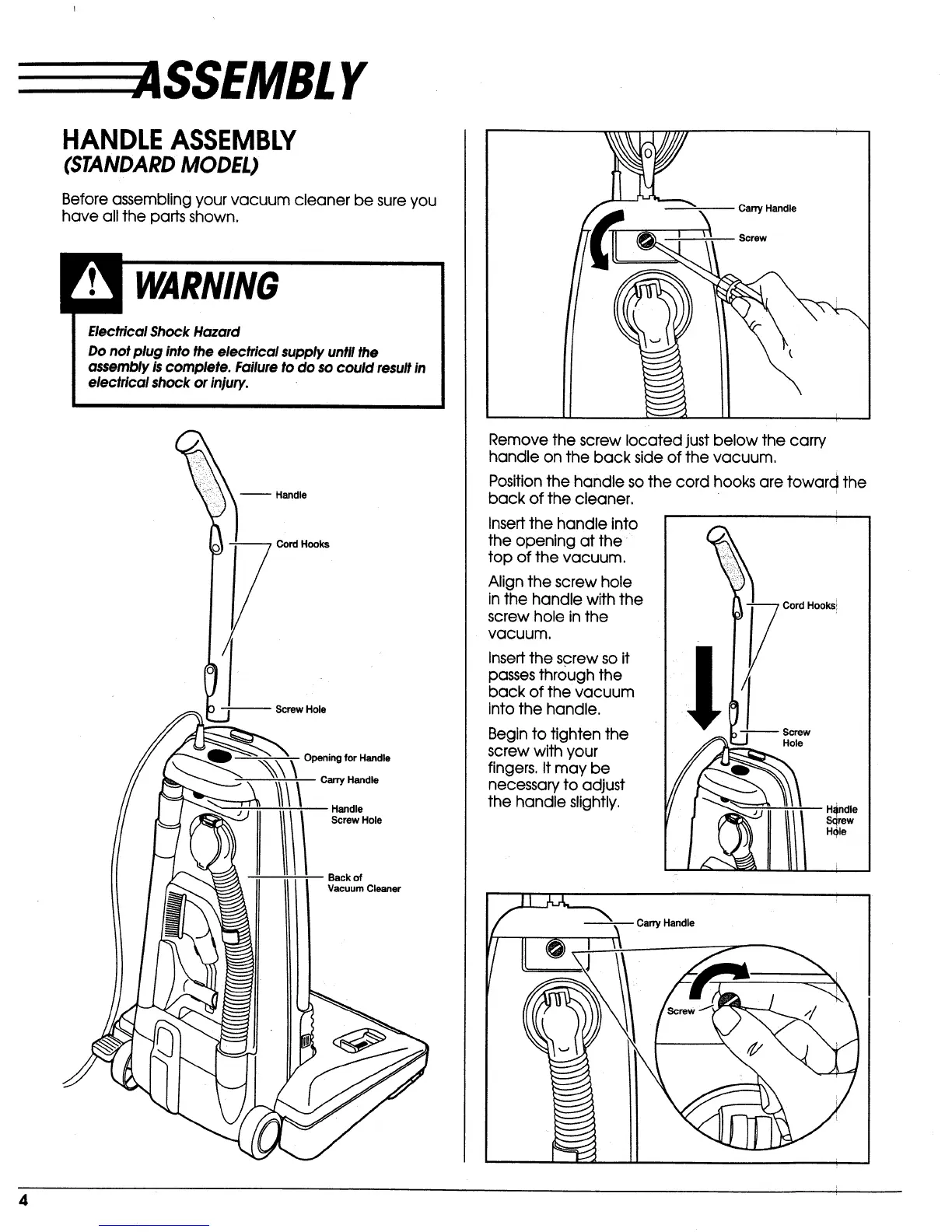
Before assembling your vacuum cleaner be sure you
have all the parts shown.
Electrical Shock Hazard
Do not plug into the electrical supply untll the
assembly is complete. Failure to do so could result in
electrical shock or injury.
-- Handle
• _ Cord Hooks
_.j Screw Hole
.,_,_ _ Opening for Handle
Handle
IIIIIIorwoe
Back of
Vacuum Cleaner
Carry Handle
Screw
Remove the screw located just below the carry
handle on the back side of the vacuum.
Position the handle so the cord hooks are toward the
back of the cleaner.
Insert the handle into
the opening at the
top of the vacuum.
Align the screw hole
in the handle with the
screw hole in the
vacuum.
Insert the screw so it
passes through the
back of the vacuum
into the handle.
Begin to tighten the
screw with your
fingers, It may be
necessary to adjust
the handle slightly,
-- Screw
Hole
Carry Handle
4


 To Next Page
 Loading...