1040 Wireless WAN card (for selected models)
For access, remove this FRU:
• “1020 Keyboard” on page 65
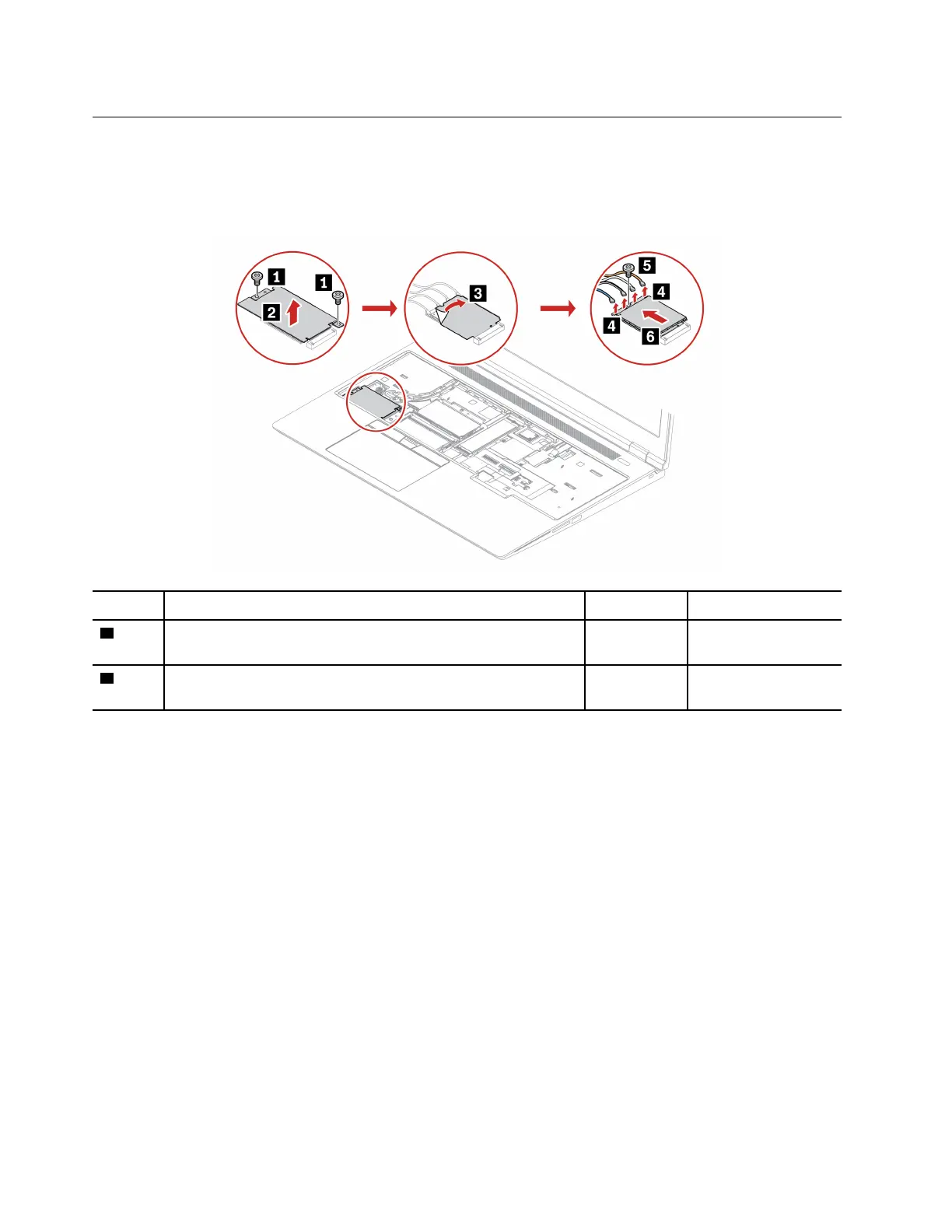
Removal steps of the wireless WAN card
Step Screw (quantity) Color
Torque
1
M2 × 2.5 mm, flat-head, nylon-coated (2)
Black 0.181 Nm
(1.85 kgf-cm)
5
M2 × 3 mm, flat-head, nylon-coated (1)
Black 0.181 Nm
(1.85 kgf-cm)
When installing: Ensure that you connect the orange cable to the main connector, the blue cable to the
auxiliary connector, the white and grey cable to the M1 connector, and the black and grey cable to the M2
connector.
68
ThinkPad P16 Gen 2 Hardware Maintenance Manual


 To Next Page
 Loading...