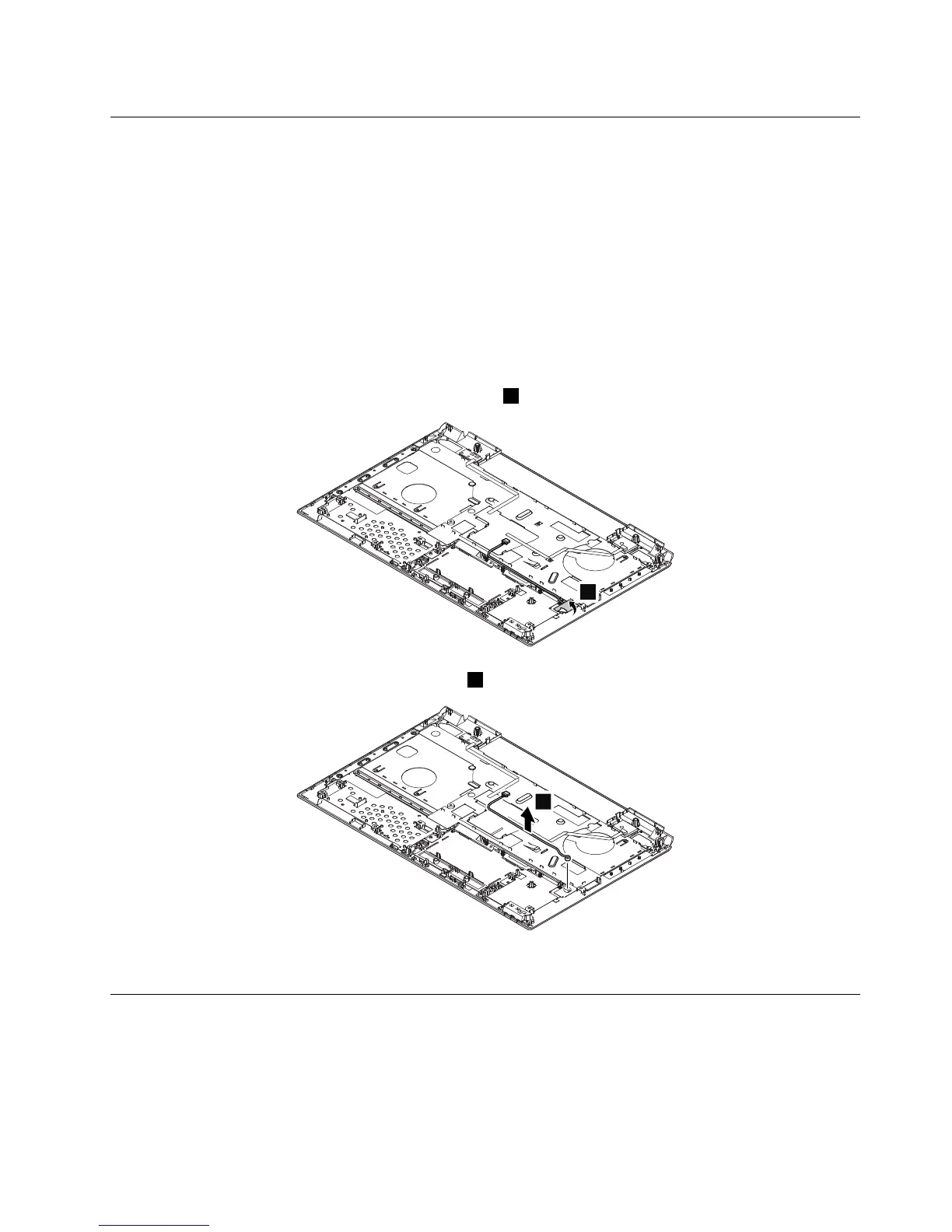
1110Microphoneassembly
Foraccess,removetheseFRUsinorder:
•“1010Batterypack”onpage44
•“1020Bottomslotcover”onpage44
•“1030Harddiskdrive”onpage45
•“1040Opticaldrive”onpage47
•“1050Memorymodules”onpage48
•“1060PCIExpressMiniCardforwirelessLAN”onpage49
•“1070Backupbattery”onpage50
•“1080Keyboard”onpage51
•“1090Keyboardbezel”onpage54
Removalstepsofmicrophoneassembly
Peeloffthetapesthatsecurethemicrophoneassembly1.
Wheninstalling:Makesurethattheconnectorisattachedrmlytothesystemboard.
1120I/OboardandRJ45Ethernetboard
Foraccess,removetheseFRUsinorder:
•“1010Batterypack”onpage44
•“1020Bottomslotcover”onpage44
•“1030Harddiskdrive”onpage45
•“1040Opticaldrive”onpage47
Chapter7.RemovingandreplacingaFRU59


 To Next Page
 Loading...