Applyinglabelstothebasecover
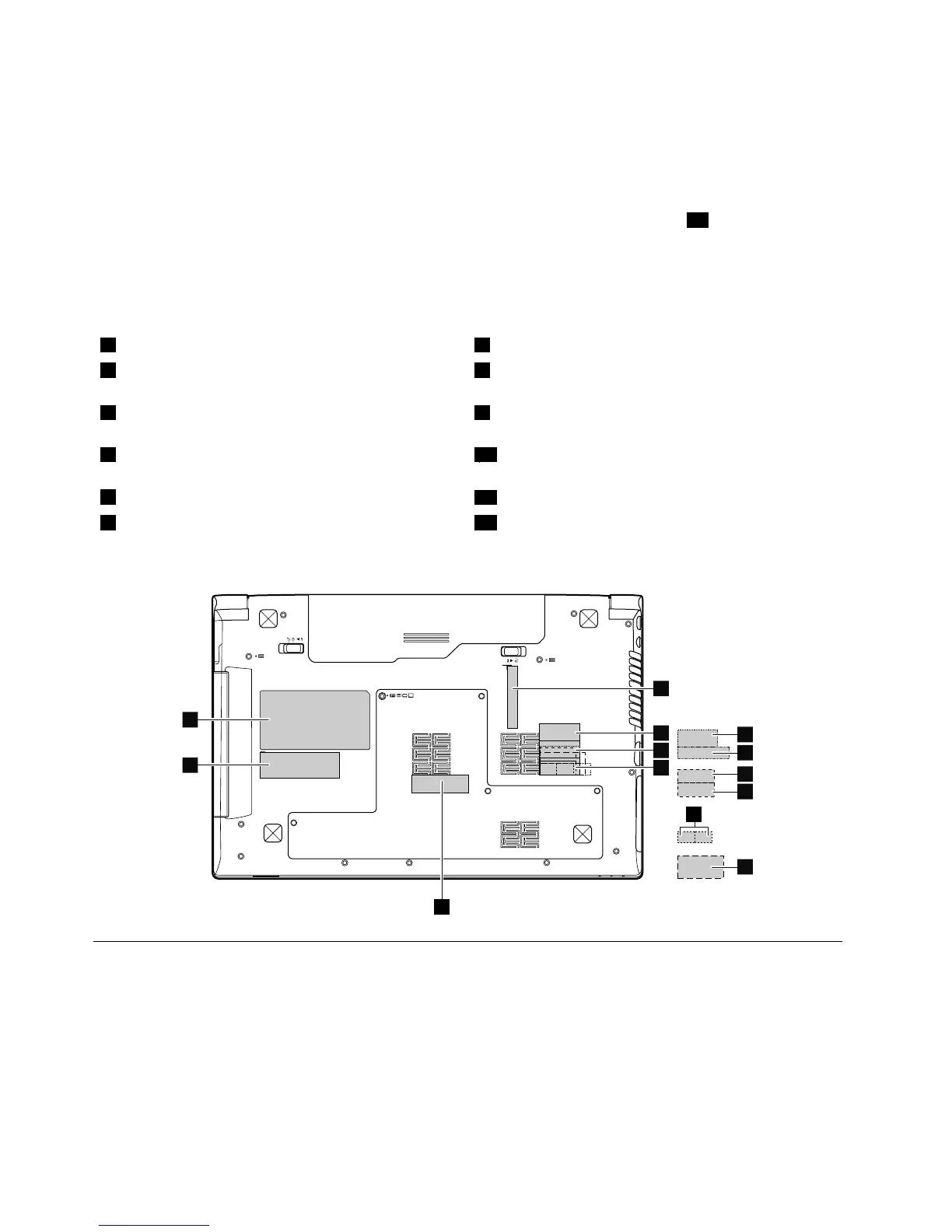
Thenewbasecoverisshippedwithakitcontaininglabelsofseveralkinds.Applythoselabelslistedwhen
youreplacethebasecover.Forthelabelswhicharenotshippedwiththenewbasecover,peelthemoff
fromtheoldbasecover,andadherethemtothenewone.
Note:IfyoureplaceapartwiththeWindowsCerticateofAuthentication(COA)label12,returntheoldpart
withthelabelattachedtothecustomer.Otherwise,youcanprovidethecustomerwithaletter,statingthe
originallocationofthelabelonthecomputerandtheinformationonthelabel,suchasthepartnumber,
serialnumber,andproductkey.
Thefollowinglabelsneedtobepeeledofffromtheoldbasecover,andneedtobeputonthenewbasecover.
1WistronlabelIndonesiaDsidelabel7IndonesiawirelessLANandBluetoothlabel
2BrazilBluetoothlabelorBluetoothlabelforUnited
States/Canada/T aiwanwirelessWANIMEIbarcodelabel
8IndonesiawirelessLANandBluetoothlabel
3BrazilwirelessLANlabelorwirelessLANlabelfor
UnitedStates/Canada/Taiwan
9MalaysiaSIRIMlabel
4BrazilwirelessLANlabelorwirelessLANlabelfor
UnitedStates/Canada/Taiwan
10PPTlabel
5Israellabel
11ChinalabelorKCClabel
6IsraellabelPPTlabel13Ratinglabel
Forthelocationofeachlabel,refertothefollowinggure:
2010LCDfrontbezel
Foraccess,removetheseFRUsinorder:
•“1010Batterypack”onpage44
•“1020Bottomslotcover”onpage44
•“1030Harddiskdrive”onpage45
•“1040Opticaldrive”onpage47
•“1050Memorymodules”onpage48
•“1060PCIExpressMiniCardforwirelessLAN”onpage49
•“1070Backupbattery”onpage50
72HardwareMaintenanceManual


 To Next Page
 Loading...