ENGLISH
27
MAKING CONNECTIONS
Component Connection
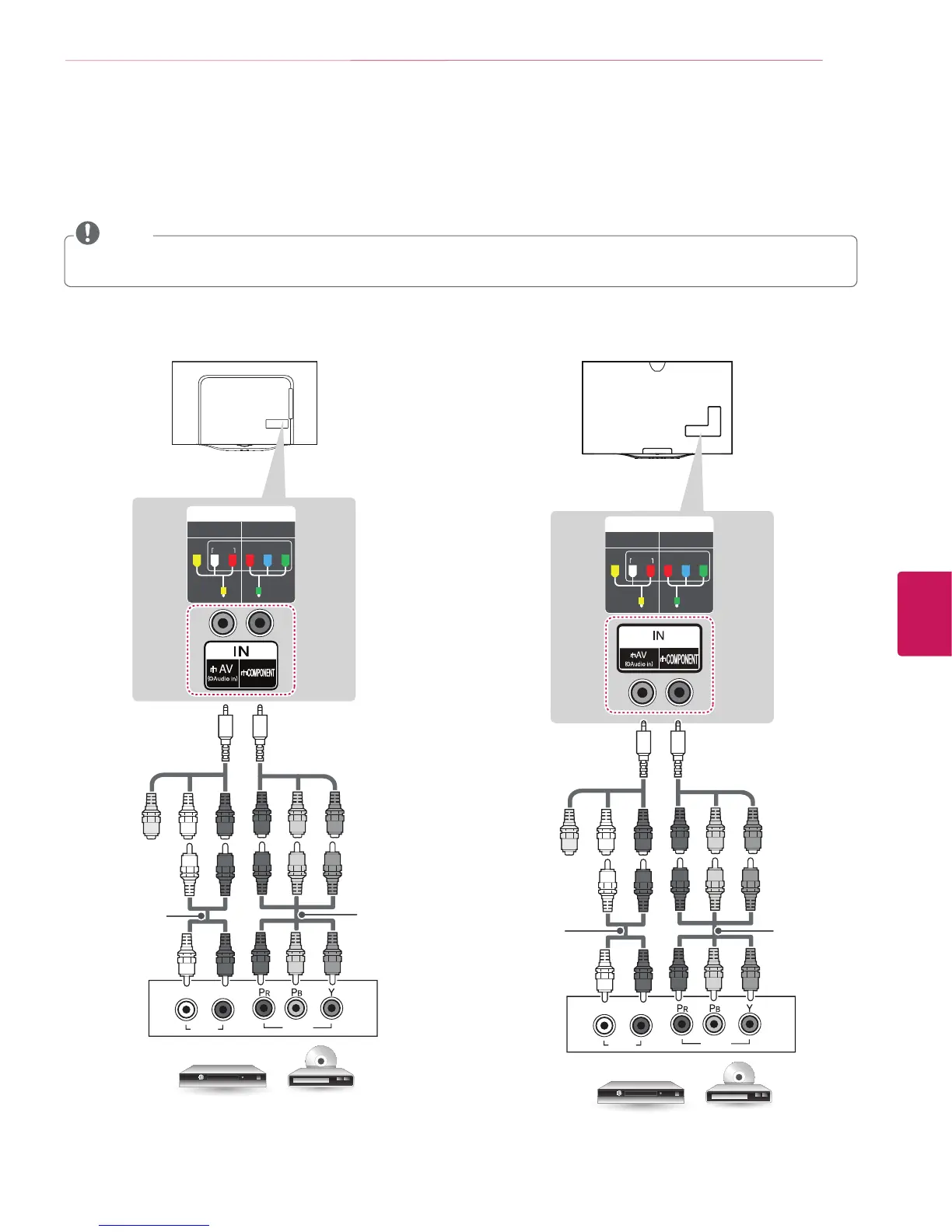
Transmits analog video and audio signals from an external device to the TV. Connect the external device and the TV with a component
cable as shown in the following illustration.
y
If cables are installed incorrectly, it could cause the image to display in black and white or with distorted color.
y
Check to ensure the cables are matched with the corresponding color connection.
NOTE
IN
COMPONENT
AV
VIDEO AUDIO
Y
P
B
P
R
VIDEO
AUDIO
LR
YELLOW
YELLOW
WHITE
RED
RED
BLUE
GREEN
WHITE
RED
RED
BLUE
GREEN
WHITE
RED
RED
BLUE
GREEN
(Use the composite video
cable provided.)
DVD / Blu-Ray / HD Cable Box
GREEN
(Use the component video
cable provided.)
(*Not Provided)
(*Not Provided)
IN
COMPONENT
AV
VIDEO AUDIO
Y
P
B
P
R
VIDEO
AUDIO
LR
YELLOW
YELLOW
WHITE
RED
RED
BLUE
GREEN
WHITE
RED
RED
BLUE
GREEN
WHITE
RED
RED
BLUE
GREEN
(Use the composite video
cable provided.)
DVD / Blu-Ray / HD Cable Box
GREEN
(Use the component
video cable provided.)
(*Not Provided) (*Not Provided)
(For 55EC9300) (For 77EC9800)


 To Next Page
 Loading...