93
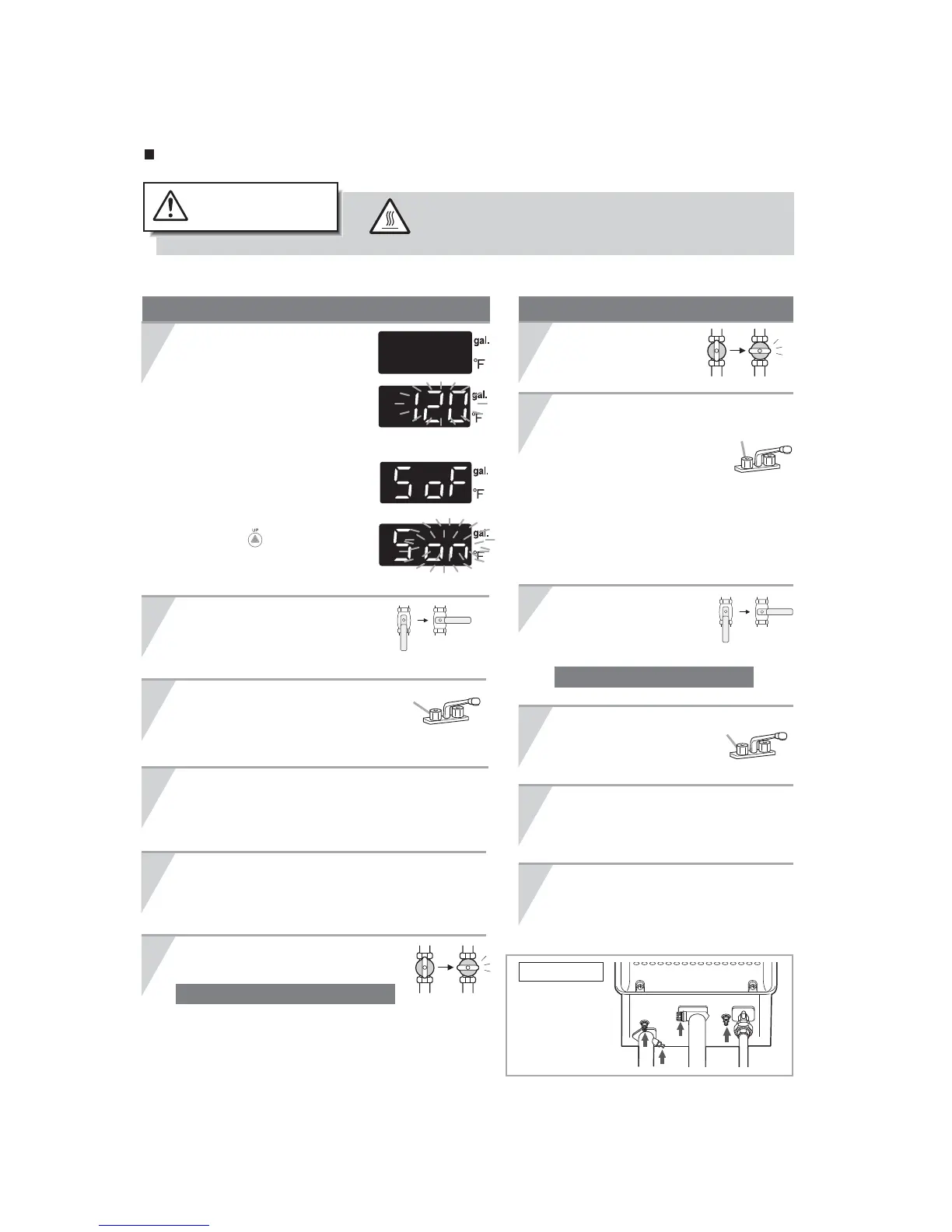
Draining the Water for Maintenance or for Freeze Prevention :
To avoid burns, wait until the equipment cools down
before draining the water. The appliance will remain
hot after it is turned o.
High Temperature
CAUTION
Fully open all hot water xtures.
4
Open all drain plugs and drain the water out of
the unit.
1
Close the water supply
valve.
6
Close the gas valve and disconnect
the electrical power supplied to the unit.
2
3
Fully open all
hot water xtures.
Fixture
Drainage Using the Remote Controller (NCC/NRC/841/842 series only)
2
(1) Turn the power on/o button “On”.
(2) Turn and leave open
the hot water xtures
for more than 2 minutes
and close.
* If multiple units are being used,
drain two minutes for each unit.
* An 11 Error Code may appear on
the remote controller.
This is not a malfunction of the unit.
Do not turn Power ON/OFF Button OFF.
Manual Draining
Close the water supply
valve and disconnect
the electrical power
supplied to the unit.
3
4
5
When the water is completely drained, replace
all drain plugs and close the hot water xtures.
5
Open all drain plugs and drain the
water out of the unit.
6
Close the gas valve.
1
When the water is completely drained,
replace all drain plugs and close the
hot water xtures.
Fixture
Fixture
(Ex. 120°F)
Do not touch with wet hands.
Drain Plugs
Do not touch with wet hands.
Drain water into a bucket to prevent water damage.
(1) Turn the power on/o
button “o”.
(2)
Press the ow meter alarm set
button for about two seconds
until the alarm sounds.
The maximum hot water
temperature will ash.
(3) Press the ow meter alarm
set button again.
(4) Press the setting button
marked “ “.
The display
will change from "oF" to "on"
after the button is pushed.
(ex. NCC199-SV/N-0841MC)


 To Next Page
 Loading...