15
How to use Control Panel
Chapter3.–UnitOperation
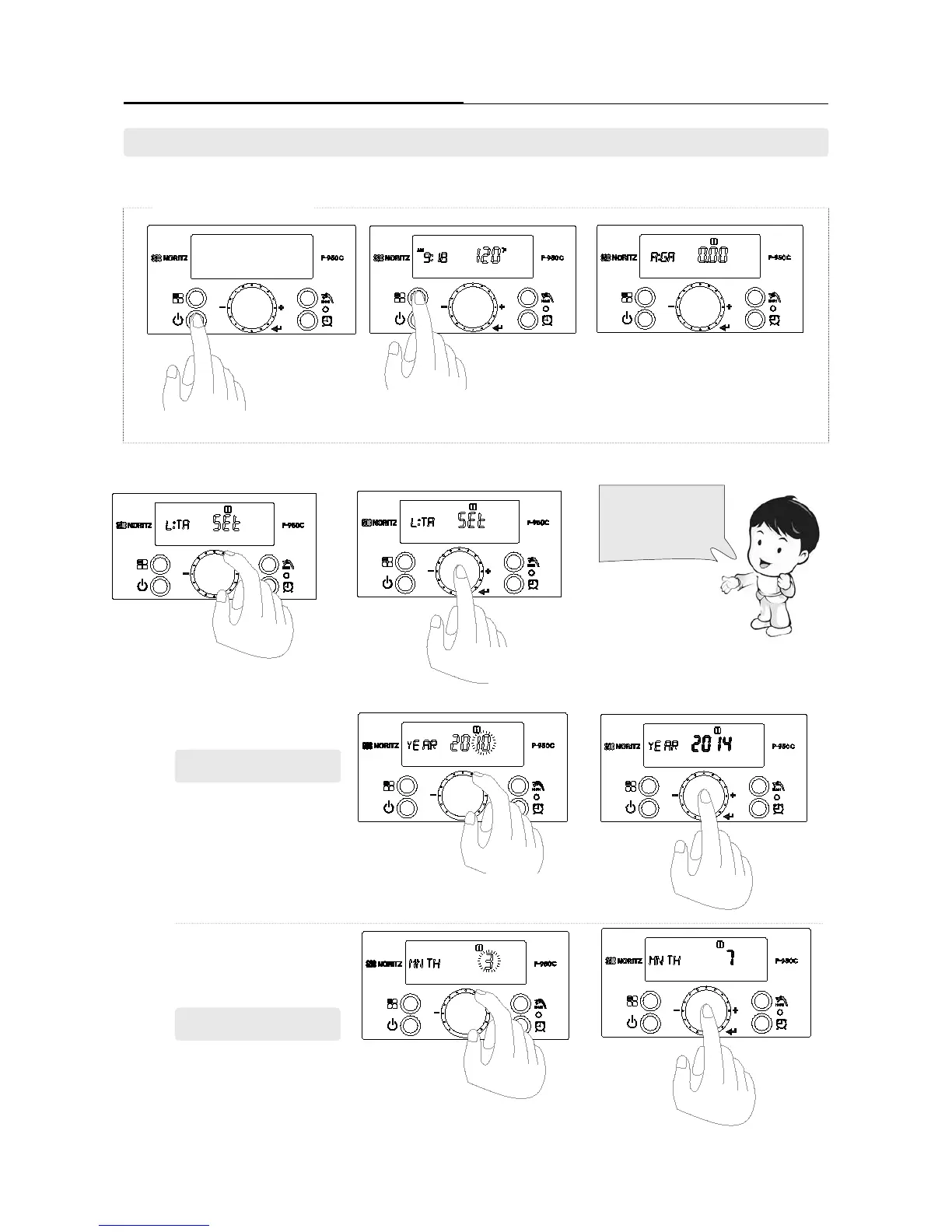
►To use the ‘RecirculationTimerMode’, the device’s internal clock should be adjusted to the current time.
Clock settings can be set in the ‘User mode’.
1. Clock Adjustment
· Set in ‘[L:TA] mode’ after turning the ‘Dial Button’ in ‘User Mode’.
· Set the YEAR - MONTH - DAY - DAY OF THE WEEK - HOUR - MINUTE in regular sequence..
Press the dial
button to store
the setting.
Press the dial
button to store
the setting.
1.Settingyear:2014
Set the ‘Year’ by turning the dial button.
(Only the ashing number can be changed.)
Set the ‘month’ by turning the dial button.
(Only the ashing number can be changed..)
Customer can set the
current date, time and
day in ‘[L:TA} mode’.
Press and hold ‘Function Button’ for approxi-
mately 5 Seconds to enter ‘User mode’.
Power must be ‘ON’ on the Display.
Enter the clock ‘Setting mode’ by pressing dial
button when ashing the [L:TA] character.
‘[A:GA]’ is displayed on the display screen.
From here, turn the ‘Dial Button’ to start the
setting.
Turn the dial button clockwise until
‘[L:TA]’ is displayed.
2. Setting month : 7
[ To enter ‘User Mode’]


 To Next Page
 Loading...