19
How to use Control Panel- User mode
Chapter3.–UnitOperation
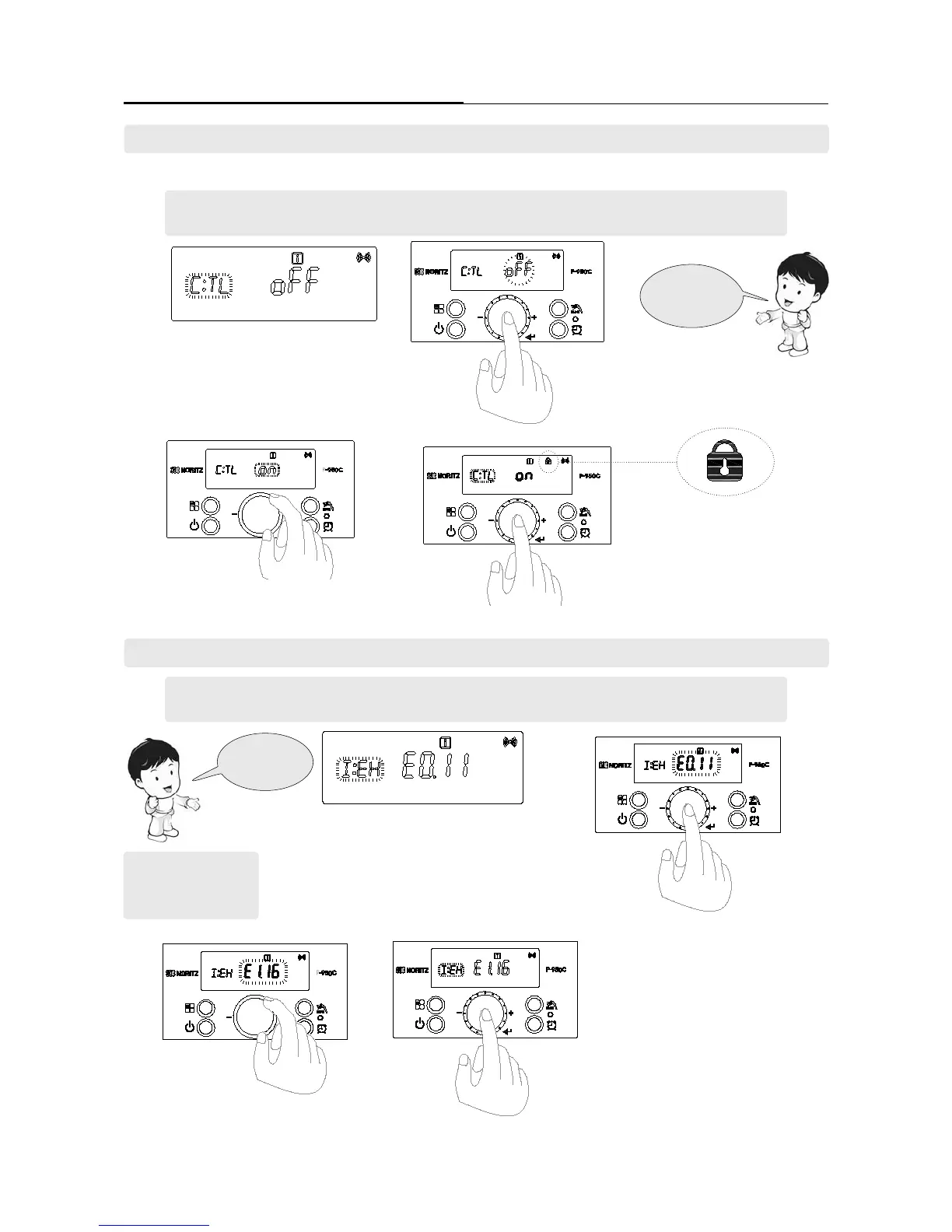
1. Select the ‘[I:EH] mode’ by turning the
‘Dial Button’ in ‘User Mode’.
2. ERROR CODE that have occurred can
be identied and ‘E0.11’ character is ash-
ing when the ‘Dial Button’ is pressed in
‘[I:EH] mode’.
3. ERROR CODE that have occurred from E0 to E9 can
be identied by turning the ‘Dial Button’ clockwise.
4. Pressed the ‘Dial Button’ to return to ‘User Mode’
Errorhistory
mode
[For example]
1’st error occurs : 11
2’nd error occurs: 16
4. How to check the ‘Error History’. [I:EH]
- Refer to page 18 ‘User mode’ setting method and set to ‘User mode’.
- Function can be checked by turning the dial button.
- Refer to page 18 ‘User Mode’ setting method and set to ‘User mode’.
- Function can be checked by turning the dial button.
1. Select the ‘[C:TL] mode’ by turning the
‘Dial Button’ in ‘User Mode’.
2. ‘Lock Mode’ is started and ‘oFF’ character
is ashing when the ‘Dial Button’ pressed in
‘[C:TL] mode’.
3. Select the ‘on’ character by turning the
‘Dial Button’ clockwise.
‘Temperature Lock’ Icon
Temperature
Lockmode
3. Locking the Control Panel. [C:TL]
Bylockingthecontrolpanel,thesettingscannotbeaccidentallychangedifabuttonispressedbymistake.
4. Press the ‘Dial Button’ to store, lock icon is
displayed. And return to ‘User Mode’


 To Next Page
 Loading...