17
How to use Control Panel- User mode
Chapter3.–UnitOperation
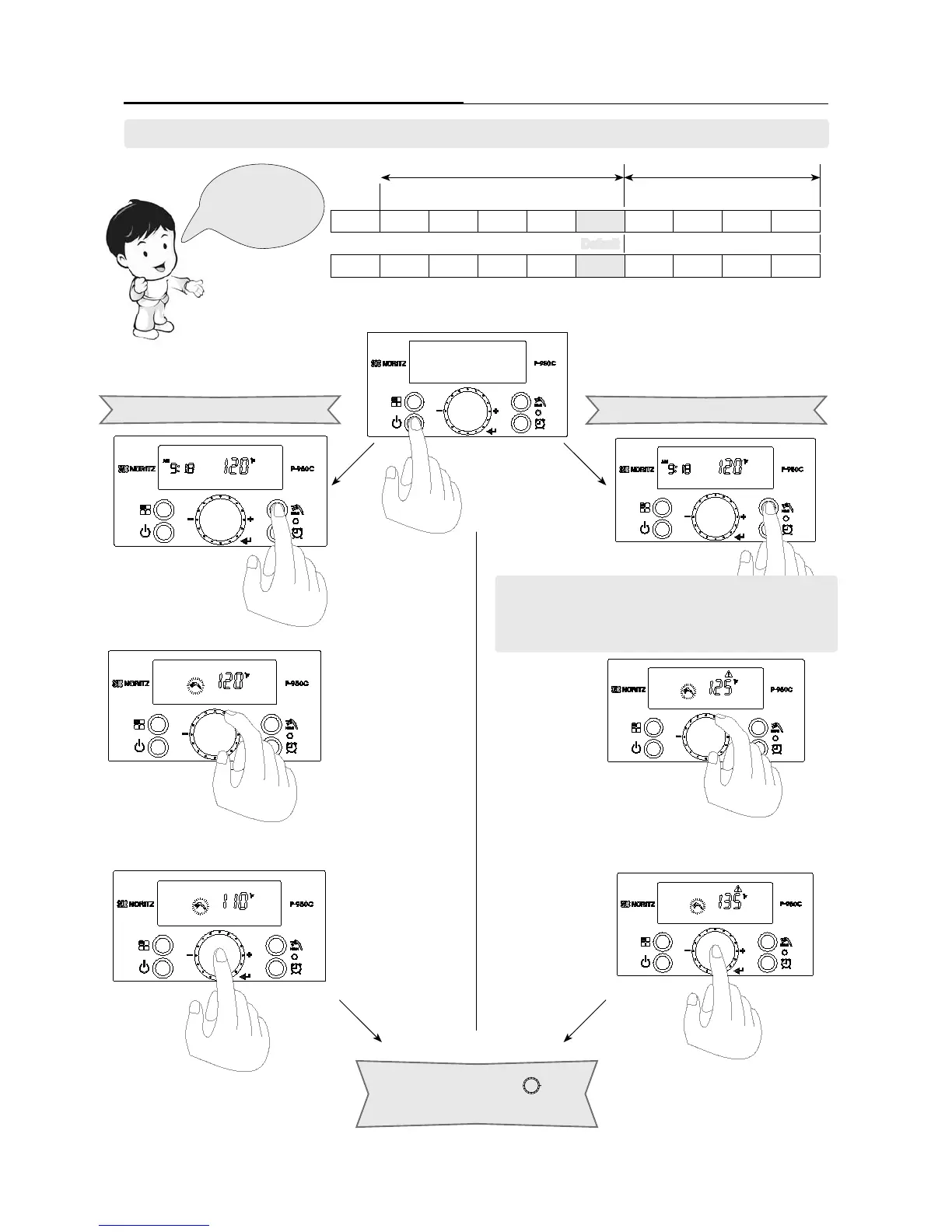
Generaltemperaturerange Hightemperaturerange
High temperat
ure setting can be set by turning the ‘Dial Button’
from
125°Fto140°F.(51.5°C~60°C)with5°Fincrements.
Normal temperature setting can be set by turning the ‘Dial Button’
from
100°Fto120°F(38°C~49°C)with5°Fincrements.
Press the ‘Hot Water
Temperature Setting Button’.
°F
100 105 110 115 120 125 130 135 140
Default
℃
38 40.5 43.5 46 49 51.5 54.5 57 60
The operation of
the high temperature
hot water can be set
separately.
High temperature range
Press the ‘Dial Button ( )’ to
store the setting.
General temperature range
2. Setting Hot Water Temperature
The temperature settings below are examples. The temperature setting necessary depends on the usage, the length
of piping and the time of year.
Press ‘Hot Water Temperature Setting Button’ once to get to
temperatures setting, then press and hold the ‘Hot Water
Temperature Setting Button’ for approximately 5 Seconds for
high temperature settings.


 To Next Page
 Loading...