33
EN
2
Use HI to select the setting option, and
press the A button to set.
Option Description
Off Macro mode is deactivated.
Macro
This enables shooting as close as
10 cm/3.9 in.
*1
(40 cm/15.8 in.
*2
) to
the subject.
Super Macro
*3
This enables shooting as close as
3 cm/1.2 in. to the subject.
*1
When the zoom is at the widest (W) position.
*2
When the zoom is at the most telephoto (T) position.
*3
The zoom is automatically fi xed.
The fl ash (p. 32) and zoom (p. 20) cannot be set
when [a Super Macro] (p. 33) is selected.
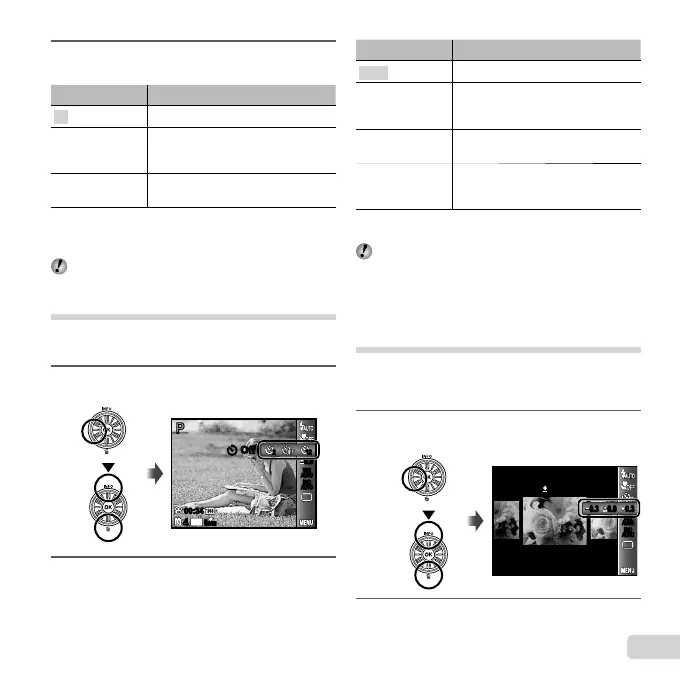
Using the self-timer
After the shutter button is pressed all the way down, the
picture is taken after a short delay.
1
Select the self-timer option in the function
menu.
16
M
44
1212
22
N
ORM
0.00.0
AUTO
WB
AUTO
WB
AUTO
ISO
AUTO
ISO
Y OffY Off
PP
00:3400:34
2
Use HI to select the setting option, and
press the A button to set.
Option Description
Y Off
The self-timer is deactivated.
Y 12 sec
The self-timer lamp turns on for approx.
10 seconds, then blinks for approx. 2
seconds, and then the picture is taken.
Y 2 sec
The self-timer lamp blinks for approx.
2 seconds, then the picture is taken.
;
Auto
Release
*1
When your pet (cat or dog) turns its head
towards the camera, its face is recognized
and the picture is taken automatically.
*1
[Auto Release] is displayed only when the s
mode is [U] or [t].
Self-timer shooting is automatically canceled after one shot.
To cancel the self-timer after it starts
To cancel the self-timer after it starts
Press the m button.
Adjusting the brightness
(Exposure compensation)
The standard brightness (appropriate exposure) set by the
camera based on the shooting mode (except for M)
can be adjusted brighter or darker to obtain a desired shot.
1
Select the exposure compensation option in
the function menu.
0.0
Exposure Comp.
0.30.3
0.3
0.00.00.3
AUTO
WB
AUTO
WB
AUTO
ISO
AUTO
ISO
PP
2
Use HI to select the desired brightness,
and press the A button.


 To Next Page
 Loading...