99
Zone 2
With the Zone 2 function, you can enjoy one input
source in the main room and a different source in another
room.
There are two connection methods: using a receiver/inte-
grated amp in Zone 2 or using only a pair of speakers in
Zone 2.
Note:
For speaker connections and related cautions, see
page 23.
Using a Receiver/Integrated Amp in Zone 2
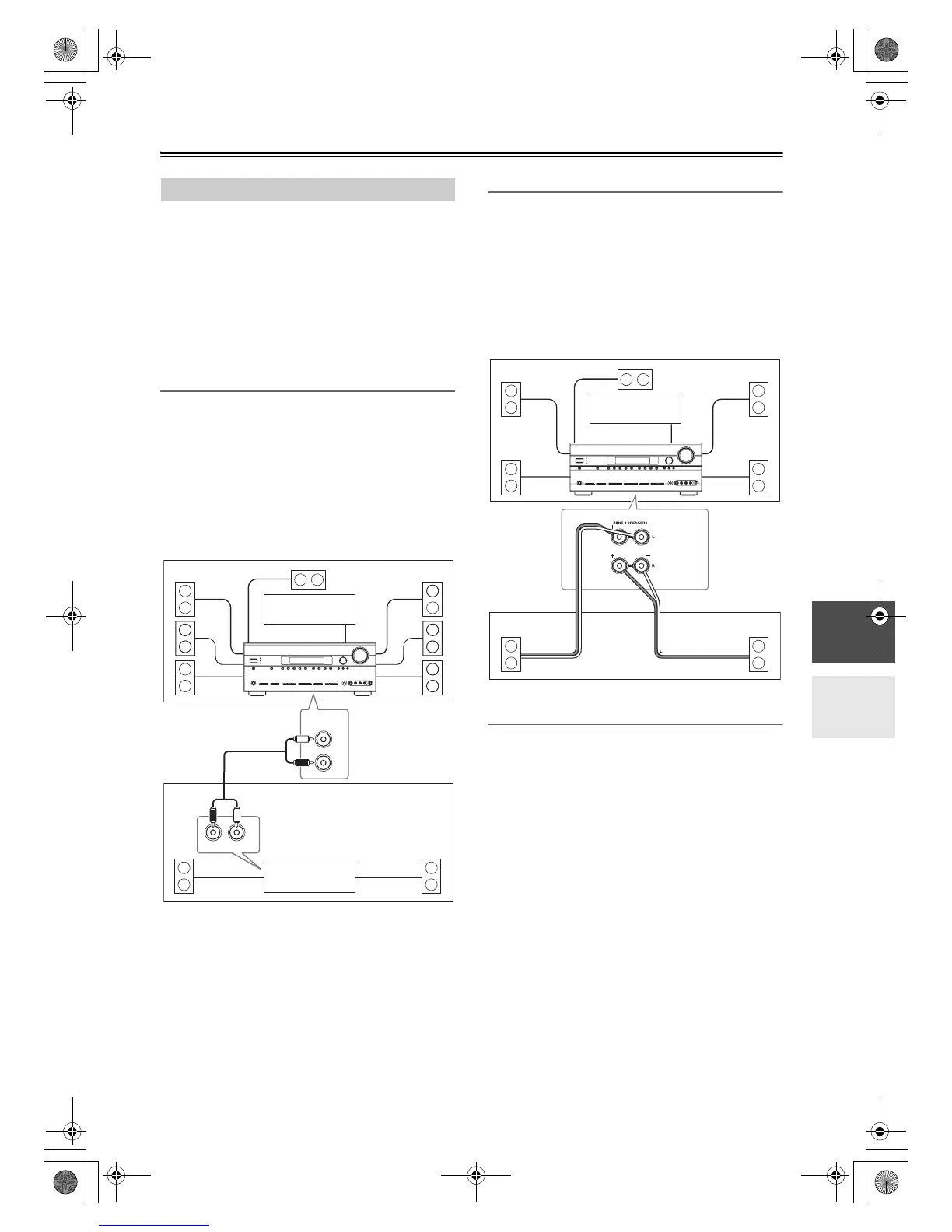
With this connection method, you can use 7.1 surround
sound in the main room and play a different AV source
in Zone 2. The volume for Zone 2 is set on the receiver/
integrated amp.
• Use an RCA audio cable to connect the AV receiver/
AV amplifier’s ZONE 2 LINE OUT L/R jacks to an
analog audio input on your receiver/integrated amp.
• Connect the Zone 2 speakers to the speaker terminals
on the receiver/integrated amp.
Using Only Speakers in Zone 2
With this connection method, you can use 5.1 surround
sound in the main room and play a different AV source
in Zone 2. The volume for Zone 2 is set on the AV
receiver/AV amplifier.
• Set the Powered Zone2 setting to “Act” (see
page 100).
• Connect your Zone 2 speakers to the AV receiver/AV
amplifier’s ZONE 2 SPEAKERS terminals.
Zone 2 12V Trigger
When Zone 2 is turned on, the output from the ZONE 2
12V TRIGGER OUT goes high (+12 volts, 100 milliam-
peres max). Connecting this jack to a 12-volt trigger
input on a component in Zone 2 will make that compo-
nent turn on or off as and when Zone 2 is turned on or off
on the AV receiver/AV amplifier.
Connecting Zone 2
IN
R
L
ZONE 2
LINE OUT
R
L
Main room
Zone 2
TV
Receiver/
integrated amp
AV receiver/AV amplifier
RL
Main room
TV
Zone 2
AV receiver/AV amplifier
TX-SR705_En.book Page 99 Monday, May 28, 2007 2:13 PM


 To Next Page
 Loading...