Replacement of batteries in remote controller
● During operation, point the remote control signal sender at the receiving
window on indoor unit.
● The distance between signal sender and receiving window should be no
more than 8m, and there should be no obstacles between them.
● Signal may be interfered easily in the room where there is fluorescent lamp
or wireless telephone; remote controller should be close to indoor unit during
operation.
● Replace new batteries of the same model when replacement is required.
● When you don’t use remote controller for a long time, please take out the
batteries.
● If the display on remote controller is fuzzy or there’s no display, please
replace batteries.
NOTICE
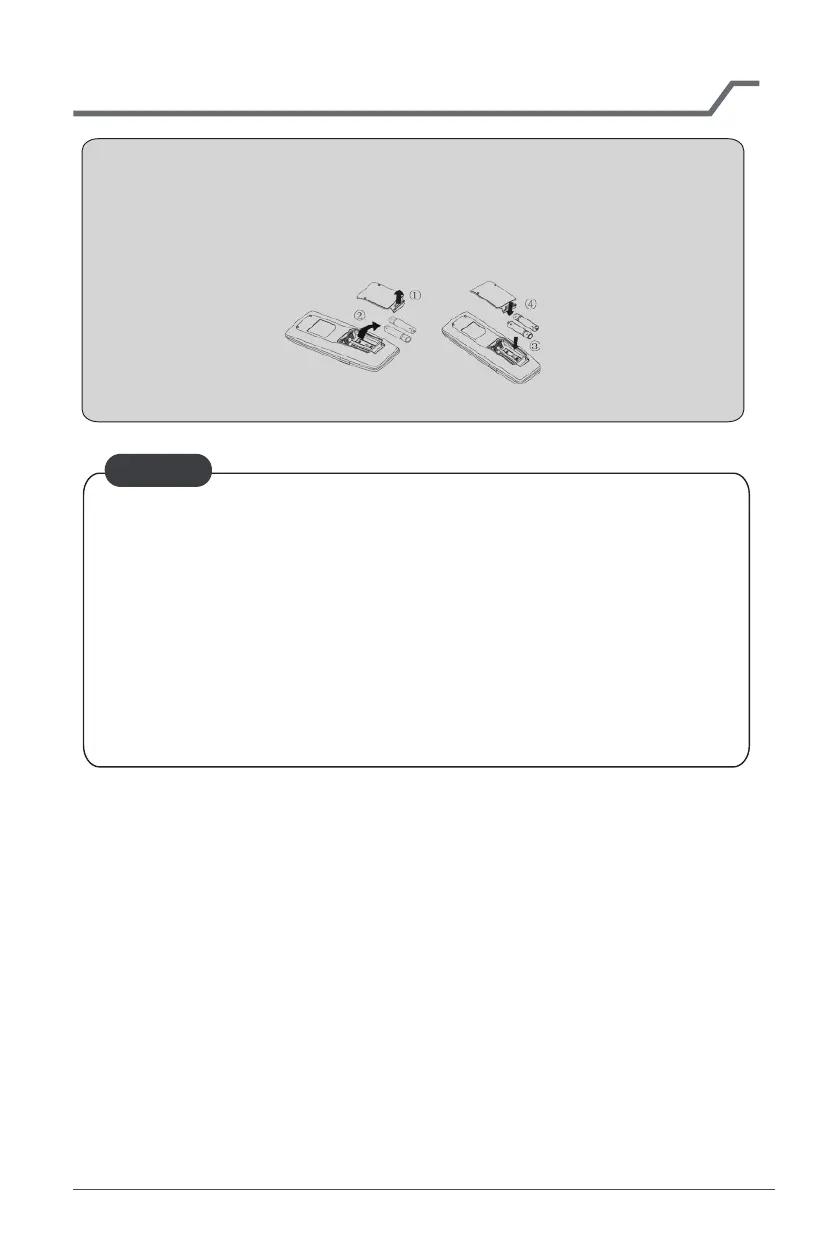
1. Lift the cover along the direction of arrow (as shown in Fig 1 ①).
2. Take out the original batteries (as shown in Fig 1 ②).
3. Place two 7# (AAA 1.5V) dry batteries, and make sure the position of “+”
polar and “-” polar is correct (as shown in Fig 2
③).
4. Reinstall the cover (as shown in Fig 2
④).
Fig.1 Fig.2
17



 To Next Page
 Loading...