5EN
English
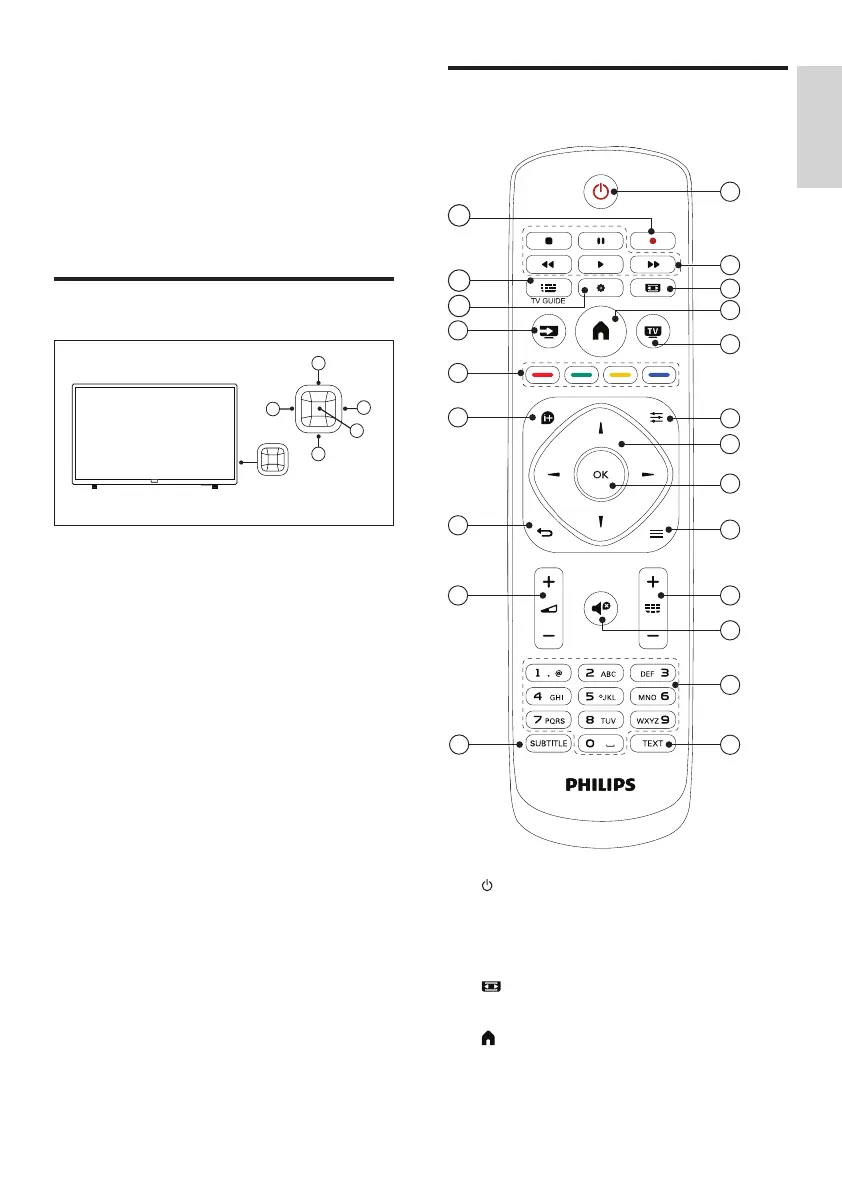
Remote control
SETUP
SOURCES EXIT
LISTBACK
FORMAT
OPTIONSINFO
1
2
3
5
6
7
8
9
10
11
12
4
13
14
15
16
17
18
19
21
22
20
a (Standby/On)
Switch the TV on or to standby.
b Playback buttons
Control video, music or text.
c FORMAT
Change picture format.
d (Home)
Access or exit from the main menu and
return to the previous menu.
3 Overview of
your TV
Congratulations on your purchase and welcome
to Philips! To fully benet from the support
offered by Philips, please register your TV at
www.philips.com/TVsupport.
Control panel
a Volume+: Without the key menu, the
volume-up function is available.
b Volume-: Without the key menu, the
volume-down function is available.
c Channel-: When there is no keyboard
menu, switch to the prior channel function;
when the keyboard menu appears, move
up and down the appropriate options.
d Channel+: When there is no keyboard
menu, switch to the next channel function;
when the keyboard menu appears, move
up and down the appropriate options.
e Signal source/OK: In standby, the signal
source/OK key is used as a power key.
Press this key to boot.
After booting, the signal source/OK key is
used to open the keyboard menu functions.
Note: In USB mode, the signal source/OK
key has no function.


 To Next Page
 Loading...