25
BLOCK PROGRAMS BASED ON MOVIE RATINGS
21
T
he AutoLock™ feature can block
programming based on the Movie
Industry ratings.
Once you’ve entered your access code
and the AutoLock™ features are dis-
played on the screen:
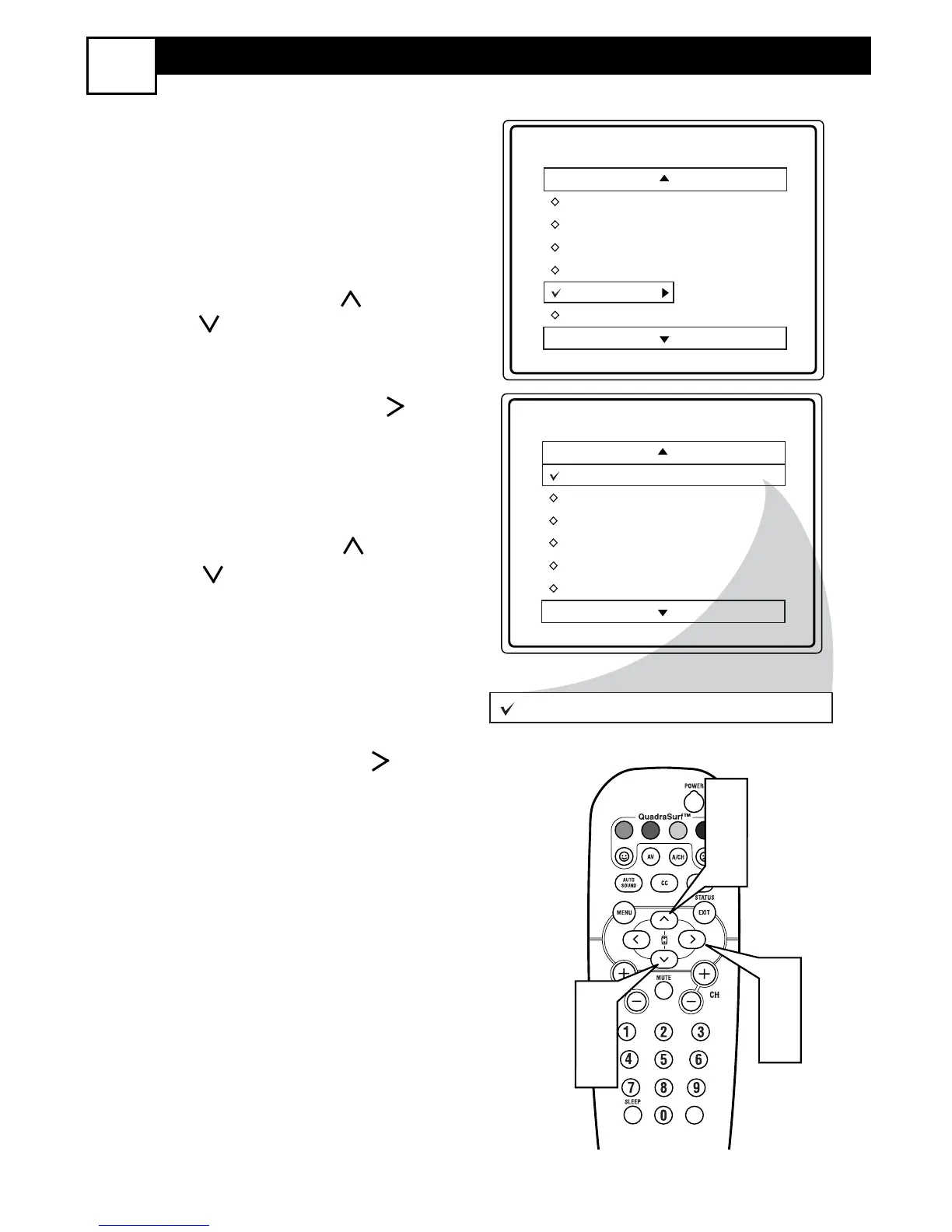
1
Press the CURSOR UP or
DOWN button to highlight the
words MOVIE RATING.
2
Press the CURSOR RIGHT
button to display the MOVIE
RATING options (G, PG, PG-13, R,
NC17, or X).
3
Press the CURSOR UP or
DOWN
button
to highlight any
of the Movie Rating options. When
highlighted, all these options can be
turned ON (which will allow block-
ing) or OFF (which will allow view-
ing).
4
Use the CURSOR RIGHT but-
ton on the remote to turn the rating
option ON or OFF.
When a rating level is chosen to be
blocked, any higher level rating will also
be blocked from viewing. (i.e.: If “R” is
selected to be blocked, NC-17 and X will
automatically be blocked.)
NOTE: If you ever forget your code, the
0, 7, 1, 1 code is the factory default and
can be used to enter and create a new
access code.



 To Next Page
 Loading...