42
Timer Recording with the VCR Plus+ Programming System
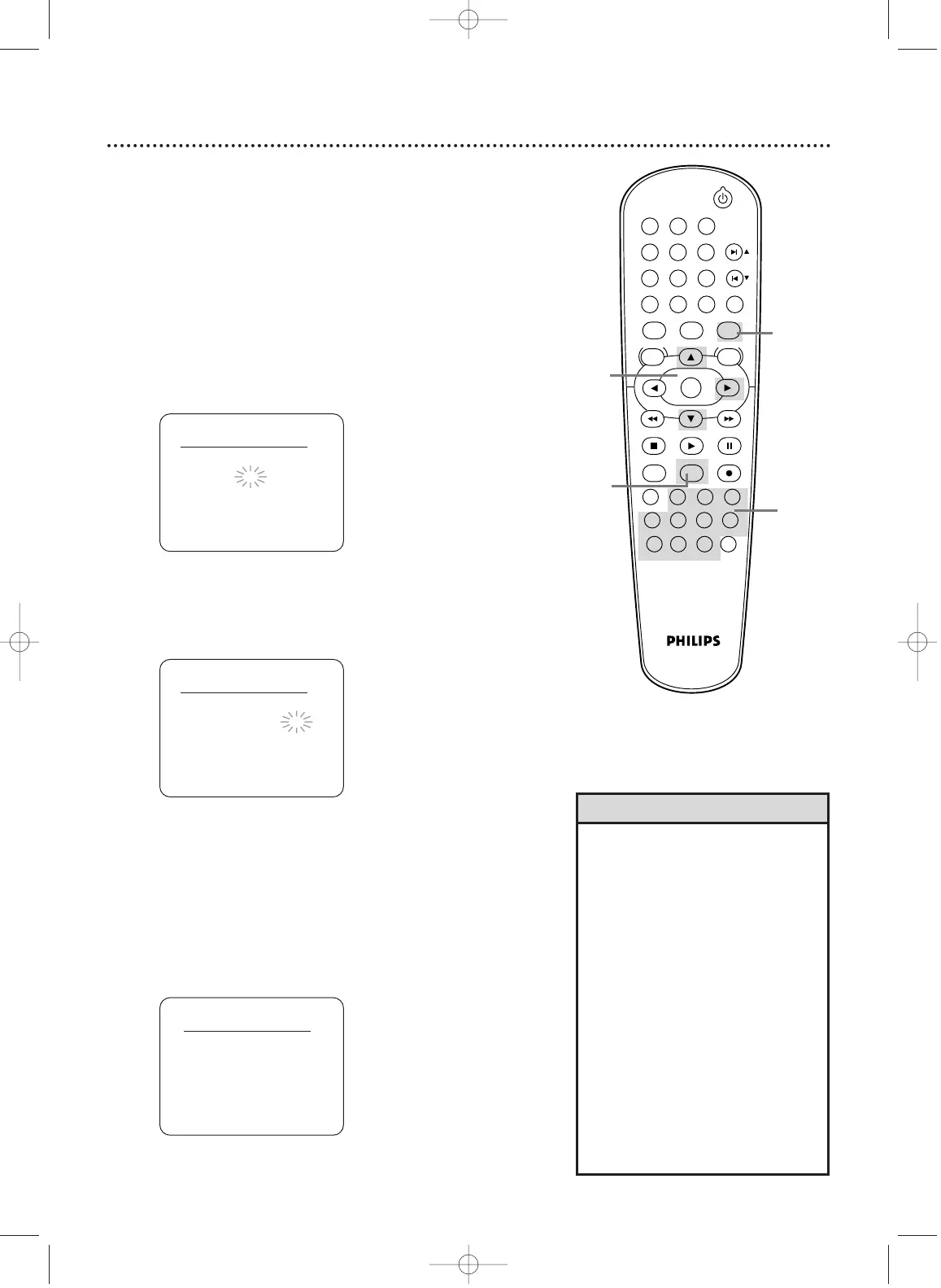
Follow these steps to set a timer recording with the PlusCode
programming numbers in your TV guide. Before you begin:
● Set up the channels at the VCR (page 26-27).
● Set up the VCR Plus+ and Cable/TV channel numbers (pages
40-41).
● Set the clock (pages 28-29).
● Put a tape in the VCR.
• The number you entered may flash
on the screen after step 3 if you
enter an incorrect PlusCode program-
ming number (for example, one that
is too short).The previous screen will
appear. Enter the correct PlusCode
programming number.
• If the number you entered flashes on
the screen after step 3, the timer
recording you just programmed and
another timer recording overlap.The
current timer recording will not occur.
• You may use the VCR Plus+
Programming System to record pro-
grams on Cable TV channels up to
channel 125.
•With ShowGuard, if the power fails
for more than 30 seconds, pro-
grammed timer recordings will be
restored when the clock is reset.
Helpful Hints
3
2-3
1
1
Press VCR.
2
Press VCR Plus+.
3
Press Number buttons to enter the PlusCode pro-
gramming number of the program you wish to
record.
Then, press VCR Plus+.
4
Press o or p to select a ONCE, DAILY, or WEEKLY
recording.Then, press B.
● ONCE: The VCR will record a TV program on any day
you choose, up to 12 months away.
● DAILY: The VCR will record a program every day from
Monday to Friday – starting at the same time and record-
ing for the same length of time.
● WEEKLY: The VCR will record a program on the same
day, at the same time, and for the same length of time
every week.
VCR Plus
+
system
B ONCE
DAILY
WEEKLY
VCR Plus
+
system
PlusCode No. : – – – – – – – –
VCR Plus
+
system
PlusCode No. : 1 2 3 4 5 – – –
STANDBY-ON
PLAY
VCR/TV
VCRDVD
OK
MENU MENU
SYSTEM
RETURN TITLE
A-B
CLEAR/RESET SLOW
SUBTITLE ZOOM
ANGLE
REPEAT REPEAT
AUDIO
SEARCH MODE
DISPLAY
SKIP / CH
DISC/VCR
PAUSESTOP
VCR Plus+ RECORDTIMER SET
SPEED
1 2 3
7
6
5
4
8
9
0
+10
4
H9421CD/DVD750(EN).pgs1-51.QX3 03.4.11 11:30 AM Page 42



 To Next Page
 Loading...