

 To Next PageTo Next Page
 Need help?
Do you have a question about the Roland TD-11 and is the answer not in the manual?
Instructions on downloading the digital manual and supplementary material from the Roland website.
Explains warning/caution notices, symbols, and key operational safety guidelines.
Covers electrical safety, location precautions, impact avoidance, and child safety.
Advice on power connection, unit placement, and potential interference.
Procedures for maintenance, data backup, and general operational precautions.
Introduction to Roland's SuperNATURAL sound and Behavior Modeling Technology.
Features for internal songs, practice support, and computer connection.
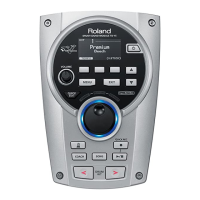
Detailed explanation of the buttons and controls on the front panel.
Description of jacks and connectors on the side panel.
Explanation of ports on the top and bottom panels for connectivity.
Step-by-step guide for safely turning the drum module on and off.
Understanding drum kits, instruments, and selecting them.
How to activate and perform the cross-stick function on the snare.
Techniques for striking pads and cymbals for different sounds.
Details on hi-hat open/closed sounds and playing techniques.
How to start and adjust the metronome for timing practice.
Functionality for recording and playing back performances using QUICK REC.
Explains the KIT MENU screens for editing drum kits.
Details the SYSTEM menu for global TD settings.
How to change the instrument sound assigned to a pad.
Managing independent settings for pad head and rim components.
Detailed editing options for individual instruments and their parameters.
Adjusting overall volume levels for the drum kit and specific pads.
Applying Ambience, Multi-FX, and EQ effects to drum kits.
Controlling the amount of ambience sent from each pad.
Enabling or disabling multi-effects for individual pads.
Assigning names and subtitles to custom drum kits.
Modifying MIDI note assignments for each pad.
Function for duplicating kit or pad settings to other locations.
Procedure for backing up custom drum kits to a USB drive.
Restoring drum kits from a USB drive to the TD.
Resetting a selected drum kit to its original factory state.
List of audio file formats (MP3, WAV) playable from a USB drive.
Guidelines for transferring audio files from a computer to a USB drive.
How to choose and play internal songs or files from a USB drive.
Adjusting volume, tempo, and loop settings for songs.
How to browse and select folders on a USB flash drive.
Repeating specific sections of a song for practice.
Displaying details like length, size, and loop status of a song.
Playing along with songs and recording the performance.
Accessing different practice modes like Time Check, Quiet Count, and Warm Ups.
Guide to using Time Check, scoring, and adjusting practice parameters.
Developing timing sense with alternating metronome and quiet intervals.
Using Warm Up routines to prepare for practice.
Detailed explanations of Change-Up, Auto Up/Down, and Time Check steps.
General steps to access and modify system-wide parameters.
List of available system settings menus and their page references.
Configuring display, illumination, auto-off, and audio volume.
Customizing metronome settings like beat, sound, and MIDI.
Assigning functions like kit selection or song control to pads.
Setting up MIDI communication, local control, and program changes.
Managing USB flash drives for saving and loading data.
Backing up all TD data, including drum kits and system settings.
Restoring saved TD data from a USB flash drive.
Removing saved data files from a USB flash drive.
Checking the contents and memory usage of the USB flash drive.
Erasing all data and preparing a USB flash drive for use.
Adjusting parameters to optimize pad performance and response.
Selecting the correct pad type for accurate signal reception.
Adjusting sensitivity, threshold, and curve for pad response.
Fine-tuning scan time, retrigger cancel, and mask time for trigger signals.
Advanced settings for mask time, crosstalk cancellation, rim, and hi-hat sensitivity.
Instructions for connecting and calibrating the VH-11 hi-hat.
Accessing system program version and other TD information.
Resetting the entire TD to its original factory default state.
Steps for connecting the TD to a computer using a USB cable.
Procedure for installing the necessary driver for computer connectivity.
Using MIDI to synchronize images with musical performance.
Information on hazardous materials in Chinese electronics products.
Explanation of symbols related to waste electrical and electronic equipment.
Compliance statements for EMC, FCC, and Canadian regulations.
Wiring instructions for the UK mains lead and a general product warning.



 General