Record a video
›
1
In Idle mode, open the application list and select Camera
to turn on the camera.
Drag the slider to the camcorder to switch to the
2
camcorder.
Aim the lens at the subject and make any necessary
3
adjustments.
2
1
4
6
5
3
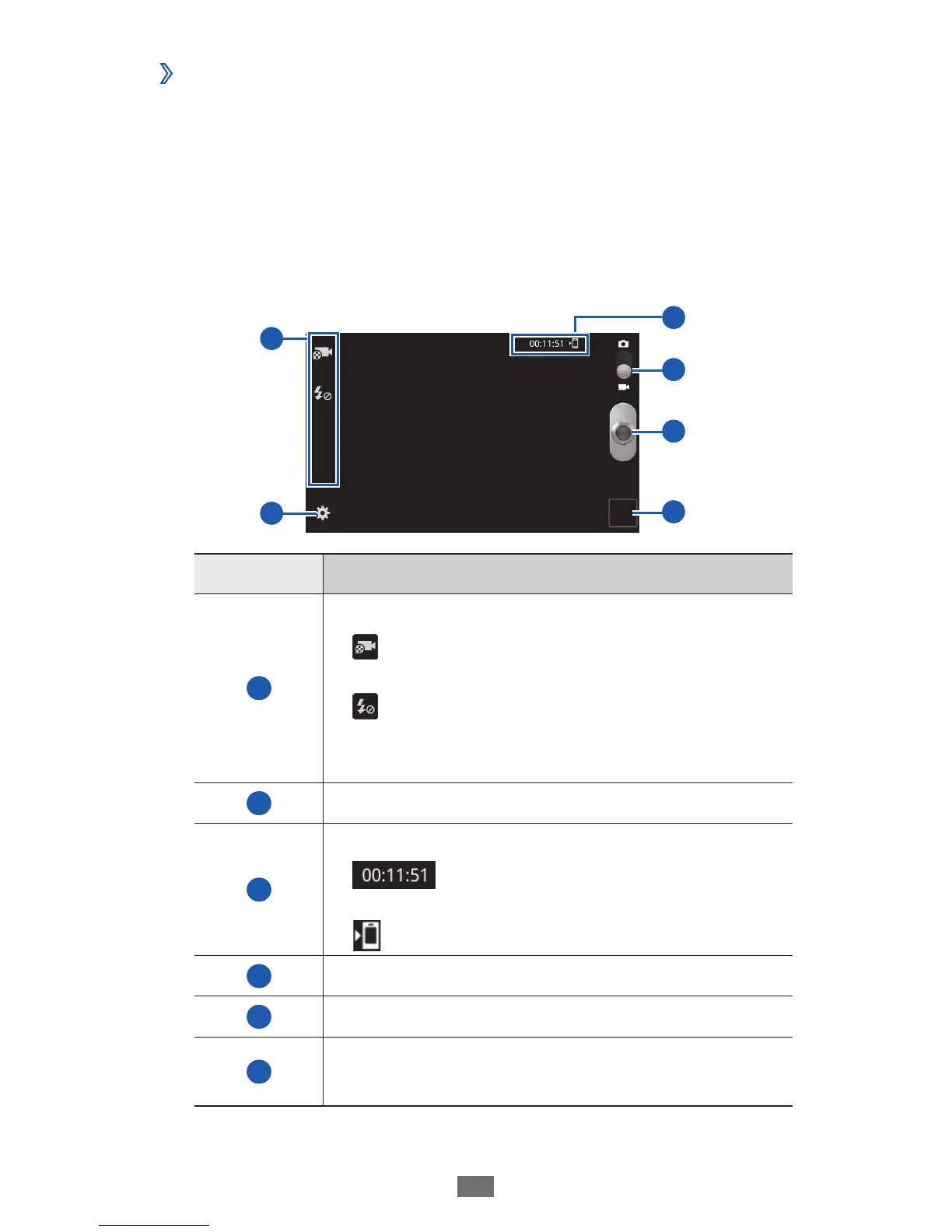
Number Function
1
Use camcorder shortcuts.
●
: Change the recording mode or switch
between the front and rear camera lenses.
●
: Change the flash setting.
You can add or remove shortcuts to
frequently used options.
► p. 66
2
Change the camcorder settings.
3
Check the camcorder status.
●
: Length of video that can be
recorded (according to available memory)
●
: Default storage location
4
Switch to the camera.
5
Record a video.
6
Open the image viewer to view videos you
recorded.


 To Next Page
 Loading...