106
GB
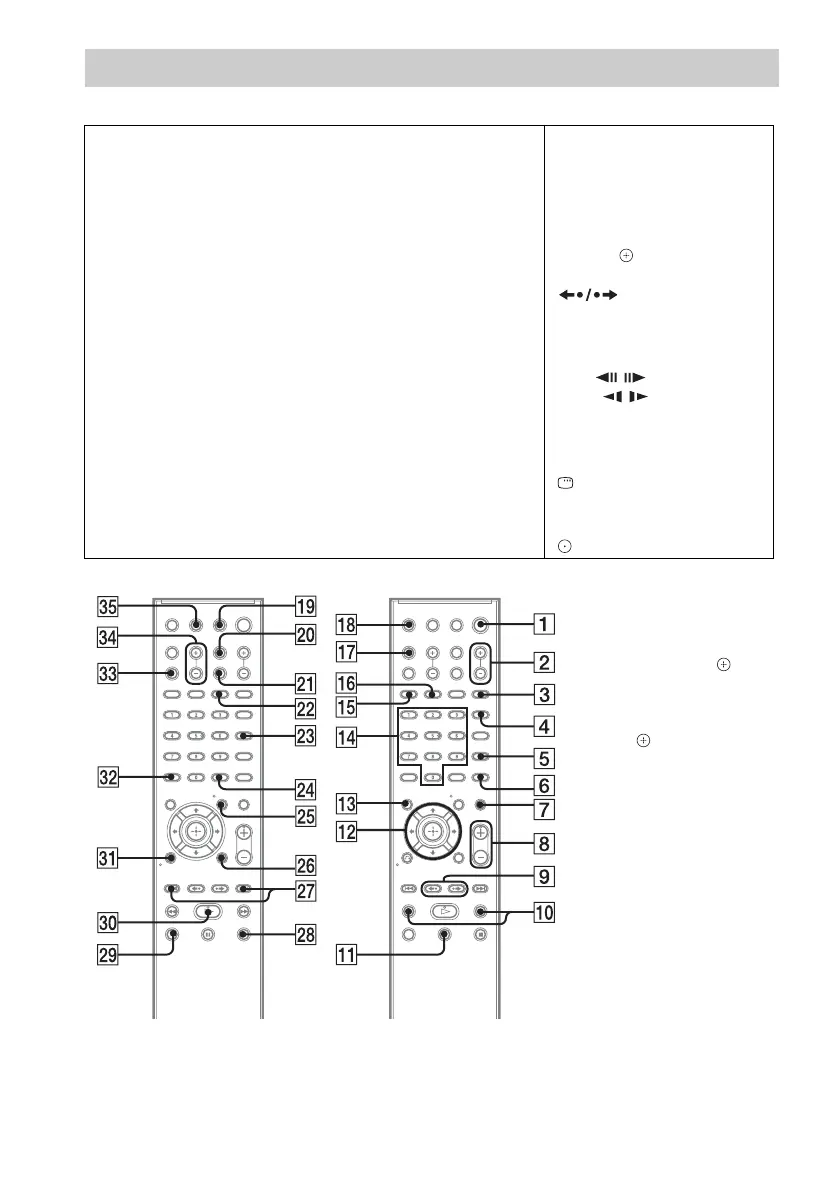
Remote control
ALPHABETICAL ORDER BUTTON DESCRIPTIONS
A – O P – Z
ANGLE 3 (36)
AUDIO qh (37)
CLEAR es (40, 52, 62)
D.TUNING ws (62)
DISC SKIP
1)
ed
DISPLAY wa (63, 72, 82)
DVD MENU wg (43)
DVD TOP MENU qd (43)
DYNAMIC BASS 6 (81)
ENTER
2)
wf (26, 27, 38, 40, 61,
78)
FUNCTION +/– 2 (30, 35)
MENU wg (80)
MUTING 7 (35)
NIGHT wd (81)
ONE-TOUCH PLAY eg (65)
PICTURE NAVI qg (45, 69)
PRESET +/– wj (62)
PROG +/–
3)
wj (80)
S-AIR MODE
1)
4
SLEEP qj (81)
SOUND MODE 5 (34)
SUBTITLE ws (37)
SYSTEM MENU wf (26, 31, 81,
82)
THEATER/THEATRE
4)
qk (64)
TOOLS wh (80)
TUNING +/– 0 (61)
TV wl (80)
TV CH +/–
5)
wj (80)
TV INPUT w; (80)
TV VOL +/– ef (80)
VOLUME +/–
8 (35)
Number buttons qf (39, 61, 80)
[/1 (on/standby) 1 (26, 27, 35)
TV [/1 (on/standby) ql (80)
C/X/x/c/
qs (26, 27, 38, 40,
61, 78)
REPLAY/ADVANCE
9 (35)
./> wj (35)
m/M 0 (35)
STEP / 9 (35)
SLOW / 0 (35)
H (play) e; (35)
x (stop) wk (35)
X (pause) qa (35)
DISPLAY
6)
wh (27, 38, 40, 78)
O RETURN
ea (39, 80)
-/--
3)
es (80)
5)
es (80)
1)
This button is not available
for this model.
2)
The ENTER button has the
same function as the
button. When you operate
the TV, the ENTER button is
used for selecting a channel,
and the button is used for
selecting menu items
(page 80).
3)
Except for North American
models.
4)
The button name differs
depending on the area.
5)
North American models
only.
6)
This button is only available
for the “DVD” or “USB*”
function.
* DAV-DZ270 only


 To Next Page
 Loading...