Playback
31
GB
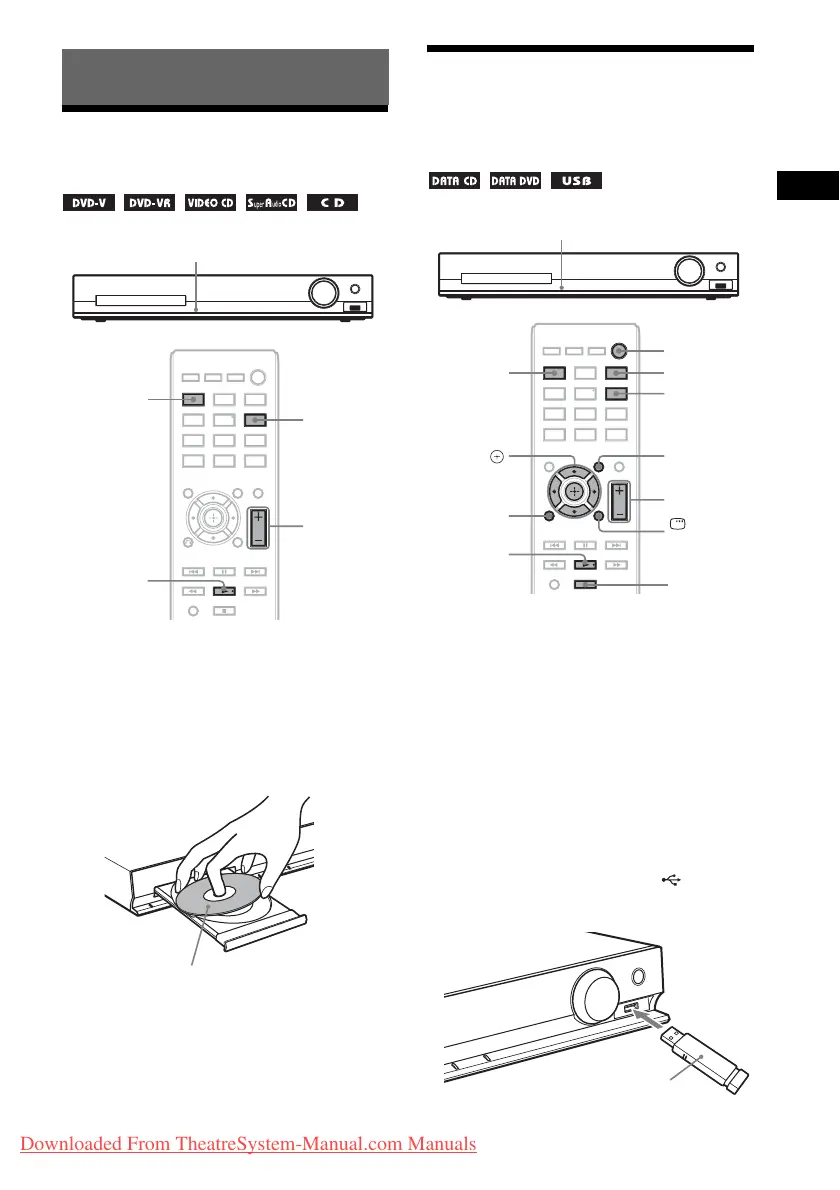
Playing a Disc
1 Press DVD/CD.
You can also select this function by
pressing FUNCTION repeatedly.
2 Press Z to open the disc tray.
3 Place a disc on the tray, then press Z.
4 Press N to start playback.
5 Press VOLUME +/– to adjust the
volume.
Playing Files on a Disc/
USB Device
1 Press DVD/CD or USB.
• DVD/CD: For a disc.
• USB: For a USB device.
You can also select the function by pressing
FUNCTION repeatedly.
2 Load the source.
x For a disc
Place a disc on the tray by pressing Z to
open/close the disc tray.
x For a USB device
Connect a USB device to the (USB)
port.
Playback
Z
FUNCTION
N
VOLUME +/–
DVD/CD
With the label side up.
Z
FUNCTION
x
N
VOLUME +/–
C/X/x/c,
DISPLAY
O
RETURN
USB
DVD/CD
DVD MENU
"/1
USB device
Downloaded From TheatreSystem-Manual.com Manuals


 To Next Page
 Loading...