44
Adding an Extra
Function to the
Component Labels
Programming the Power-On
command of a selected
component (for Sony
components only)
When using Sony components,
you can program the Power-On
signal for each component on a
component label. You can select
the desired component and turn it
on by just selecting that label after
pressing the COMPO button.
COMPO
SYSTEM
TIMER
SCROLL
SET
REC
VIDEO1 VIDEO2 AUX
TUNER CD TAPE
MD
TV
DVD
MENU
MUTING RECALL
VOL CH
GUIDE
PHONO
POWER
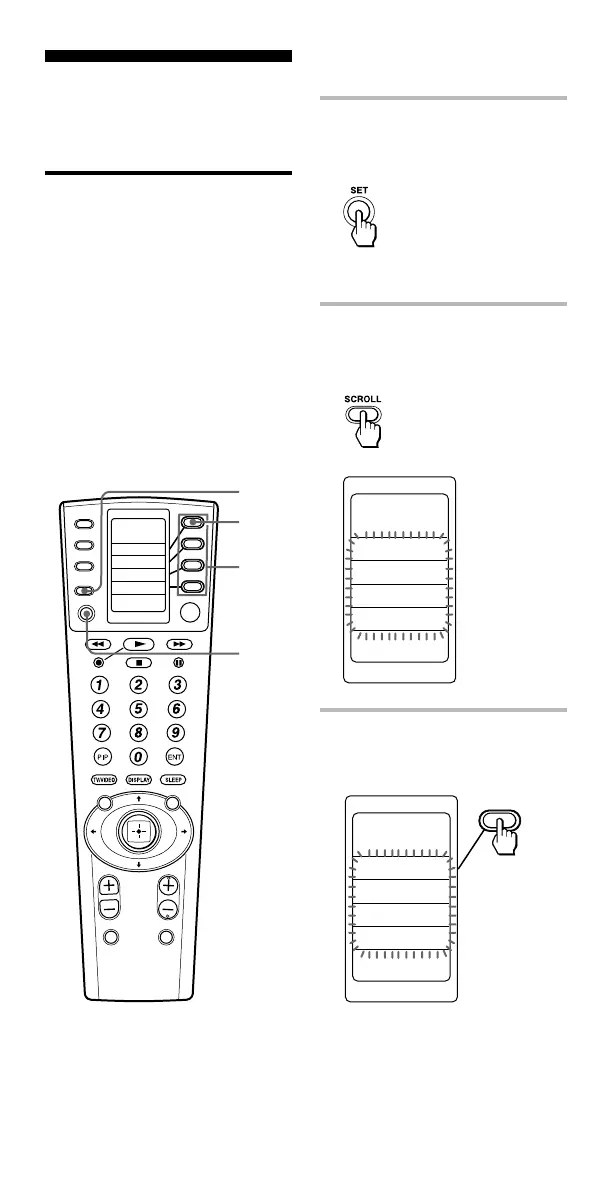
1,5
2
4
3
Example: To program the TV
label
1 Keep the SET button
pressed for more than a
second.
“SET” appears on the LCD
display.
2 Press the SCROLL button
twice to display “POWER
ON” on one of the labels.
3 Select “POWER ON” by
pressing the Label Select
button.
“POWER ON” appears on the
LCD display, and component
names are displayed on the
labels.
SET
POWER ON
COPY
CLEAR
SYSDELAY
SET
POWER ON
COPY
CLEAR
SYSDELAY



 To Next Page
 Loading...



