EasyManua.ls Logo

Sony SA-WCT770 - Power Cord (AC1)

Sony SA-WCT770
38 pages
Print Icon
To Next Page IconTo Next Page
To Previous Page IconTo Previous Page
Loading...
SA-WCT770
10
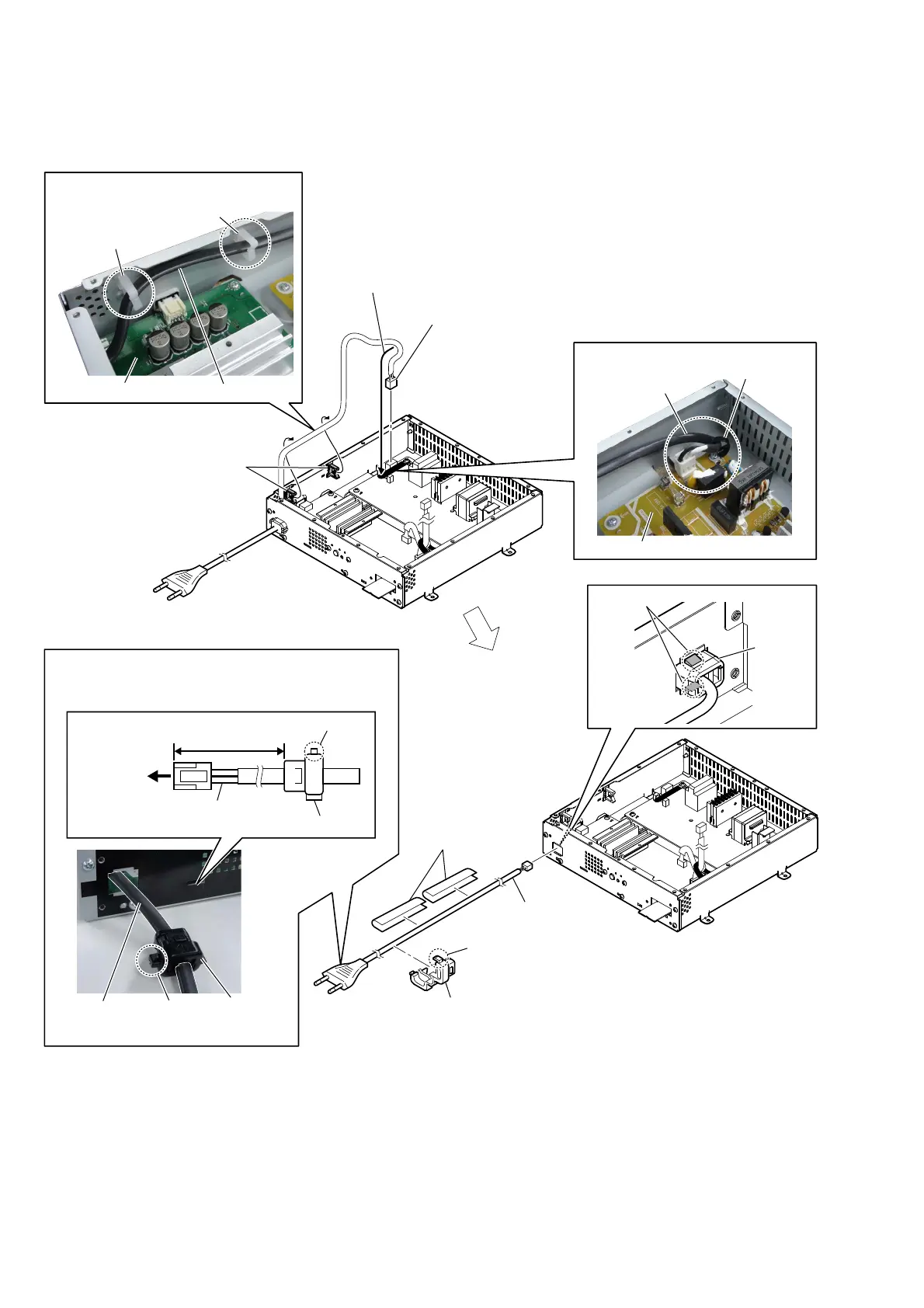
2-8. POWER CORD (AC1)
3RZHUFRUGVHWWLQJ
power cord
(AC1)
cord bushing
(FBS001)
claw
8 power cord
(AC1)
7 two unweaved 2
cushions
6 cord bushing
(FBS001)
5 claw
power cordSUB MAIN board
3RZHUFRUGVHWWLQJ
2 power cord connector
(CN900)
1 Remove the power cord
from the clamp (L35).
3 Remove the power cord
from two wire holders.
wire holder
wire holder
power cord
POWER board
3RZHUFRUGVHWWLQJ
power cord (AC1)
cord bushing (FBS001)
claw
270 mm
to POWER board
clamp (L35)
6XE$03EORFNUHDUYLHZ
Note:
When installing the power cord (AC1), check the direction
of claw of cord bushing (FBS001) and install correctly.
4 two claws
cord bush

Other manuals for Sony SA-WCT770

Related product manuals