EasyManua.ls Logo

Sony STR-GX69ES - Chapter 3 Advanced Operation: Surround Sound; Surround Effect Types; Speaker Placement for DOLBY PRO LOGIC

Sony STR-GX69ES
31 pages
Print Icon
To Next Page IconTo Next Page
To Previous Page IconTo Previous Page
Loading...
Chapter
3
Advanced
Operation
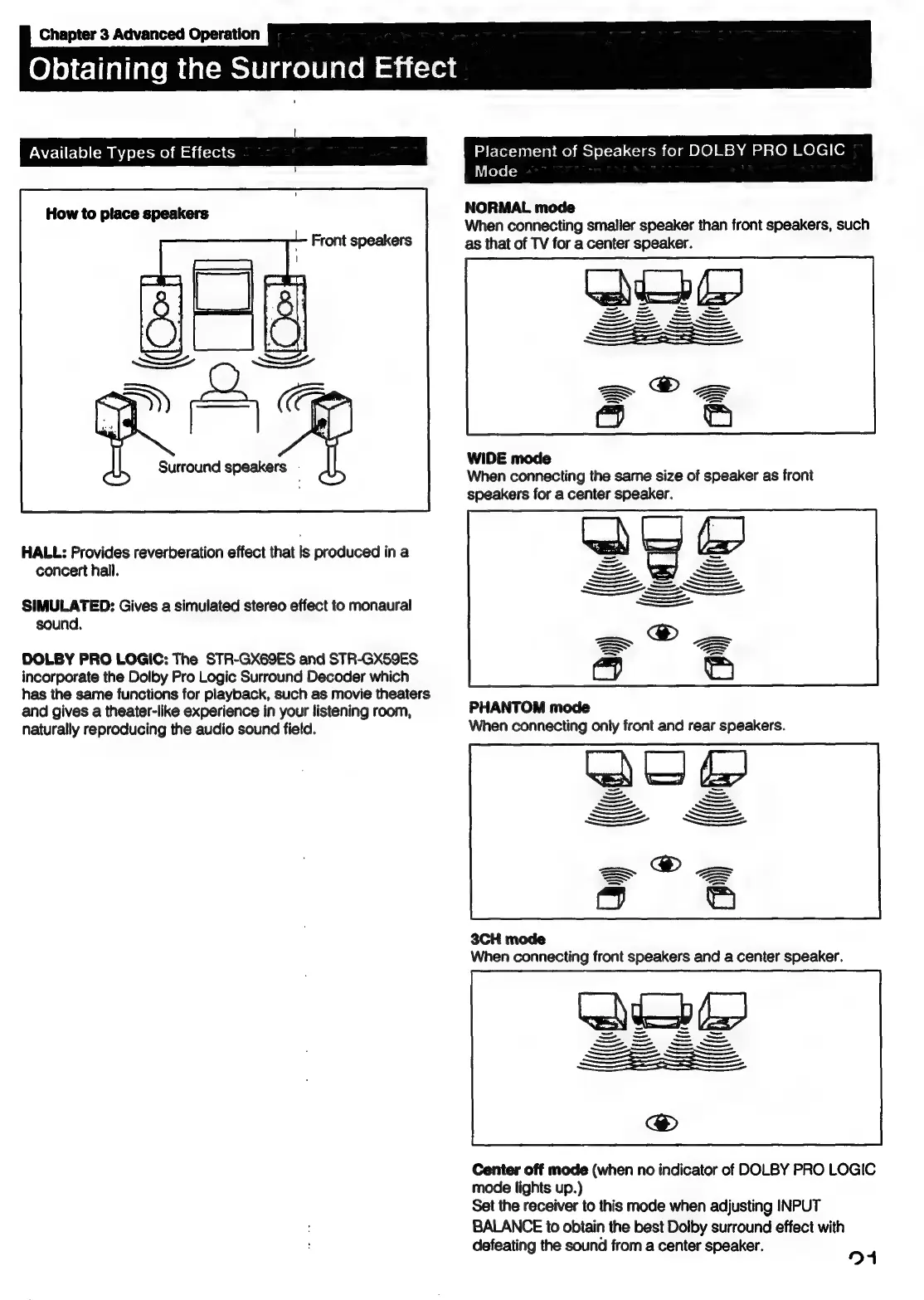
Available
Types
of
Effects
How
to
place
speakers
Front
speakers
HALL:
Provides
reverberation
effect
that
is
produced
in
a
concert
hall.
SIMULATED:
Gives
a
simulated
stereo
effect
to
monaural
sound.
DOLBY
PRO
LOGIC:
The
STR-GX69ES
and
STR-GX59ES
incorporate
the
Dolby
Pro
Logic
Surround
Decoder
which
has
the
same
functions
for
playback,
such
as
movie
theaters
and
gives
a
theater-like
experience
in
your
listening
room,
naturally
reproducing
the
audio
sound
field.
OleleTialialemeatsMeclelacelelecem
atatsvet
Placement
of
Speakers
for
DOLBY
PRO
LOGIC
Mode
NORMAL
mode
When
connecting
smaller
speaker
than
front
speakers,
such
as
that
of
TV
for
a
center
speaker.
WIDE
mode
When
connecting
the
same
size
of
speaker
as
front
speakers
for
a
center
speaker.
PHANTOM
mode
When
connecting
only
front
and
rear
speakers.
3CH
mode
When
connecting
front
speakers
and
a
center
speaker.
Center
off
mode
(when
no
indicator
of
DOLBY
PRO
LOGIC
mode
lights
up.)
Set
the
receiver
to
this
mode
when
adjusting
INPUT
BALANCE
to
obtain
the
best
Dolby
surround
effect
with
defeating
the
sound
from
a
center
speaker.
91

Table of Contents

Other manuals for Sony STR-GX69ES

Related product manuals