15
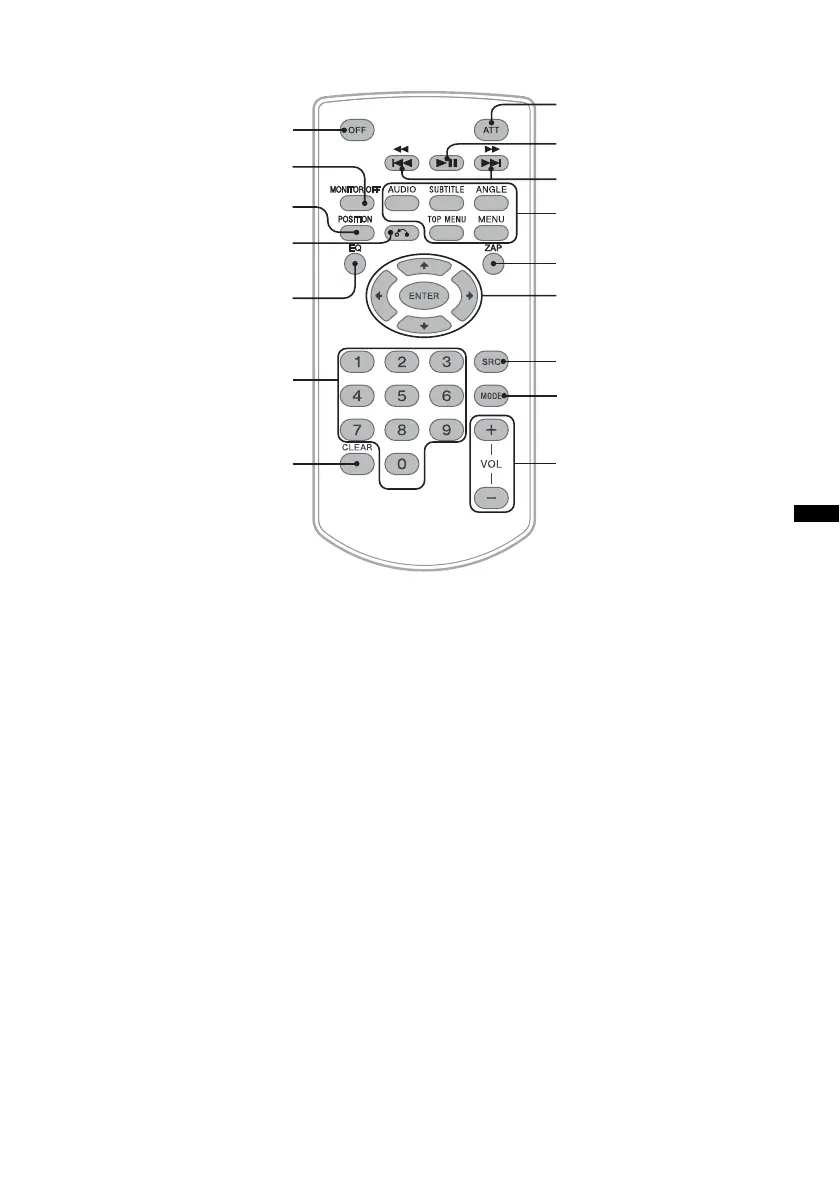
RM-X170 Remote Commander
• The remote commander can be generally used
to operate the audio controls simply. For menu
operations, use the touch panel.
• Refer to the pages listed for details.
• Remove the insulation film before use
(page 17).
A OFF button
Press to exit the source/stop the source.
Press and hold to turn off.
B MONITOR OFF button
Press to turn off the monitor and the button
illumination. To turn back on, press again.
C POSITION button
Press to switch the listening position (“Front
L”/“Front R”/“Front”/“All”/“Custom”/
“OFF”).
D O (Return) button
Press to return to the previous display/return
to the menu on a VCD*
1
.
E EQ (Equalizer) button
Press to select an equalizer curve from 7
music types (“Xplod”/“Vocal”/“Edge”/
“Cruise”/“Space”/“Gravity”/“Custom”/
“OFF”).
F Number buttons page 27
Radio:
Press to receive stored stations.
Press and hold to store stations.
Disc/USB:
Press to locate a title/chapter/track.
G CLEAR button
Press to delete an entered number.
H ATT (Attenuate) button
Press to attenuate the sound. To cancel, press
again.
I u (Play/Pause) button
1
2
3
4
5
7
6
qd
qh
qf
qg
qs
qa
8
9
q;
continue to next page t


 To Next Page
 Loading...